
How to Bypass PerimeterX (HUMAN Security) in 2026: 5 Working Methods
PerimeterX (now HUMAN Security) blocks your scraper? These 5 tested methods bypass its TLS fingerprinting, behavioral analysis, and JS challenges, with working code examples.

PerimeterX (HUMAN Security) uses TLS fingerprinting, behavioral machine learning, and JavaScript challenges to block scrapers. The easiest way to bypass PerimeterX is a scraping API (e.g., ZenRows). For DIY, use Zendriver, SeleniumBase UC, Camoufox, or Patchright with a session warmup. Residential proxies alone aren't enough. For full control, reverse engineer the JavaScript challenge, but expect ongoing maintenance.
— TL;DR:
You found a website you want to scrape, coded your scraper, and ran it, only to realize PerimeterX has blocked you. You're not alone in this struggle!
PerimeterX, now rebranded as HUMAN Security, protects over 29,650 websites, including Zillow, Fiverr, and ZoomInfo. This guide shows you 5 tested methods to bypass it in 2026, from a one-line scraping API call to a full reverse-engineering walkthrough.
- Method #1: Use a Web Scraping API for PerimeterX Bypass.
- Method #2: Use Fortified Headless Browsers.
- Method #3: Employ Smart Proxies to Bypass PerimeterX.
- Method #4: Warm up your scraper session.
- Method #5: Reverse Engineer the PerimeterX JavaScript Challenge.
Key Takeaways
- PerimeterX (now HUMAN Security) detects scrapers through TLS/JA3 fingerprinting, IP reputation, JavaScript challenges, and behavioral machine learning (ML).
- The easiest and most reliable way to bypass PerimeterX (HUMAN Security) is via a dedicated scraping API.
- For a DIY headless-browser PerimeterX bypass, use Zendriver, SeleniumBase UC, or Camoufox.
- Avoid deprecated stealth tools like
puppeteer-stealthandplaywright-stealth. They're obsolete for bypassing PerimeterX in 2026. - Always warm up a new session by visiting the other pages within the site before hitting your target URL.
- Residential proxies alone are not enough because PerimeterX layers IP checks with fingerprinting and behavioral analysis.
- For advanced bypass, reverse-engineering the PerimeterX JS challenge provides the deepest level of control but requires ongoing maintenance as the challenge script evolves.
- Bypass techniques are not universal. HUMAN Security trains custom ML models per site, so what works on one site may not work on another.
What is PerimeterX?
PerimeterX, now rebranded as HUMAN, is a Web Application Firewall (WAF) that sits between a website and its visitors, analyzing incoming requests to detect automated threats and bot activities, such as web scraping attempts. It employs advanced algorithms, including behavioral analysis and machine learning, to distinguish legitimate human users from bots.
When PerimeterX detects suspicious behavior, it typically responds by returning an HTTP 403 with a block page, or injecting a "Press & Hold to confirm you are a human" challenge directly into the page, like the one below
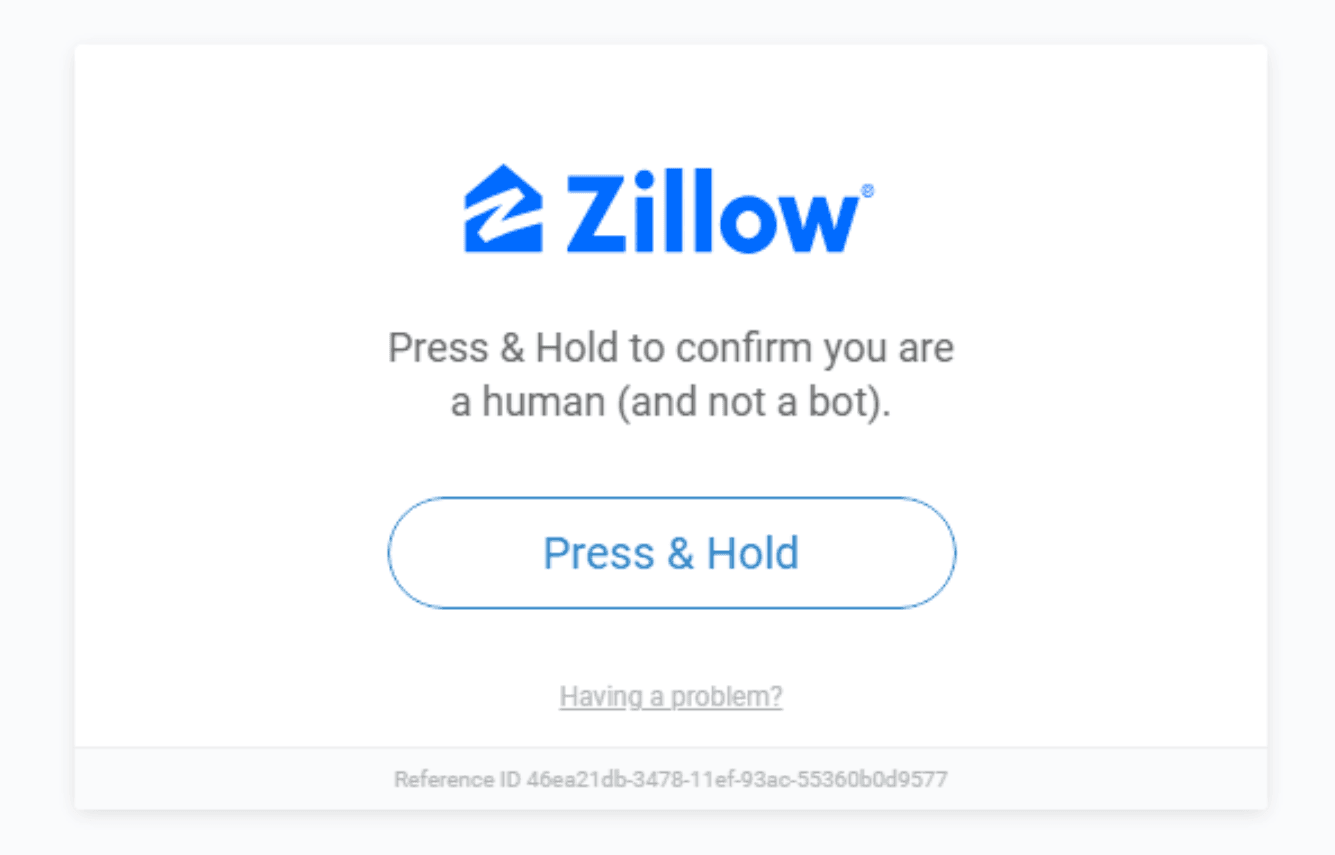
The block page itself rarely mentions PerimeterX or HUMAN by name.
If you're not sure what's blocking you, check the page source for PerimeterX hints by opening DevTools on the blocked page and running the following in the browser console:
window._pxAppId
If it returns a value like PXHYx10rg3, PerimeterX has flagged your request as bot-like. To get past it, you first need to understand exactly what it's looking for.
How Does PerimeterX Detect Bots
PerimeterX employs a multi-layered approach to identify and block bot traffic. From analyzing network patterns and HTTP headers to evaluating browser fingerprints and genuine user behavior, it utilizes a complex web of detection mechanisms to catch automated access attempts.
The list below covers the most aggressive defenses PerimeterX deploys. We'll explain how each works and then focus on ways to overcome them.
1. TLS and HTTP/2 Fingerprinting
PerimeterX employs TLS fingerprinting and HTTP/2 fingerprinting to analyze the initial connection with a client. It uses JA3 hashes to generate a unique identifier for each client based on TLS handshake parameters, including cipher suites, extensions, and elliptic curves. It then uses HTTP/2 fingerprinting to analyze a client's unique HTTP/2 implementation and configuration, including header priorities, SETTINGS frames, WINDOW_UPDATE frames, and window sizes.
Most regular scraping tools use TLS and HTTP/2 defaults that differ from those of a real browser, and some even still send requests over HTTP/1.1, which real browsers no longer use. TLS and HTTP/2 fingerprinting catch these signals before any JavaScript runs.
To counter TLS and HTTP/2 fingerprinting, your scraper needs to mimic a real browser's connection profile. Tools like curl-impersonate patch libcurl to replicate Chrome or Firefox's exact TLS and HTTP/2 parameters. For production scraping, a managed API like ZenRows is the more reliable option. It handles TLS and HTTP/2 fingerprinting automatically without the maintenance overhead of keeping curl-impersonate in sync with the latest browser versions.
Skip the blocks. Try Zenrows free and get clean web data without the anti-bot fight.
2. JavaScript Fingerprinting
PerimeterX employs JavaScript fingerprinting to examine a wide array of factors, including browser and device characteristics, screen resolution, color depth, installed plugins and fonts, WebGL rendering information, and JavaScript execution environment details. Even subtle differences in how a browser processes and renders content can contribute to this unique fingerprint.
PerimeterX uses these fingerprints to build profiles of typical human users and flag anomalies that indicate bot activity. A headless browser running with default settings will expose a navigator.webdriver = true property, report zero installed fonts, and produce a WebGL hash inconsistent with any real GPU. These are all immediate red flags that result in blocking.
To bypass JavaScript fingerprinting, your scraper needs to suppress these signals at the browser level. Tools like Nodriver, Zendriver, SeleniumBase UC Mode, Patchright, and Camoufox take different approaches to this, from patching browser properties to spoofing Firefox at the binary level.
3. IP Filtering
PerimeterX maintains extensive lists of IP addresses known to be associated with bots, data centers, proxy services, and VPN providers. Like other WAFs, such as DataDome, it assigns a reputation score to each connecting IP address. If your scraper's IP has a bad reputation, it will be blocked regardless of how clean your other signals are.
IP filtering is rarely the only defense PerimeterX relies on. It combines IP reputation with behavioral analysis, fingerprinting, and JavaScript challenges, so even a clean residential IP can be blocked if other signals look bot-like.
4. Checking HTTP Headers
One of the simplest yet effective methods PerimeterX uses to detect bots is by examining HTTP headers. Many automated tools and libraries, such as Python's Requests or Node.js's Axios, often send requests with headers that differ from those typically sent by web browsers. For instance, the following User Agent header from Python's Request quickly sends a bot-like signal:
python-requests/2.32.5
PerimeterX's system is trained to recognize these patterns and can quickly identify requests that don't match expected browser behavior. To bypass this check, it's crucial to ensure that your requests include a full set of headers that closely mimic those of a real browser.
5. CAPTCHAs and Behavioral Analysis
PerimeterX uses advanced machine-learning algorithms to analyze user behavior patterns and distinguish human visitors from bots. This goes beyond simple header checks. It examines how visitors interact with a website over time, including request and navigation patterns, mouse movements, session duration, page interactions, and timing of site accesses.
As part of this system, PerimeterX deploys its own CAPTCHA called HUMAN Challenge. When a session's behavior score crosses a threshold, the challenge is presented. Requesting a target URL directly with a fresh session, for example, is a common trigger, since real users rarely land deep on a site without any prior browsing activity.
To bypass behavioral analysis like Human Challenge, your scraper needs to simulate realistic session behavior. This means spreading requests over time, mimicking natural navigation patterns, and warming up a session before hitting protected endpoints. For example, you can load the homepage first, browse a category page, then request your target URL.
Now that we understand how PerimeterX detects bots, let's explore various methods for bypassing these defenses.
Method #1: Use a Web Scraping API for PerimeterX Bypass
Web scraping APIs handle the heaviest lifting when it comes to bypassing PerimeterX. They manage TLS fingerprinting, browser fingerprinting, proxy rotation, and CAPTCHA solving automatically, so you don't need to maintain any of that infrastructure yourself.
The ZenRows Universal Scraper API is one such API. It bypasses PerimeterX reliably at scale and includes an Adaptive Stealth Mode that automatically adjusts its bypass strategy based on the protection level. For PerimeterX-protected sites, that means the right combination of fingerprint spoofing, proxy type, and JS rendering is applied without any manual configuration.
All you need is a single API with the mode:auto parameter, which applies the most cost-effective configuration that passes, without you having to guess which combination of parameters works.
Let's put ZenRows to the test and scrape Zillow, a PerimeterX-protected website.
Sign up and go to the Universal Scraper API Playground. Paste the target URL in the link box and activate Adaptive Stealth Mode.
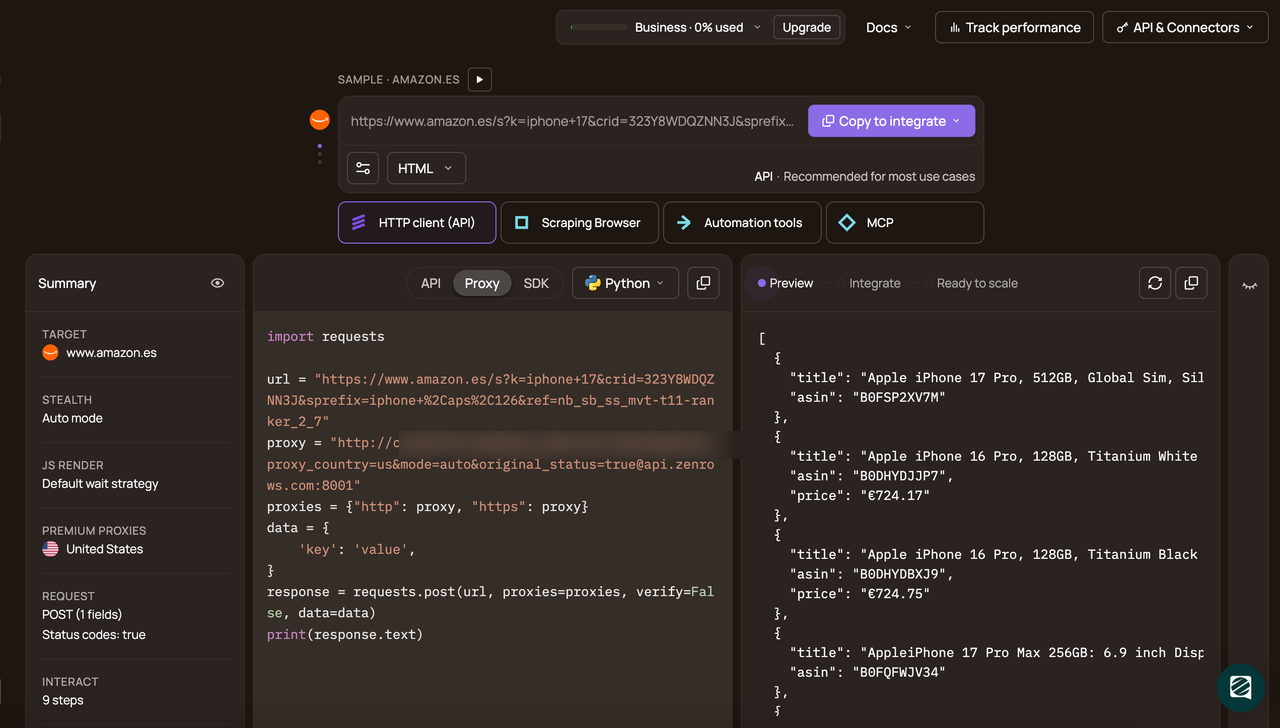
Select your preferred programming language (e.g., Python) and choose the API mode.
Copy and paste the generated code into your scraper:
# pip install requests
import requests

url = "https://www.zillow.com/"
apikey = "<YOUR_ZENROWS_API_KEY>"
params = {
    "url": url,
    "apikey": apikey,
    "mode": "auto",
}
response = requests.get("https://api.zenrows.com/v1/", params=params)
print(response.text)
Run it, and you'll get the HTML content of your target web page:
<html lang="en">
<head>
    <!-- ... -->
    <title>Zillow: Real Estate, Apartments, Mortgages & Home Values</title>
    <!-- ... -->
</head>
<body>
    <!-- ... -->
    <h1>
        Agents. Tours. Loans. Homes.
    </h1>
    <!-- other content omitted for brevity -->
</body>
</html>
That's how easy it is to bypass PerimeterX's advanced anti-bot protection using ZenRows.
While this is the recommended and most reliable method for bypassing PerimeterX, other manual techniques can help, especially if you prefer a hands-on approach and don't mind maintaining in-house stealth.
Method #2: Use Fortified Headless Browsers
While headless browsers were originally designed for testing, they've also become essential tools for web scraping because they can execute JavaScript to render dynamic content and simulate user interactions.
However, headless browsers expose automation signals that PerimeterX is trained to detect, including the navigator.webdriver property, missing fonts, and inconsistent WebGL output. Even with CAPTCHA interaction automated, a standard headless browser will still get blocked.
Fortified or stealth browsers patch these signals to present a more convincing browser fingerprint. That said, they require ongoing maintenance as PerimeterX updates its detection, and they consume significantly more CPU, memory, and bandwidth than a simple HTTP request. They're best suited for development and testing rather than production scraping at scale.
The tools worth using in 2026 are:
Bypass PerimeterX in Python with Zendriver
Zendriver is a community-maintained fork of Nodriver that incorporates unmerged bug fixes and maintains active community engagement. It connects directly to Chrome via CDP without ChromeDriver, removing one of the most obvious automation signals. If you've been using Nodriver, the API is nearly identical, and migration is straightforward.
# pip install zendriver
import zendriver as zd
import asyncio
import time

async def main():
    browser = await zd.start()
    page = await browser.get("https://www.zillow.com/")
    time.sleep(10)
    print(await page.get_content())
    await browser.stop()

asyncio.run(main())
Note
Nodriver, Zendriver's predecessor, is no longer actively maintained and has several open bugs that have gone unaddressed for months. It's also incompatible with Python 3.14. Zendriver is the recommended replacement.
How to Bypass PerimeterX with SeleniumBase UC Mode
SeleniumBase's UC mode is the easiest drop-in for existing Selenium users. It patches the most common detection vectors and is actively maintained.
# pip3 install seleniumbase
from seleniumbase import SB

with SB(uc=True) as sb:
    sb.open("https://www.zillow.com/")
    print(sb.get_page_source())
PerimeterX (HUMAN) Bypass with Camoufox
Camoufox is a Firefox hard fork with anti-detection applied at the binary level. It performs well against some anti-bot systems, though real-world results against PerimeterX specifically have been inconsistent.
#pip3 install camoufox
from camoufox.sync_api import Camoufox

with Camoufox(headless=True) as browser:
    page = browser.new_page()
    page.goto("https://www.zillow.com/")
    print(page.content())
The following stealth plugins were useful but no longer work in 2026; avoid them.
Bypass PerimeterX in Node.js and Python with Patchright
Patchright is a drop-in replacement for Playwright that patches CDP leaks and other detectable signals. It's available in both Python and Node.js, making it the most practical upgrade for teams already using Playwright who don't want to switch languages or frameworks.
# pip3 install patchright
# patchright install
from patchright.sync_api import sync_playwright

with sync_playwright() as p:
    # launch browser and open a new page
    browser = p.chromium.launch(headless=False)
    page = browser.new_page()

    # navigate to target URL
    page.goto("https://www.zillow.com/")
    print(page.content())
    page.close()
And this is the Node.js equivalent of the above Patchright Python code:
// npm install patchright
// npx patchright install chromium
const { chromium } = require("patchright");

(async () => {
    const browser = await chromium.launchPersistentContext("", {
        channel: "chrome",
        headless: false,
        viewport: null,
    });
    const page = await browser.newPage();
    await page.goto("https://www.zillow.com/");
    console.log(await page.content());
    await browser.close();
})();
Note
Patchright only supports Chromium-based browsers. Firefox and WebKit aren't supported.
Stealth Tools to Avoid for PerimeterX Bypass in 2026
To avoid wasting crawl budget, it's crucial to know which tools to avoid for bypassing PerimeterX in 2026.
- Puppeteer Extra Plugin Stealth: A good switch for Puppeteer users, but it's now obsolete and no longer actively maintained.
- Playwright Stealth: Only the Python version is actively maintained. The Node.js version hasn't received any meaningful updates since 2023. Regardless, this tool doesn't work against PerimeterX in 2026. Use Patchright instead.
Method #3: Employ Smart Proxies to Bypass PerimeterX
IP reputation is one of the first signals PerimeterX evaluates, making proxies a necessary part of any bypass strategy, though they won't get you through alone. Even a perfect browser fingerprint will get blocked if the request comes from a data center IP that PerimeterX has flagged.
PerimeterX assigns a trust score to every IP that hits a protected site. Data center IPs score poorly by default. Residential proxies score better because they're associated with real ISPs and home connections. Still, well-known residential proxy pools are increasingly flagged too, as PerimeterX tracks and scores proxy provider ranges over time.
While IP monitoring and filtering are powerful tools in PerimeterX's arsenal, sophisticated bots often use techniques such as IP rotation and residential proxies to circumvent these defenses. That said, residential proxies alone are rarely enough against PerimeterX, since it combines IP filtering with behavioral and fingerprint analysis. Mobile proxies tend to carry higher trust scores and are worth trying when residential proxies consistently fail.
A few practical points when using proxies against PerimeterX:
- Rotate per request: PerimeterX tracks session behavior across requests, so reusing the same IP builds a behavioral profile that can trigger blocks even on clean IPs. Use a proxy provider that supports per-request rotation, or write a custom IP rotation logic if you're managing the pool yourself.
- Match proxy geography to the target: Some sites geo-block requests entirely from outside their primary market. Even where they don't, mismatched geography contributes to a lower trust score. That said, most proxy providers offer geo-targeting, so use IPs in the same country as the site's primary audience.
- Proxies don't solve fingerprinting: IP reputation is only one layer. PerimeterX will still run TLS, JavaScript, and behavioral checks on top of it. Proxies need to be combined with proper browser fingerprinting to be effective.
For help choosing a proxy provider, see our guide on the best web scraping proxies. If you'd rather skip the setup entirely, the ZenRows Proxy Rotator handles rotation, geo-targeting, and residential IP management automatically.
Method #4: Warm Up Your Scraper Session
When using headless browsers to bypass PerimeterX, jumping straight to a target URL with a fresh session is a common trigger. Real users rarely do this. They browse the homepage first, scroll through a category, then land on a product page.
Prefixing your automation with a warmup sequence mimics that natural pattern and raises the trust score before hitting the protected endpoint. Here is an example using SeleniumBase UC Mode:
# pip3 install seleniumbase
from seleniumbase import SB
with SB(uc=True) as sb:
    sb.open("https://www.zillow.com/")            # homepage
    sb.sleep(2)
    sb.open("https://www.zillow.com/homes/for_sale/")  # category browse
    sb.sleep(2)
    sb.open("https://www.zillow.com/london-ar/rentals/")  # target
    print(sb.get_page_source())
The same IP address and session state naturally carry over across all three requests in a browser context. Two warm-up steps are usually sufficient before your actual target, such as visiting the homepage and one category or search page.
This same principle applies to nodriver and Camoufox. Just replace the SB calls with their equivalent navigation methods. The key is that all requests share the same browser session, so PerimeterX sees a coherent browsing history rather than an isolated cold request.
Method #5: Reverse Engineer the PerimeterX JavaScript Challenge
One way to bypass the PerimeterX Bot Defender is to reverse engineer its checks and challenges. These are the steps:
- Analyze the network logs.
- Deobfuscate the PerimeterX JavaScript challenge script.
- Analyze the deobfuscated script and the subsequent checks.
How to Create a PerimeterX Bypass
It's essential to understand the firewall's internals to reverse-engineer it. We'll use JavaScript primarily, but the techniques in this tutorial will let you implement your PerimeterX bypass in Python or any other language.
In our example, we'll analyze Fiverr's anti-bot implementation.
Step 1: Analyze the Network Log
First, open the developer tools in your preferred web browser and switch to the "Network" tab.
Next, leave the developer tools open and navigate to Fiverr. As the page loads, you'll notice many requests appearing in the Network log. The important ones to take note of, in chronological order, are as follows:
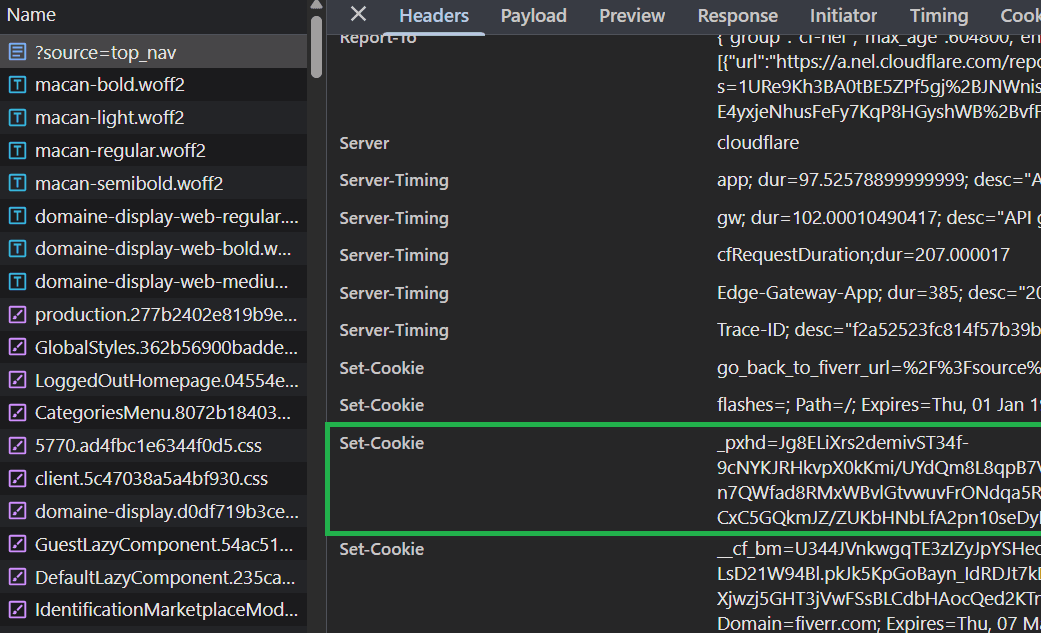
Make an initial GET request to https://www.fiverr.com. Looking at the response headers in the Network tab, you'll see a Set-Cookie header for _pxhd. This is an important cookie: it acts as a session indicator and will be used in future requests. Your PerimeterX bypass will need some data from this cookie to calculate the correct values to send to the server for validation. Note that on subsequent visits, the Set-Cookie header may no longer appear. If so, clear the site data and reload the site when in the Network tab.
Note
Behavior can vary between sites. So, the exact cookies present and how they're set differ, depending on the site's PerimeterX configuration.
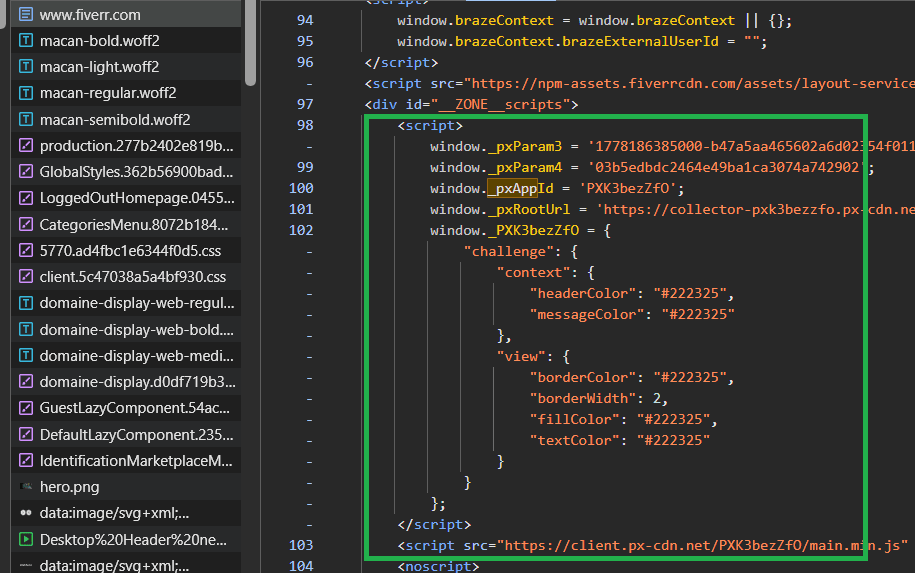
Check also that the response body's HTML contains the <script> tag that fetches the PerimeterX challenge script. Go to the Network tab and click the ?source=top_nav request → Response → search for _pxAppId to locate that specific function. This is a standard PerimeterX function, and it looks like this:
(function() {
    // ...
    window._pxAppId = 'PXK3bezZfO';
    window._pxRootUrl = 'https://collector-pxk3bezzfo.px-cdn.net';
    // ...
    s.src = '/K3bezZfO/init.js';
    // ...
}());
This is followed by a separate script tag that loads the challenge script from PerimeterX's CDN:
<script src="https://client.px-cdn.net/PXK3bezZfO/main.min.js" async crossorigin="...">
When you run window._pxAppId via the console, you'll see its actual value (PXK3bezZfO): This is the unique app ID assigned to each site, enabling PerimeterX to load the correct client-side bot-detection challenge script for that site.
To load the full script, make a GET request to /<_pxAppId>/main.min.js (where <_pxAppId> is the value of window._pxAppId). Note that this varies by site and can be /<_pxAppId>/init.js on some websites.
The min.js file is obfuscated and minified, so you won't be able to understand much of it for now. Click here to see the entire script.
Then, a POST request to /<_pxAppId>.px-cdn.net/api/v2/collector happens. The request payload is a string with content-type application/x-www-form-urlencoded, and contains the following data:
<payload>is an encrypted and Base64 encoded string.<appId>is the previously defined value ofwindow._pxAppId.<tag>is a Base64 encoded string, static per site.<uuid>is a randomly generated UUID, e.g., 4420aff0-351d-11ed-95d0-c137f4896ca9.<ft>is an integer (static per site), e.g., 278.<seq>has the value 0.<en>has the value NTA.<pc>is an integer, e.g., 3195683956001701.<pxhd>is the value of the_pxhdcookie. Note that this field may not appear on all sites, as its presence depends on the site's PerimeterX configuration.<bi>is an encrypted string containing behavioral and biometric data.<hid>is an encrypted string containing hardware and device identifiers.<rsc>has a value of 1: this is a request counter that varies per request.<p3>,<p4>are site-specific custom parameters and vary by site.
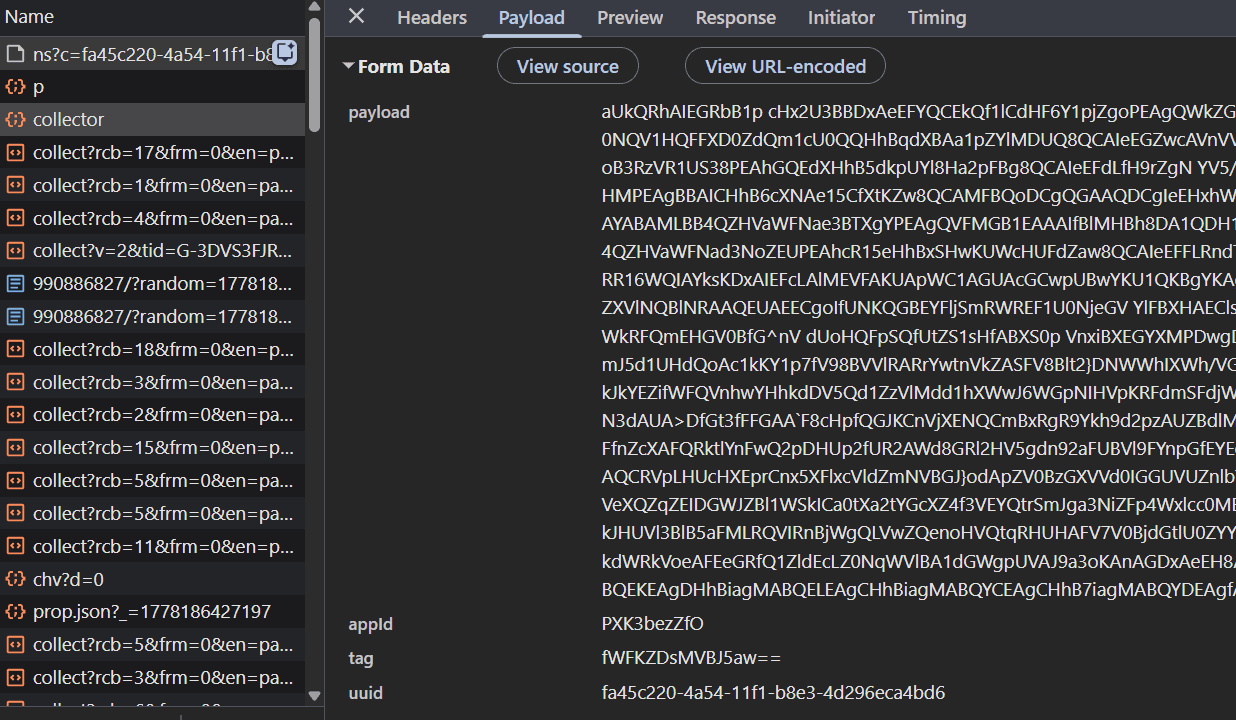
The response body is a JSON object with a single top-level field: do. The do field contains an array of strings. The format is as follows:
{
	"do": [
		"sid|<sid>", // a string, ex. 4415dfc2-351d-11ed-a66d-7275714f5843
		"pnf|cu",
		"cls|<cls>", // an integer, ex. 85062563435994268828
		"sts|<sts>", // is a UNIX timestamp, ex. 1663263533114
		"wcs|<wcs>", // a string, ex. cchm6ba3onsi8miotj00
		"drc|<drc>", // an integer, ex. 4460
		"cts|<cts>|true", // a string, ex. 4415e33e-351d-11ed-a66d-7275714f584
		"cs|<cs>", // a SHA2-256 hash, ex. dd2d5dc601445d684b2c4249a4c68f300048446afd4fece93c44ae41f62bdda3
		"vid|<vid1>|<vid2>|true", // a string and an integer, ex. 43c15b2f-351d-11ed-97ec-797549415148 and 31536000
		"sff|cc|60|<sff>" // a base64-encoded string, ex. U2FtZVNpdGU9TGF4Ow==
	]
}
And a second POST request to /<_pxAppId>.px-cdn.net/api/v2/collector. The payload has the same content-type as before and a similar format with a few added fields:
<payload>is a much longer, encrypted + Base64 encoded string.<appId>,<tag>,<uuid>,<ft>and<pxhd>are the same as the previous request.<seq>is incremented by 1 from the previous request.<en>has the value NTA.<cs>is a SHA2-256 hash, ex.dd2d5dc601445d684b2c4249a4c68f300048446afd4fece93c44ae41f62bdda3.<pc>is an integer, e.g.,1670315818019117.<sid>is a string, e.g.,4415dfc2-351d-11ed-a66d-7275714f5843.<vid>is a string, e.g.,43c15b2f-351d-11ed-97ec-797549415148.<cts>is a string, e.g.,4415e33e-351d-11ed-a66d-7275714f5843.<rsc>has the value2; is incremented by 1 from the previous request
If you take a closer look, you'll see that the cs, sid, vid and cts fields are derived directly from the JSON object returned from the first POST request.
Additionally, the values of seq and rsc have increased by 1 relative to the first POST request. This behavior is maintained for all following POST requests, as well, so we can determine that these fields act as some sort of request counter.
PerimeterX sends another JSON object in the response body, once again containing an array of strings:
{
	"do": ["bake|_px3|330|<jwt>|true|300", "pnf|cu"]
	 // where jwt is a JWT Token, e.g., eyJ1IjoiNDQyMGFmZjAtMzUxZC0xMWVkLTk1ZDAtYzEzN2Y0ODk2Y2E5IiwidiI6IjQzYzE1YjJmLTM1MWQtMTFlZC05N2VjLTc5NzU0OTQxNTE0OCIsInQiOjE2NjMyNjM4MzQxMjIsImgiOiIwNzUzZDJhYTU1OWEzZDFhYjM5YjcyOGFmZDA0MDUyYWFlNDQ2MmU1NjMxNjZkNjM4MjM0NjZkNmNjMzIwY2ZlIn0=
}
The response also contains an ob field with an encrypted string whose purpose varies by implementation.
You may have noticed that none of the POST requests contain a Set-Cookie response header. Typically, once a browser has passed bot-detection checks, an anti-bot system will set special cookies or headers for use in future requests. Then, once a client makes a request to a protected endpoint, the request headers and cookies are validated on the server side.
So, how does this work for PerimeterX? If you request an endpoint protected by PerimeterX, you won't see any unusual headers. You will, however, notice what seems to be some PerimeterX-related cookies. For a cleaner overview, you can view all the cookies on the site (DevTools → Application → Cookies → https://www.fiverr.com) and filter by the keyword px:
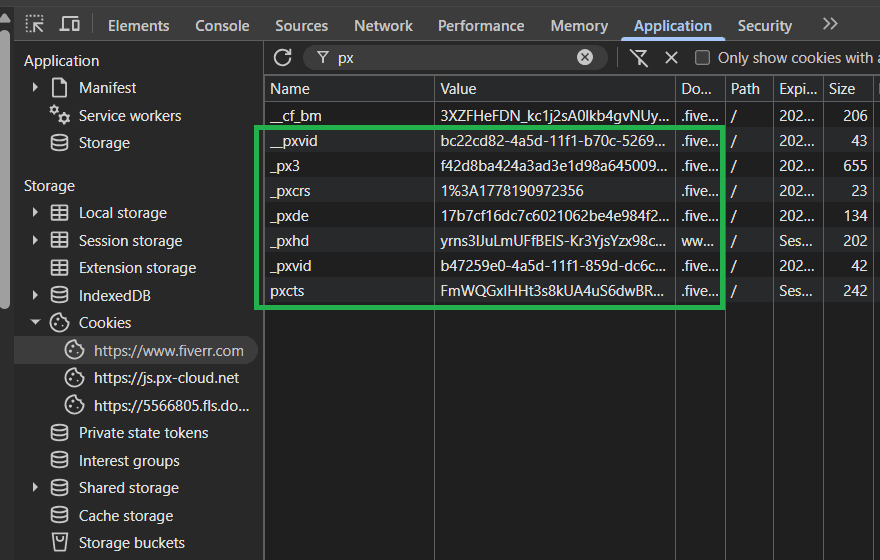
These are PerimeterX's clearance cookies. They are checked on the server side to determine if a request should be blocked or forwarded to the origin. But remember, there's no record of these cookies being set with the Set-Cookie header in the network log. So, where are they coming from?
You might recognize the cookie names and values from the response bodies of the POST requests. This must mean that the cookies are being set directly via JavaScript, which makes sense considering all the PerimeterX cookies lack an Http-Only flag.
Note
Depending on the security level of a PerimeterX-protected site, your browser, and your device, the behavior of the challenge script and its requests may differ slightly. At the time of writing, Fiverr requires two POST requests to
<_pxAppId>.px-cdn.net/api/v2/collector. The second POST yields a_px3cookie, which is the main clearance cookie that grants unblocked access to the site.
Higher-security sites may require additional POST requests before issuing the _px3 clearance cookie. For those sites, _px3 acts as a required clearance cookie. Don't worry, though, since the techniques we discuss here will also be useful for bypassing PerimeterX on high-security sites.
By analyzing the requests, we learned a lot about PerimeterX's behavior. Unfortunately, we're still missing a lot of information. We still don't know what data is contained in the encrypted payload field, how other fields are generated, or which client-side bot detection checks the script performs. If you want to bypass PerimeterX, that knowledge is crucial.
If we want to answer the remaining questions, we have no choice but to consult the PerimeterX challenge script directly to figure out exactly how it works.
Step 2: Deobfuscate the PerimeterX JavaScript Challenge
To make the script unreadable to reverse engineers, PerimeterX obfuscates its JavaScript challenge. Here's a non-exhaustive list of some examples:
String Concealing
This technique replaces all references to string literals with a call to a decoder function. In the case of PerimeterX, strings are either Base64 encoded or additionally encrypted with a simple XOR cipher.
// String concealing example from the PerimeterX script

// Creates an empty lookup cache for use in the decoding function
var o = Object.create(null);

/* ... */

// XOR Decryptor function
// Returns the decoded string.
// This function references some external variables and functions.
// The n() and r() functions are related to recording timestamps, and are irrelevant to the decoding function.
// The i() function is a polyfill function for atob (base64 decoding)
// The o variable is defined earlier in the script as a cache.

function c(t) {
	// n() is irrelevant to the decoding
	var a = n(),
		e = o[t];
	if (e) u = e; // Try to look up the decoding string in the cache
	else {
		// i() is a polyfill function for atob
		// Base64 decodes the input string
		var c = i(t);

		var u = "";
		// XOR decryption
		for (var f = 0; f < c.length; ++f) {
			var A = "dDqXfru".charCodeAt(f % 7);
			u += String.fromCharCode(A ^ c.charCodeAt(f));
		}
		// Store the result in the cache
		o[t] = u;
	}
	return r(a), u; // r(a) is irrelevant to the decoding.
}

/* ... */

// Later on in the script, it's used like this:

c("NBxAaVZGQg"); // => "PX11047"
Proxy Variables/Functions
This technique replaces direct references to a variable/function's identifier with an intermediate variable.
/* Proxy function example */

// Decoding function from above
function c(t) {
	/* ... */
}

// Intermediate variable declaration
var r = c;

// Calling r() instead of c() directly
r("NBxAaVZERw"); // => "PX11062"

/* Proxy variable example */

// Intermediate variable for the identifier "window"
var F = window;

// Referencing "F" instead of "window" directly
F.performance.now();
Unary Expressions
Rather than directly using boolean literals or the undefined keyword, this technique leverages the automatic type conversion behavior of JavaScript's unary expression.
var o = !0; // equivalent to o = true
var c = !1; // equivalent to c = false
void 0 === this.channels; // equivalent to undefined === this.channels
Though the PerimeterX challenge script's obfuscation may not be as sophisticated as that of other bot-detection vendors, it still requires specialized reverse-engineering skills to make it readable. Simply pasting it in a general JavaScript deobfuscator won't produce easily understandable code.
To deobfuscate the PerimeterX script, you'll need to create a custom deobfuscator. This step can be difficult, but it's essential for creating a PerimeterX bypass!
Hint
Try using abstract syntax tree (AST) manipulation.
Once you've deobfuscated the PerimeterX challenge script, you can read it to determine what bot detection checks are performed and how to replicate the challenge-solving behavior. In the next step, we will go over the deobfuscated script and try to extract critical information about its internals.
Step 3: Analyze the Deobfuscated PerimeterX Script
Let's start by figuring out how the payload is encrypted!
PerimeterX's Payload Encryption
To figure out how the payload is encrypted so that we can code our custom PerimeterX bypass, we're going to work backward. First, we find where it's set by searching for the string "payload=" in the deobfuscated script:
var B = {
	vid: cn,
	tag: ff.Bn,
	appID: ff.J,
	cu: Uo,
	cs: f,
	pc: A,
};
var N = Wc(n, B);
var l = [
	"payload=" + N,
	"appId=" + ff.J,
	"tag=" + ff.Bn,
	"uuid=" + Uo,
	"ft=" + ff.Nn,
	"seq=" + Uu++,
	"en=NTA",
];
The final value of the payload is stored in the variable N. From the definition of N, we can determine that the Wc function is responsible for payload encryption. Wc takes in two parameters:
n: a JavaScript object that stores the raw payload data.B: a JavaScript object that stores some values used as keys in the encryption process.
Let's look up the definition of Wc:
var B = {
var Wc = function (n, r) {
	var t;
	var a = n.slice();
	t = nc || "1604064986000";
	var e = zr(Un(t), 10);
	var i = z(a);
	a = Un(zr(i, 50));

	var c = (function (n, r, t) {
		var a, e, i, o, c;
		var u = zr(Un(t), 10);
		var f = [];
		var A = -1;

		for (var B = 0; B < n.length; B++) {
			/* ... */
		}

		for (var v = 0; n.length > v; v++) {
			/* ... */
		}

		return f.sort(function (n, r) {
			return n - r;
		});
	})(e, a.length, r[Hc]);

	a = (function (n, r, t) {
		/* ... */
		return (a += r.substring(e));
	})(e, a, c);

	return a;
};
This is PerimeterX's encryption cipher. The original function is quite long and references many external variables/functions. For practicality, we've truncated it.
However, there are some important things you can learn about this cipher by looking at the fully deobfuscated PerimeterX script:
- The payload uses two encryption keys: the values of
uuidandsts. - uuid appears in every
POSTrequest, while sts appears from the 2nd' POST' request onward. For the 1st POST request, wherestsis absent,"1604064986000"is used in its place. - This is a symmetric-key algorithm. Therefore, as long as you have the original sts and
uuidvalues, you can decrypt any PerimeterX-encrypted payload. This is useful for analyzing the payload your browser sends, since the keys are always included in the POST request along with the encrypted content.
How PerimeterX Sets Cookies
We previously concluded that all PerimeterX-related cookies were set by the actual script itself. Recall that the raw value of the _px3 cookie first appeared inside of a JSON-formatted response body (as <jwt>):
{
	"do": ["bake|_px3|330||true|300", "pnf|cu"]
}
The field name do is quite literal: its corresponding value is an array of instructions. Each string is split on every | into an array. For the first string in the do array, that looks like this:
// The first instruction
var processedInstruction1 = "bake|_px3|330||true|300".split("|"); // => ["bake","_px3","330","","true","300"]
The first element of the resulting array determines the function to be executed, while the remaining elements are taken as the arguments for the function. In this case, bake is the name of the function to be executed.
Searching for bake in the deobfuscated PerimeterX script, we discover the cu object. This cu object holds the handler for the bake instruction:
var cu = {
	/**
	 * @param n = "_px3"
	 * @param r = "330"
	 * @param t = ""
	 * @param a = "true"
	 * @param e = "300"
	 */
	bake: function (n, r, t, a, e) {
		if (ff.J === window._pxAppId) {
			wt(n, r, t, a);
		}
		/* ... */
	},
	/* ... */
};
The arguments n, r, t, a, and e all take on the values of "_px3", "330", "<jwt>", "true", and "300" respectively.
The bake method calls a function, wt. Let's look up the definition of that too:
/**
 * @param n = "_px3"
 * @param r = "330"
 * @param t = ""
 * @param a = "true"
 */

function wt(n, r, t, a) {
	/* ...*/

	try {
		var i;
		// Creates the expiry date of the cookie, based on the "r" parameter.
		if (r !== null) {
			i = new Date(+new Date() + 1000 * r).toUTCString().replace(/GMT$/, "UTC");
		}
		// Initialize the _px3 cookie string
		var o = n + "=" + t + "; expires=" + i + "; path=/";
		var c = (a === true || a === "true") && bt();
		// Append the site domain to the cookie, and add the cookie to document.cookie
		c && (o = o + "; domain=" + c)((document.cookie = o + "; " + e));
		return true;
	} catch (n) {
		return false;
	}
}
So, it looks like the bake instruction directly sets the _px3 cookie! It's also a play on words, as in baking cookies.
Congrats! You found where in the code their main anti-bot cookie is being set! The next step will be to calculate values for it that make sense to PerimeterX, so your bot does not get flagged as suspicious.
You should note that the cu object also contains handlers for all other possible do instructions! To bypass PerimeterX, you need to reverse engineer the functionality of each do instruction.
Let's learn how to break some of the security checks you might find inside this do array.
WebGL Fingerprinting
In the snippet below, PerimeterX uses WebGL APIs to create and render an image. The hash of the image is then stored in canvasfp:
// This function creates, renders, and hashes the image to construct "canvasfp".

function A() {
	return new T(function (c) {
		setTimeout(function () {
			try {
				a = n.createBuffer();
				n.bindBuffer(n.ARRAY_BUFFER, a);
				var u = new Float32Array([
					-0.2, -0.9, 0, 0.4, -0.26, 0, 0, 0.732134444, 0,
				]);
				n.bufferData(n.ARRAY_BUFFER, u, n.STATIC_DRAW)((a.itemSize = 3))(
					(a.numItems = 3)
				)((e = n.createProgram()))((i = n.createShader(n.VERTEX_SHADER)));
				n.shaderSource(
					i,
					"attribute vec2 attrVertex;varying vec2 varyinTexCoordinate;uniform vec2 uniformOffset;void main(){varyinTexCoordinate=attrVertex+uniformOffset;gl_Position=vec4(attrVertex,0,1);}"
				);
				/* Some more transformations on the canvas image... */
				/* ... */
				n.drawArrays(
					n.TRIANGLE_STRIP,
					0,
					a.numItems
				)(
					(r.canvasfp = n.canvas === null ? "no_fp" : In(n.canvas.toDataURL())) // In() computes a hash of the generated image
				)((r.extensions = n.getSupportedExtensions() || ["no_fp"]));
			} catch (n) {
				r.errors.push("PX10703");
			}
			/* ... */
		}, 1);
	});
}
This is useful for fingerprinting because even when instructed to draw the same image, slight variations in hardware or low-level software (e.g., operating systems) will produce different outputs (and thus different hashes). This makes WebGL fingerprinting a good way to classify devices.
PerimeterX also collects additional WebGL properties to classify your device better. Using machine learning algorithms, they can use this data to detect if you're spoofing WebGL properties/rendering.
The computed canvasfp, along with the additional WebGL properties, is added to the payload object in the snippet below:
// Adding the collected WebGL data to the POST request payload

(function (t) {
	(a.PX10061 = t.canvasfp)((a.PX11016 = t.webglVendor))((a.PX10529 = t.errors))(
		(a.PX10279 = t.webglRenderer)
	)((a.PX10753 = t.webGLVersion))((a.PX10246 = t.extensions))(
		(a.PX11232 = In(t.extensions))
	)((a.PX10871 = t.webglParameters))((a.PX11231 = In(t.webglParameters)))(
		(a.PX11077 = t.unmaskedVendor)
	)((a.PX10165 = t.unmaskedRenderer))((a.PX10244 = t.shadingLangulageVersion));
	tt("PX11223");
	r(a);
});
Automated Browser
Below, PerimeterX is checking for the existence of automated-browser-specific properties:
try {
	(n.PX10010 = !!window.emit)((n.PX10225 = !!window.spawn))(
		(n.PX10855 = !!window.fmget_targets)
	)((n.PX11065 = !!window.awesomium))((n.PX10456 = !!window.__nightmare))(
		(n.PX10441 = Xr(window.RunPerfTest))
	)((n.PX10098 = !!window.geb))((n.PX10557 = !!window._Selenium_IDE_Recorder))(
		(n.PX10170 = !!window._phantom || !!window.callPhantom)
	)((n.PX10824 = !!document.__webdriver_script_fn))(
		(n.PX10087 = !!window.domAutomation || !!window.domAutomationController)
	)(
		(n.PX11042 =
			window.hasOwnProperty("webdriver") ||
			!!window["webdriver"] ||
			document.getElementsByTagName("html")[0].getAttribute("webdriver") ===
				"true")
	);
} catch (n) {}
Sandboxing Checks
PerimeterX checks for the existence of NodeJS-only APIs to determine if the script is being sandboxed:
var n;
// The process object only exists in NodeJS.
try {
	n =
		n ||
		((typeof process == "undefined" ? "undefined" : A(process)) === "object" &&
			String(process) === "[object process]");
} catch (n) {}

try {
	n = n || /node|io\.js/.test(process.release.name) === true;
} catch (n) {}
To make sure built-in functions haven't been modified (i.e., monkey-patched), PerimeterX calls typeof and an implicit toString on them:
// A() acts as a wrapper for "typeof"

function A(n) {
	A =
		typeof Symbol == "function" && typeof Symbol.iterator == "symbol"
			? function (n) {
					return typeof n;
				}
			: function (n) {
					return n &&
						typeof Symbol == "function" &&
						n.constructor === Symbol &&
						n !== Symbol.prototype
						? "symbol"
						: typeof n;
				};
	return A(n);
}
//
function Xr(n) {
	// When typeof is called on an unmodified built-in function, it will return "function".
	// "" + n is an implicit toString()
	// An unmodified built-in function will always include "[native code]" in the result.
	return A(n) === "function" && /\{\s*\[native code\]\s*\}/.test("" + n);
}

/* ... */

// Later used like this:

n.PX10213 = Xr(window.EventSource);
n.PX10283 = Xr(Function.prototype.bind);
n.PX10116 = Xr(window.setInterval);

// If they haven't been modified, all the above calls should return true.
User Input Event Tracking
PerimeterX collects behavioral biometrics, such as mouse movements, keyboard presses, and touch movements. The collected data can then be analyzed with machine learning to determine if the inputs are human-like or generated by a bot.
In this snippet, PerimeterX tracks the timing and position of touch events:
{
	(function (n, r) {
		_i.length < 10 &&
			_i.push(
				+n.movementX.toFixed(2) + "," + +n.movementY.toFixed(2) + "," + wr(r)
			);

		if (n && n.movementX && n.movementY) {
			if (Pi.length < 50) {
				Pi.push(
					(function (n) {
						var r = n.touches || n.changedTouches;
						var t = r && r[0];
						var a = +(t ? t.clientX : n.clientX).toFixed(0);
						var e = +(t ? t.clientY : n.clientY).toFixed(0);

						var i = (function (n) {
							return +(n.timestamp || n.timeStamp || 0).toFixed(0);
						})(n);

						return "".concat(a, ",").concat(e, ",").concat(i);
					})(n)
				);
			}
		}
	})(n, t);
}
Which PerimeterX Bypass Method Should I Choose?
Each method has different trade-offs depending on your use case. Here is a quick overview to help you decide:
| Method | Best For | Maintenance | Scale |
|---|---|---|---|
| Scraping API | Production scraping, no infrastructure overhead | None | Unlimited |
| Fortified headless browsers | Development, testing, low-volume scraping | High: patches needed as detection evolves | Low to medium |
| Smart proxies | Supplementing other methods | Medium | Medium |
| Session warmup | Improving trust score when using headless browsers | Low | Depends on the browser tool used |
| Reverse engineering | Deep control over a single target, security research | Very high: challenge script changes regularly | Low |
Troubleshooting PerimeterX Blocks
- "Press and Hold" on every first request: Your TLS or HTTP/2 fingerprint is being flagged. Switch to Zendriver, SeleniumBase UC, or Camoufox. Or, better yet, use a web scraping API.
- Blocks after several successful requests: Behavioral ML is lowering your trust score over time. Add delays between requests, rotate proxies, and avoid predictable sequential access patterns.
- Browser automation detected immediately:
navigator.webdriverand other automation signals are exposed. Switch to a fortified browser tool like SeleniumBase. - Residential proxies still getting blocked: Your proxy range is flagged, or other loopholes beyond IP are exposing your scraper. Switch proxy providers, match your proxy country to the target site's audience, and rotate on every request. If blocks persist, consider using a dedicated scraping API (e.g., ZenRows), which handles proxy management, TLS fingerprinting, and browser signals together rather than relying on proxies alone.
- JavaScript challenge never completes: Set your timeout to at least 15 seconds. Wait for a specific content element to appear rather than relying on page load events.
Conclusion
You've learned about the different ways to bypass the PerimeterX bot-detection system, including manual and auto-managed solutions. For hands-on approaches, fortified headless browsers like Zendriver, SeleniumBase UC Mode, Patchright, and Camoufox are the right starting point. Combine them with session warmup and residential proxy rotation for the best results. You just need to be prepared to maintain them as detection methods evolve.
For advanced PerimeterX bypass, a reverse-engineering approach gives you a deep understanding of how PerimeterX challenges operate at the protocol level. This is useful for building custom solvers or understanding exactly what signals the anti-bot evaluates.
However, for most use cases, a dedicated scraping API, such as ZenRows, is the most reliable solution at scale. It handles the full detection stack automatically and stays up to date with PerimeterX updates without requiring any changes on your end.
Try ZenRows for free now or speak with sales!
FAQ
How can I solve PerimeterX CAPTCHA when scraping?
When scraping, you can bypass PerimeterX by using rotating premium proxies with a stealth headless browser like SeleniumBase. If you don't mind a DIY approach, you can also reverse-engineer PerimeterX's anti-bot measures from scratch. Unfortunately, these methods aren't enough against PermeterX.
Ideally, your PerimeterX CAPTCHA solver or bypass technique should keep pace with regular security updates. The best way to achieve this is via an auto-managed scraping solution, such as ZenRows. With such a service, you don't need to waste time and resources on tweaking your scraper for each anti-bot update or debugging frequent failures. ZenRows handles these under the hood.
Is it legal to scrape a PerimeterX-protected website?
It's generally legal to scrape publicly available data, as long as you don't misuse the extracted data. That said, ensure you abide by data privacy laws and avoid scraping private data, such as information behind a login wall. It's also important to follow best practices during scraping.
Can I bypass PerimeterX CAPTCHA completely?
Yes, you can bypass PerimeterX completely if you follow the right approach. DIY and manual approaches eventually fail due to the increased cost of maintenance at scale and the inability to keep up with anti-bot updates.
The most reliable and sustainable solution is to opt for web scraping APIs, such as ZenRows, which provide auto-managed infrastructure for scraping successfully at scale.
How do I know if a site uses PerimeterX?
Open DevTools on the blocked page and run window._pxAppId in the console. If it returns a value like PXHYx10rg3, the site uses PerimeterX. You can also check the Network tab for requests to /<appId>/init.js or POST requests to /<appId>.px-cdn.net/api/v2/collector, depending on the site's implementation.
What is the difference between PerimeterX and HUMAN Security?
PerimeterX rebranded to HUMAN Security in 2022. The underlying technology, detection methods, and bypass techniques are identical. Some block pages still display PerimeterX branding while others show HUMAN Security.
Does PerimeterX block Playwright?
Yes. Standard Playwright exposes automation signals that PerimeterX detects immediately. Use Patchright instead, which patches the CDP leaks and detectable signals that vanilla Playwright leaves exposed.