
How to Bypass DataDome: Complete Guide 2026
Learn how to effectively bypass DataDome's security measures and protect your web scraping activities with smart strategies.

Many websites have implemented advanced anti-bot protections, such as DataDome, to prevent you from scraping their content. The good news? In this guide, you'll not only learn how DataDome works but also discover ways to bypass it, including:
- Method 1: Stealth browsers.
- Method 2: Use a Web scraping API (the easiest and most reliable).
- Method 3: Use residential proxies.
- Method 4: CAPTCHA bypass.
- Method 5: Scrape cached content.
- Method 6: Stay away from honeypot traps.
Ready? Let's get to it!
What Is DataDome?
DataDome is a web security platform that uses various detection techniques to prevent cyber threats, including DDoS attacks, SQL/XSS injection, and card and payment fraud. It also targets web scrapers, preventing them from scraping pages and accessing data.
Over 1200 companies use the DataDome web application firewall (WAF) across America and Europe. Its security system has become more sophisticated over the years, with the ability to quickly spot and block automated access attempts such as web scraping.
Chances are you'll encounter DataDome and similar anti-bots, such as Cloudflare and PerimeterX, when scraping.
Common DataDome Block Page Messages
Like most anti-bot measures, DataDome blocks usually return 403 forbidden errors, but in rare cases, you might get 500+ or other 400+ error statuses.
Some DataDome block page examples include strings such as dd in the returned HTML script tag, datadome in the Set-Cookie header, or x-datadome in the response headers. That said, the block is usually accompanied by a DataDome CAPTCHA challenge like the one below:

DataDome's machine learning algorithm makes it intuitive. Even if you don't encounter these blocks initially, the anti-bot might trigger them mid-scraping.
How DataDome Detects Your Web Scraper
DataDome maintains a regularly updated dataset of trillions of anti-bot signals to keep up with the ever-evolving bot landscape. To improve bot-detection accuracy, it analyzes individual user behavior, geolocation, network fingerprints, and more using multi-layered machine-learning algorithms.
DataDome builds a trust score on these detection metrics. Web scrapers generally have low trust scores, which makes them highly detectable. Before bypassing DataDome, you need to understand its primary detection techniques:
TLS Fingerprinting
TLS (Transport Layer Security) fingerprinting is a server-side detection technique that DataDome uses to identify the client that sent a request to the server. It analyzes parameters in the initial TLS handshake, particularly the "ClientHello" message, such as supported cipher suites, TLS versions, and extensions.
By examining these parameters using hashing techniques such as JA3 and JA4, the server can create a "fingerprint" to distinguish legitimate clients from potential bots before any application data exchange occurs.
Each web scraping tool has a unique TLS fingerprint. However, most web scraping tools fail to support modern, secure TLS versions (like 1.2 and 1.3) and may default to older versions like TLS 1.0 or 1.1. These versions are often flagged by servers that require up-to-date encryption protocols.
To avoid detection via TLS fingerprinting, scrape with modern libraries or headless browsers like Puppeteer and Playwright, which support custom TLS configuration.
IP Address Fingerprinting
DataDome also scans traffic from your IP against a database of allowed and disallowed IP addresses and may block your IP if it has a low trust score. If your IP address has broken rate-limiting or geo-restriction rules in the past, it may be assigned a low trust score or enter the disallowed list, causing DataDome's security measures to detect and block it.
You can route your scraper behind a proxy to avoid IP fingerprinting. However, DataDome can also block web scrapers originating from IP addresses with low trust scores. Scraping with datacenter proxies can result in suspicion because real users don't use them. It's best to use residential or mobile proxies for better anonymity. We'll discuss this in more detail later.
Skip the blocks. Try Zenrows free and get clean web data without the anti-bot fight.
Behavioral Analysis
Another detection method DataDome uses is analyzing individual users' behavioral patterns, including clicks, mouse movements, hovers, typing, scrolls, and more. While these patterns are dynamic among real users, bots typically exhibit static behavior, such as scrolling to the same height at a fixed interval, filling a form faster than usual, or rapidly navigating multiple pages simultaneously.
The DataDome security measure can flag these fixed patterns as bot-like. You can avoid this detection method by mimicking human behavior. For instance, you can use request retry mechanisms to reduce your request rate or vary user actions such as scrolling.
Browser Fingerprinting
Browser fingerprinting is another technique DataDome uses to uniquely identify web browsers by collecting various information about them. This data creates a unique "fingerprint" to track browsers across websites and sessions. The collected information includes the browser type and version, screen resolution, installed plugins, and more.
When you send an HTTP request, the anti-bot scans your client's fingerprint data against a database of known browser fingerprints to determine its legitimacy. Some techniques employed in browser fingerprinting are Canvas fingerprinting, Audio fingerprinting, storage and persistent tracking, and media device fingerprinting. One way to limit browser fingerprinting is by using stealth headless browser tools.
HTTP Protocol and Header Analysis
Your HTTP request headers are among the most critical metrics that can hint to DataDome that you're a bot. Advanced web application firewalls (WAFs) like DataDome analyze the request headers to determine the HTTP version (HTTP/1.1, HTTP/2, or HTTP/3). Outdated HTTP protocols may signal anti-bot behavior.
DataDome can also spot bot-like behavior if your request header contains anomalies like incorrect parameters, mismatched values, missing header strings, etc. For example, using a Windows Chrome User Agent and a Linux platform header may result in blocking.
Let's now learn the different DataDome bypass techniques.
Method #1: Bypass DataDome with Stealth Headless Browsers
Standard headless browsers, including Selenium, Puppeteer, and Playwright, can't bypass DataDome's security measures because they contain obvious bot-like information, like the presence of an automated WebDriver, missing plugins, and more. All these make it easy for DataDome to fingerprint and block them.
However, you can fortify these headless browsers to hide most of their bot-like details and mimic human browsing behavior. Each has a patched version that enhances it with stealth to increase your chances of bypassing DataDome during scraping. They include:
- The Puppeteer Extra Stealth Plugin for Puppeteer.
- Playwright Stealth for bypassing blocks in Playwright.
- SeleniumBas with Undetected ChromeDriver for Selenium.
Keep in mind that while libraries such as Puppeteer Stealth and Playwright Stealth were commonly used against WAFs in the past, their effectiveness has declined due to their inability to keep up with anti-bot updates.
SeleniumBase is quite new and is more effective. However, its main limitation is that it works best in non-headless (GUI) mode and often gets blocked after a few requests. This makes it unfit for real-world scraping needs.
These stealth extensions can reduce the likelihood of detection. But they don't guarantee sustainable success. As open-source projects, they lose maintenance over time and can't keep pace with DataDome's rapidly evolving security measures.
Stealth headless browsers also require running dedicated browser instances, resulting in significant memory and resource overhead. This makes them costly to host and maintain, especially for large-scale scraping operations.
Method #2: Use a Web Scraping API (Recommended)
The most straightforward and effective way to bypass DataDome is to use a web scraping API such as the ZenRows Universal Scraper API. ZenRows automatically adapts to DataDome's security measures and helps you bypass them under the hood with one API call.
With the Adaptive Stealth Mode option, ZenRows applies the optimal configurations to achieve the highest success rate at the lowest cost. This allows you to focus on drawing valuable insights from data rather than wasting development time and resources fixing scraping blocks.
For example, a DataDome-protected website like Best Western will block your scraper. Try it out with the following Python code:
# pip3 install requests
import requests

response = requests.get("https://www.bestwestern.com")

if response.status_code != 200:
    print(f"An error occurred with {response.status_code}")
else:
    print(response.text)
The code outputs a 403 forbidden error, indicating that DataDome has blocked your request:
An error occurred with 403
Let's retry that request with ZenRows to bypass DataDome.
Sign up to load the ZenRows Request Builder. Paste the target URL into the link box, then enable the Adaptive Stealth Mode.
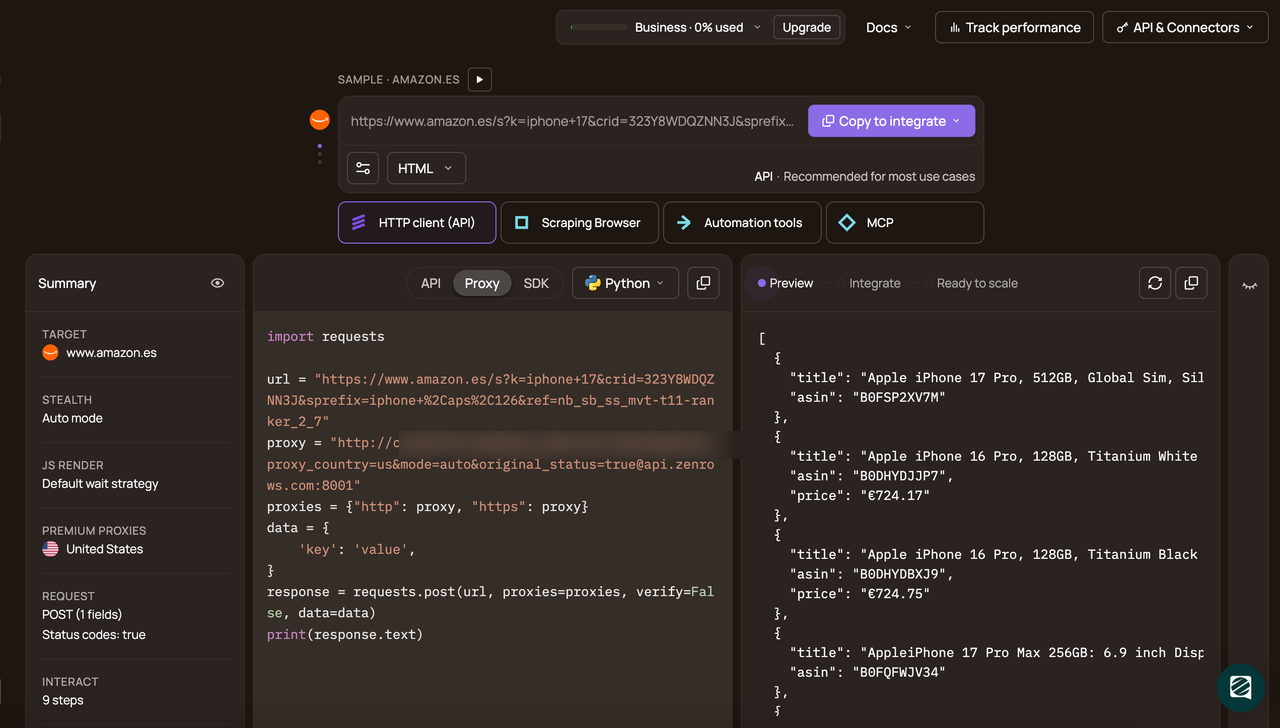
Choose your programming language (we've used Python in this example) and select the API connection mode. Copy and paste the generated code into your script:
The generated Python code should look like this:
# pip install requests
import requests

url = "https://www.bestwestern.com"
apikey = "<YOUR_ZENROWS_API_KEY>"
params = {
    "url": url,
    "apikey": apikey,
    "js_render": "true",
    "premium_proxy": "true",
}
response = requests.get("https://api.zenrows.com/v1/", params=params)
print(response.text)
The above code accesses the protected website and outputs its HTML:
<html lang="en-us">
<head>
    <title>Best Western Hotels - Book Online For The Lowest Rate</title>
</head>
<body class="bestWesternContent bwhr-brand">
    <header>
        <!-- ... -->
    </header>

    <!-- ... -->

</body>
</html>
You just bypassed DataDome with ZenRows. Congratulations! 🎉
Method #3: Use Residential Proxies
Your IP address can be banned if it exceeds a request quota or violates geo-restriction rules. Proxies are essential for web scraping DataDome-protected websites because they route your request through another location, increasing your chances of bypassing DataDome.
While proxies may be insufficient in edge cases, they can help bypass anti-bot measures or DataDome CAPTCHA triggered by rate limiting. There are two proxy types based on cost and service quality: free and premium. While free proxies are good for prototyping and testing, they're unreliable due to their short lifespan and shared nature.
The best options are premium web scraping proxies, which offer advanced features, including proxy rotation and geo-location. While choosing a provider, ensure you opt for residential proxies, as these are more reliable for web scraping, distributing your traffic across several IPs belonging to daily internet users.
Method #4: DataDome CAPTCHA Bypass with CAPTCHA Solvers
Solving DataDome CAPTCHA can serve as hard proof that the user is human. There are two types of CAPTCHA-solving services:
- Automated CAPTCHA solvers: These provide quick solutions to CAPTCHA challenges using machine learning techniques, such as optical character recognition (OCR) and object detection.
- Human solvers: A team of human workers who manually solve CAPTCHAs and provide you with a response. Although slow and expensive, this method is reliable.
Examples of CAPTCHA-solving services include 2Captcha and CapSolver.
However, it's best to avoid letting your scraper hit the DataDome CAPTCHA, as it can slow the scraping process and add costs.
You can increase your chances of bypassing DataDome CAPTCHA by using CAPTCHA proxies. A good CAPTCHA proxy should be fast, scalable, and able to support different renderings without compromising speed. That said, the best way to bypass CAPTCHA completely is via a web scraping API.
Method #5: Scrape Cached Content
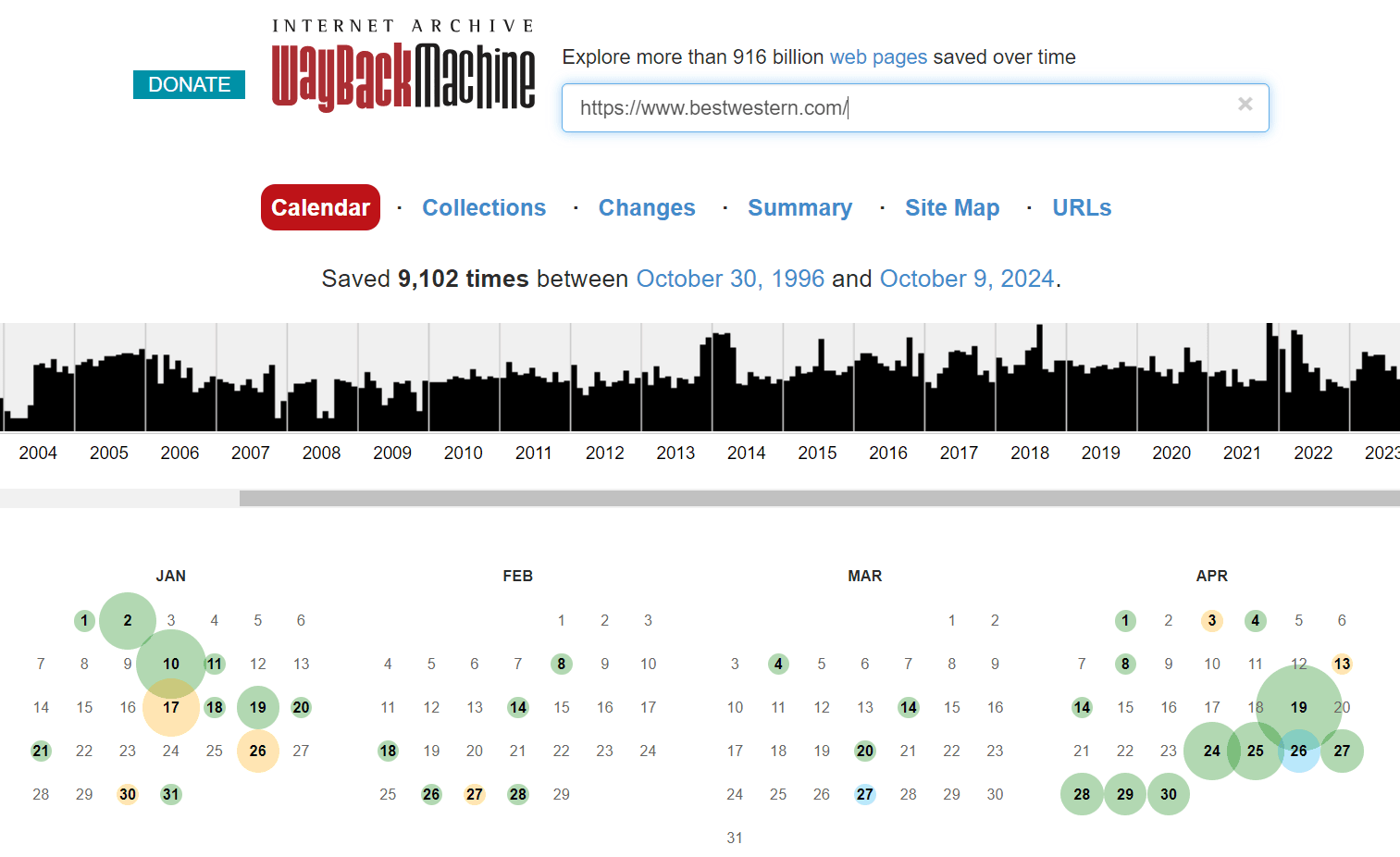
Another way to bypass a DataDome is to scrape old copies of a protected website from a Wayback machine like the Internet Archive. It contains a catalog of web page snapshots from different days and times.
To use this method, open Internet Archive, paste the URL of the protected website in the link box, and select a snapshot date and time to view its archive.
However, a downside of these methods is that archived or cached website versions can be stale, and you'll likely scrape outdated content. Additionally, the cache method won't work if the target website doesn't support caching or if the search engine changes its caching policies. The cache service might also implement an anti-bot block on its end, which could block your scraper.
Method #6: Stay Away From Honeypot Traps
Honeypots are traps that mimic legitimate websites or resources. They could be hidden links, fake data repositories, login forms, or decoy servers. DataDome employs such traps to detect and block web scraping bots.
You can avoid honeypots by analyzing the network traffic patterns to identify deceptive links and deploying premium proxies to mimic a legitimate user. Avoid interacting with hidden form fields and links. Then, ensure you respect a website's robots.txt during scraping.
Check out our article on bypassing honeypots for more actionable steps.
Reverse Engineering the Anti-bot System With JS Deobfuscation
Since client-side measures rely on running a script in the user's device, they must be shipped with the protected website or application. These scripts contain proprietary code and are protected using obfuscation. These measures may make it more complex and slower to reverse-engineer, but it doesn't make it impossible.
Start using an online JavaScript deobfuscator, like Deobfuscate.io, and head to https://js.datadome.co/tags.js, where DataDome hosts its script. The JavaScript deobfuscator renames variables to more human-friendly formats, abstracts proxy functions, and simplifies expressions.
Some obfuscation techniques aren't easily reversible and will need you to go further than automated tools.
Let's go through these techniques step by step.
String Concealing
Variables and functions are renamed to meaningless names to lower the script's readability, and all references to strings are replaced with hexadecimal representations. Besides renaming and encoding, they're hidden using a string-concealing function.
larone() is an example of the function in DataDome's script since it's called in the script over 1200 times and contains alphabet characters from "a" to "z" with three special symbols, indicating character manipulation. Throughout the code, this function will often be reassigned to a variable to confuse debugging.
When called with an integer as a parameter, it returns a string that will uncover function calls and variable names. Translating its usage to the corresponding functions will be a massive step in the deobfuscation, so let's see what this function returns for each call in a file.
You can set a breakpoint in the browser's developer console where the said function will be available as window.larone and write a simple loop to generate a mapping of parameters into string outputs:
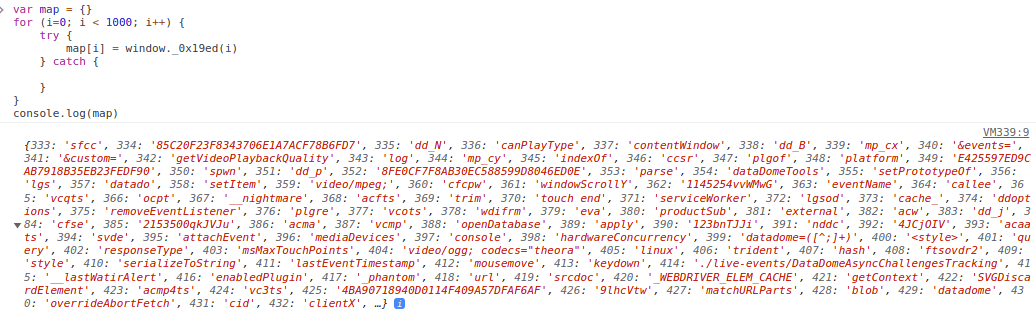
After that, we'll write a script to replace calls to the larone() function in the JS file with their string equivalent. This turn statements like document[_0x3b60ec(132)]("\x63\x61\x6e\x76\x61\x73")["\x67\x65\x74\x43\x6f\x6e\x74\x65\x78\x74"](_0x3b60ec(406)); into more expressive ones like document.createElement("canvas").getContext("webgl");.
After converting these hexadecimal identifiers to human-readable versions and replacing the string-concealing function, some of the puzzles we figured out are CAPTCHAs, POST request's payload, DataDome JS Keys and the Chrome ID.
Editing Variables at Runtime
A significant matter in the script is the vast array of cryptic values. Following where it's used leads us to the first self-invoking function in the script. It shuffles the array by moving the first element to the last position until an expression equals the second integer parameter:
(function (margart, aloura) {
    var masal = margart();
    while (true) {
        try {
            var yasameen =
                (parseInt(larone(392)) / 1) * (-parseInt(larone(713)) / 2) +
                (-parseInt(larone(390)) / 3) * (-parseInt(larone(606)) / 4) +
                parseInt(larone(756)) / 5 +
                (-parseInt(larone(629)) / 6) * (-parseInt(larone(739)) / 7) +
                (-parseInt(larone(679)) / 8) * (parseInt(larone(426)) / 9) +
                parseInt(larone(385)) / 10 +
                (parseInt(larone(362)) / 11) * (-parseInt(larone(699)) / 12);
            if (yasameen === aloura) break;
            else masal.push(masal.shift());
        } catch (prabh) {
            masal.push(masal.shift());
        }
    }
})(jincy, 291953);
By setting a convenient breakpoint and adding a counter to the function above, we see it's called about 300 times.
The sole purpose of this function is to edit the encryption global variable until the yasameen variable evaluates the second integer parameter. It reorganizes it by shifting the first element to the last position. That happens at runtime and may disorient the reader when decrypting a concealed string.
Control Flow Obfuscation
Developers like to organize their code by its responsibility, such as data, business logic, HTTP libraries, encryption, etc. That allows us to separate concerns and follow the flow of execution, especially when debugging.
Good code is readable, and obfuscators know that, so they take advantage of it using control flow obfuscation. This process rearranges instructions to make following the script's logic difficult for humans. If the script is compiled and obfuscated with such techniques, it can even crash decompilers trying to make sense of it.
In our case, the primary function in the script heavily uses recursion and nested calls to blur the path of execution. That is noticeable with the main() function and the executeModule() function it defines. We've also renamed the variables to more expressive names:
!(function main(allModules, secondArgument, modulesToCall) {
    function executeModule(moduleIndex) {
        if (!secondArgument[moduleIndex]) {
            if (!allModules[moduleIndex]) {
                var err = new Error("Cannot find module '" + moduleIndex + "'")
            }
        }
            // ...
            allModules[moduleIndex][0].call(
                // ...
                function (key) {
                    return executeModule(allModules[moduleIndex][1][key] || key);
                },
                // ...
                main,
                modulesToCall
                // ...
            );
        }
        return secondArgument[moduleIndex].exports;
    }
    for (...) executeModule(modulesToCall[i]);
    return executeModule;
})(...)
Figuring out the flow of execution of such functions isn't trivial. We suspect it orchestrates all the execution and handling of JavaScript modules. Why? Because the error message Cannot find module in the above code gives it away.
Note
This could be due to control flow obfuscation or standard JS module bundling. But it does obfuscate our understanding of the script, so we'll count it as obfuscation.
Analyzing the Deobfuscated Script
So far, we've peeled quite a few obfuscation layers to understand how to bypass DataDome. It's time to step back and take a bird's-eye view of the script. The script contains three categories: the global variables, the string-concealing functions and the main function:
// Global variables, with import paths as keys and small integers as values
...
var global3 = {
    "./common/DataDomeOptions": 1,
    "./common/DataDomeTools": 2,
    "./http/DataDomeResponse": 5,
}
var global4 = {...}
// ...

// First self-invoking function to shuffle global array defined below
(function (first, second) {
    ...
})(globalArray, 123456)

// String-concealing function
function concealString(first, second) {
    // ...
}

// Global array of 500+ cryptic strings
globalArray = [
    "CMvZB2X2zwrpChrPB25Z",
    "AM5Oz25VBMTUzwHWzwPQBMvOzwHSBgTSAxbSBwjTAg4",
    // ...
]

// Main function
!(function main(first, second, third) {
    // Orchestrate JavaScript module passed in first argument
})(
    // Nine JavaScript modules,
    {
        1: [
            function () {},
            global1,
        ],
        2: [...],
        // ...
    }
    {},
    [6], // Entrypoint module
)
Our analysis will focus on the main function. It has a substantial first parameter, and most of the file's code is in this parameter alone. The first parameter is an object that follows a specific pattern, and each value of the object is an array of 2 elements: a function with three arguments and a global object.
Most modules are auxiliary to bot detection and deal with event tracking, HTTP requests, and string handling. We'll leave those for you to discover on your own. As for bot detection, the modules related to it are:
- Module 1: It initializes DataDome's options, like
this.endpoint,this.isSalesForce, andthis.exposeCaptchaFunction. It also defines and runs a function calledthis.check. This function loads all DataDome options and is called early in the entry point module. - Module 3: This is where fingerprinting happens. It defines over 35 functions, with names prefixed by
dd_, and runs them asynchronously. Each of these functions gathers a set of fingerprinting signals. For example, the functionsthis.dd_j()andthis.dd_k()check window variables indicating the use of PhantomJS. - Module 6: The last argument of the
main()function. It loads DataDome options (using module 1) and enables tracking of events (using modules 7 and 8).
Conclusion
Whew! That was quite a ride. Congratulations on sticking with us till the end. In this article, we introduced the techniques of the DataDome bot-detection system, discussed DataDome bypass techniques, recommended the best DataDome bypass method, and reverse-engineered the anti-bot.
As a recap, the methods to bypass DataDome bot detection are:
- Use stealth browsers.
- Use a web scraping API.
- Use residential proxies.
- Use CAPTCHA-bypass services.
- Scrape the cached version of a website.
- Avoid honeypots.
While these methods are effective, they can be expensive and stressful, and there's still a risk of detection while scaling. DataDome's regular updates make these methods a constant maintenance burden, diverting valuable time and resources from your data extraction work. The best way to avoid this is to use an all-in-one web scraping solution like ZenRows to bypass DataDome and other anti-bots.
Try ZenRows for free now or speak with sales!
FAQ
Can I bypass DataDome completely?
While manual evasion techniques and stealth tools can increase your chances of bypassing DataDome, they don't guarantee a complete DataDome bypass. The best way to bypass DataDome is to use web scraping APIs. These tools continuously adapt to DataDome's security measures, enabling you to scrape any website at scale without getting blocked.
Is it legal to scrape a DataDome-protected website?
It's generally legal to scrape public data, as long as you use it ethically. That said, it's important to avoid scraping private data, such as personal details behind a login wall. Ensure you comply with relevant data privacy laws and follow best practices for web scraping.
How does DataDome work?
DataDome analyzes multiple parameters in real time to identify and block bot-like traffic. Some of its main bot-detection techniques include:
- Behavioral analysis.
- IP address fingerprinting.
- TLS fingerprinting.
- Browser fingerprinting.
- Request-header analysis.
DataDome scans incoming traffic for patterns and attributes associated with legitimate users. When a request deviates from expected behavior or exhibits signs of automation, DataDome may classify it as a bot and block it.
What is a DataDome cookie?
The DataDome cookie is a token stored in your browser whenever you access a DataDome-protected website. This cookie enables DataDome's security system to distinguish between legitimate and automated requests. The DataDome cookie is typically session-based, providing uninterrupted access to the website as long as your requests are recognized as authentic.