
2 Easy Ways to Bypass "Please Verify You Are a Human
Discover the most efficient method to bypass the "Please verify you are human" challenge by PerimeterX and resume your scraping efforts.

Is your scraper getting blocked by a "Press & Hold" screen or a "Please Verify You Are Human" prompt? You're being blocked by the HUMAN (formerly PerimeterX) Bot Defender. Unlike simple CAPTCHAs, HUMAN uses a behavioral sensor to analyze your browser’s execution environment, hardware-level entropy, and event timing before the challenge even renders.
Fortunately, there is a way to bypass the "Press & Hold" or "Please Verify You Are Human" verification. In this guide, you’ll learn two proven methods:
- The custom approach of using a fortified headless browser to simulate challenge clicking.
- The scalable and most reliable solution to bypass HUMAN with zero infrastructure maintenance.
Key Takeaways
- The "Press & Hold" button is a telemetry trap. PerimeterX measures the frequency of mousedown events and "requestAnimationFrame" loops to distinguish organic human jitter from robotic static holds.
- The CAPTCHA button is often injected into a closed shadow root, intentionally breaking standard Selenium locators like "find_element".
- Navigating via keyboard events (Tab to focus, Enter to hold) is often more successful than mouse-based ActionChains because it follows a logical, easier-to-simulate behavioral flow.
- Modern sensors check for the lack of hardware-accelerated GPU textures. Running stealth tools on a basic VPS without dedicated resources is a high-confidence bot signal.
- Even fortified browsers can leak salient fingerprints over time. For high-volume production, a scraping API with an adaptive stealth mode is required to keep up with evolving behavioral signatures.
What Is "Please Verify You Are a Human" From PerimeterX?
The "Please verify you are a human" or "let's prove you're human press and hold the button" message means the website owner wants you to confirm you're a human user, not a bot. This action prevents malicious programs from accessing the website.
Unfortunately, it may also appear when scraping with tools like Selenium or Playwright, blocking you from obtaining your target data.
To verify, you'll be given a task that's easy for humans but hard for bots, such as solving a visual puzzle, answering a question, or performing a specific action. Bypassing PerimeterX (known as HUMAN nowadays) typically requires the "Press & Hold to confirm you are a human" action screen, similar to the one below:
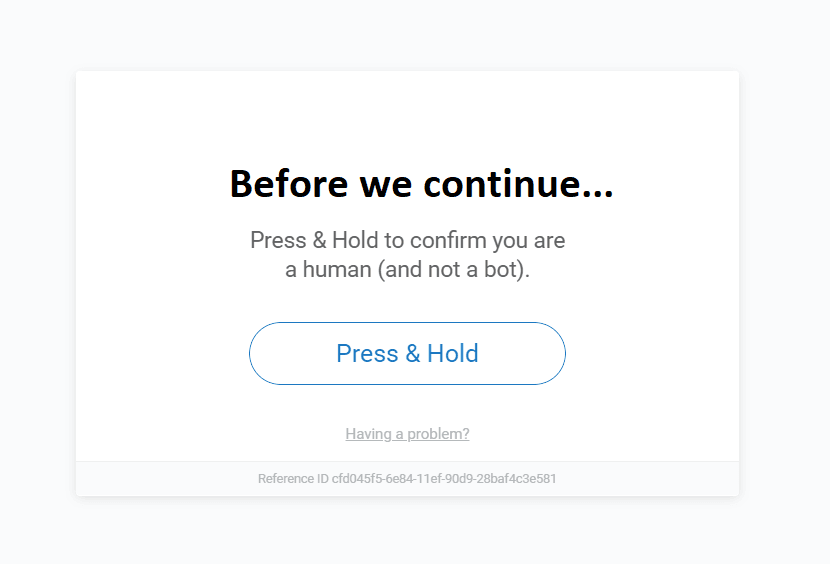
The Press & Hold" button isn't a timer. In reality, PerimeterX is collecting telemetry during that hold. It’s measuring the frequency of mousedown events, the variance in coordinates, and how your browser handles the
requestAnimationFrameloop while the button is active. If your scraper sends a perfectly steady 10-second hold every time, you'll most likely get locked behind that CAPTCHA screen.— Matheus Canhizares, Senior Software Engineer at ZenRows
In the next section, you'll see how to bypass the above PerimeterX "Press & Hold to confirm you are a human (and not a bot)" CAPTCHA.
Skip the blocks. Try Zenrows free and get clean web data without the anti-bot fight.
How Do I Avoid "Please Verify / Press & Hold to Confirm You Are a Human" From PerimeterX?
We'll present two techniques to bypass the PerimeterX human verification anti-bot message. The first is a free method that can work for smaller web scraping tasks, while the other is a foolproof paid solution suitable for large-scale scraping.
1. Manual Solution: Press and Hold With a Fortified Headless Browser
A headless browser scraper doesn't launch a graphical user interface (GUI) but allows you to automate user interactions on web pages, such as clicking, scrolling, submitting forms, etc.
Since the PerimeterX error typically appears during the initial request to a protected website, a headless browser such as Selenium can simulate the "Press & Hold" action.
Related: Web Scraping With Selenium and Python
However, headless browsers like Selenium expose anti-bot properties that lead to anti-bot detection and subsequent blocking. For instance, Selenium exposes the WebDriver navigator, shows a HeadlessChrome flag in headless mode, presents incorrect browser fingerprints, and more. That's where fortified headless browsers help.
Unlike standard headless browsers, stealth browsers patch the bot leaks in the base versions, enabling your scraper to emulate a real user. These include stealth evasion techniques and other fingerprinting fixes that can significantly reduce the risk of anti-bot detection during scraping.
Various browser automation tools feature specific stealth plugins for anti-bot evasion. For instance, you can use Playwright Stealth with Playwright, patch Puppeteer with Stealth, or enhance evasion in Selenium using SeleniumBase with the Undetected ChromeDriver.
For this manual method, we'll bypass the human verification check by using SeleniumBase to improve stealth in Selenium. SeleniumBase uses a similar automation API to the standard Selenium driver. So, their syntaxes are the same.
SeleniumBase includes evasion techniques that prevent the initial human verification prompt from appearing, so you don't have to automate the Press & Hold action manually. That said, manual intervention is also essential in case the initial evasion fails.
PerimeterX typically injects the "Press & Hold" button into closed shadow roots, specifically to break standard element locator functions such as Selenium's find_element.
By isolating the CAPTCHA button in a detached DOM tree, PerimeterX forces scrapers to rely on low-level interactions, such as ActionChains or coordinate-based actions. Unfortunately, these methods are easy for the anti-bot to fingerprint and block, especially when using standard headless browsers like Playwright or Selenium.
Standard Selenium clicks are too perfect. Static clicks lack the micro-movements of a human hand, and the pattern is easy to spot.
Fortunately, there's a way out!
Wrapping Selenium's ActionChain in a stealth-patched environment like SeleniumBase enables you to go beyond button-clicking. It lets you spoof the entire behavioral profile, increasing the success rate.
Instead of clicking a coordinate, you can use Selenium's Action API to shift focus via keyboard events. This is often more reliable because keyboard navigation follows a predictable logical flow and is easier to simulate than organic mouse movement.
To see how tat works in SeleniumBase, you'll use the Tab key to focus on the CAPTCHA button and simulate the "Pressing & Hold" action with the Enter key.
Let's test this out on Zillow, a PerimeterX-protected website.
To automate the Press & Hold action with SeleniumBase, first install the library with pip:
pip3 install seleniumbase
First, import the necessary dependencies and set up your SeleniumBase driver in a maximized window. The uc=True parameter launches the driver in stealth mode using the Undetected ChromeDriver. Open the target site and implicitly wait for the page to load:
# pip3 install seleniumbase
from seleniumbase import Driver
from selenium.webdriver.common.action_chains import ActionChains
from selenium.webdriver.common.keys import Keys
import time

# create a new Driver instance in UC mode
driver = Driver(uc=True)

# maximize the browser window
driver.maximize_window()

# open the target site
driver.get("https://www.zillow.com/")

# implicitly wait for the DOM to load
driver.implicitly_wait(10)
Once the challenge loads, automate the Press & Hold action by sending the Tab and Enter strokes using the Action Chain, as shown below. The try/except block ensures you can catch errors in case the "Press & Hold" button isn't on the loaded page:
# ...

time.sleep(10)

# press and hold human verification manually if CAPTCHA is triggered
try:
    # initialize for low-level interactions
    action = ActionChains(driver)

    # focus on the button with the Tab button
    action.send_keys(Keys.ENTER)
    action.pause(5)
    action.send_keys(Keys.TAB)
    action.pause(5)
    # press and hold the Enter key to simulate "Press & Hold"
    action.key_down(Keys.ENTER)
    action.pause(10)
    # release the Enter key after pressing it for 10 seconds
    action.key_up(Keys.ENTER)
    action.perform()
    # execute the Action Chain
    action.perform()
    # keep holding for 10s
    time.sleep(10)

except Exception as error:
    print(f"{error}, Press & Hold button not found")
    pass


# ...continue scraping

# quit the browser and release its resources
driver.quit()
Combine the snippets. Here's the final code:
# pip3 install seleniumbase
from seleniumbase import Driver
from selenium.webdriver.common.action_chains import ActionChains
from selenium.webdriver.common.keys import Keys
import time

# create a new Driver instance in UC mode
driver = Driver(uc=True)

# maximize the browser window
driver.maximize_window()

# open the target site
driver.get("https://www.zillow.com/")

# implicitly wait for the DOM to load
driver.implicitly_wait(10)

time.sleep(10)

# press and hold human verification manually if CAPTCHA is triggered
try:
    # initialize for low-level interactions
    action = ActionChains(driver)

    # focus on the button with the Tab button
    action.send_keys(Keys.ENTER)
    action.pause(5)
    action.send_keys(Keys.TAB)
    action.pause(5)
    # press and hold the Enter key to simulate "Press & Hold"
    action.key_down(Keys.ENTER)
    action.pause(10)
    # release the Enter key after pressing it for 10 seconds
    action.key_up(Keys.ENTER)
    action.perform()
    # execute the Action Chain
    action.perform()
    # keep holding for 10s
    time.sleep(10)

except Exception as error:
    print(f"{error}, Press & Hold button not found")
    pass


# ...continue scraping

# quit the browser and release its resources
driver.quit()
The "Press & Hold" simulation works! See it below:
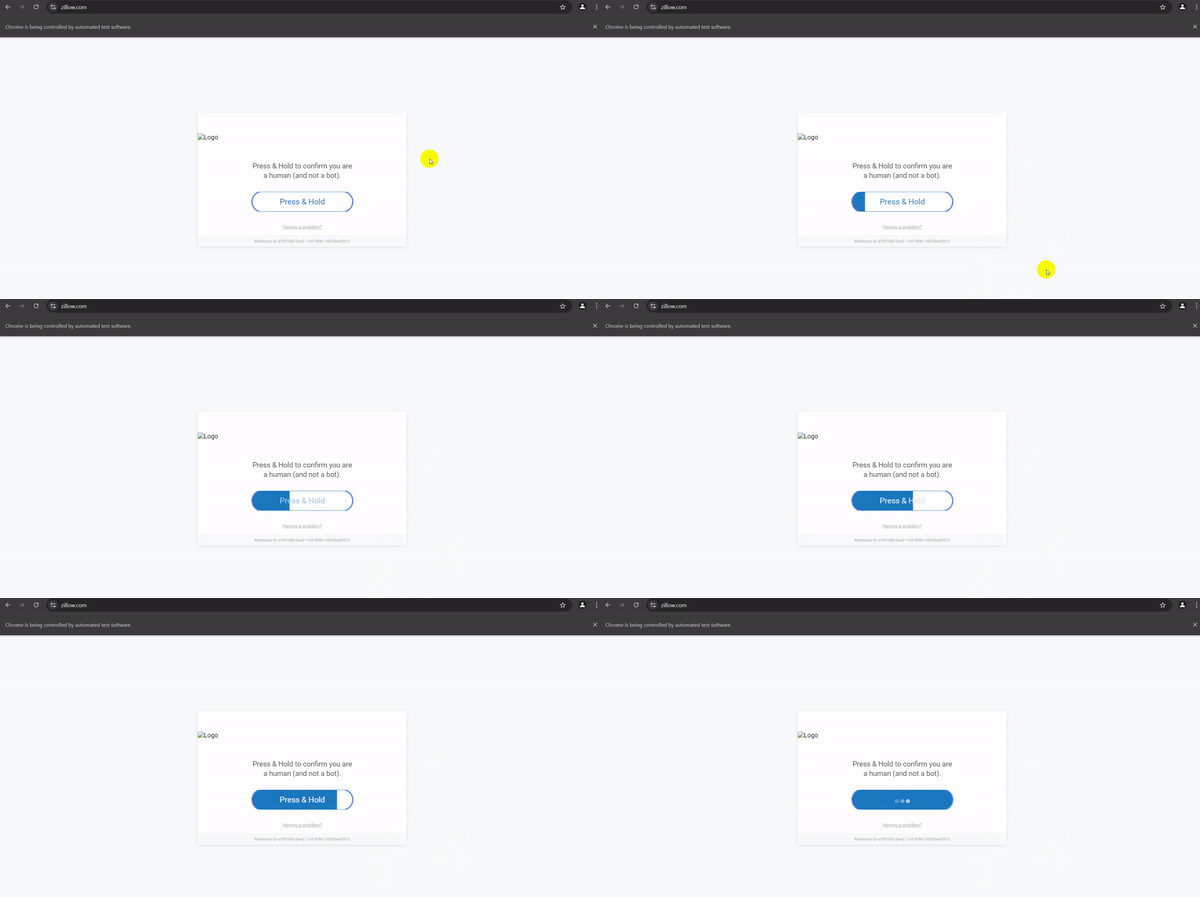
While this method helps with the "Press & Hold" simulation, PerimeterX might still detect you as a bot after a few requests. That's because even fortified headless browsers like SeleniumBase still leak some bot-like properties. Such bot-like parameters include misconfigured media codecs, suspicious browser runtime, and other salient fingerprint leaks.
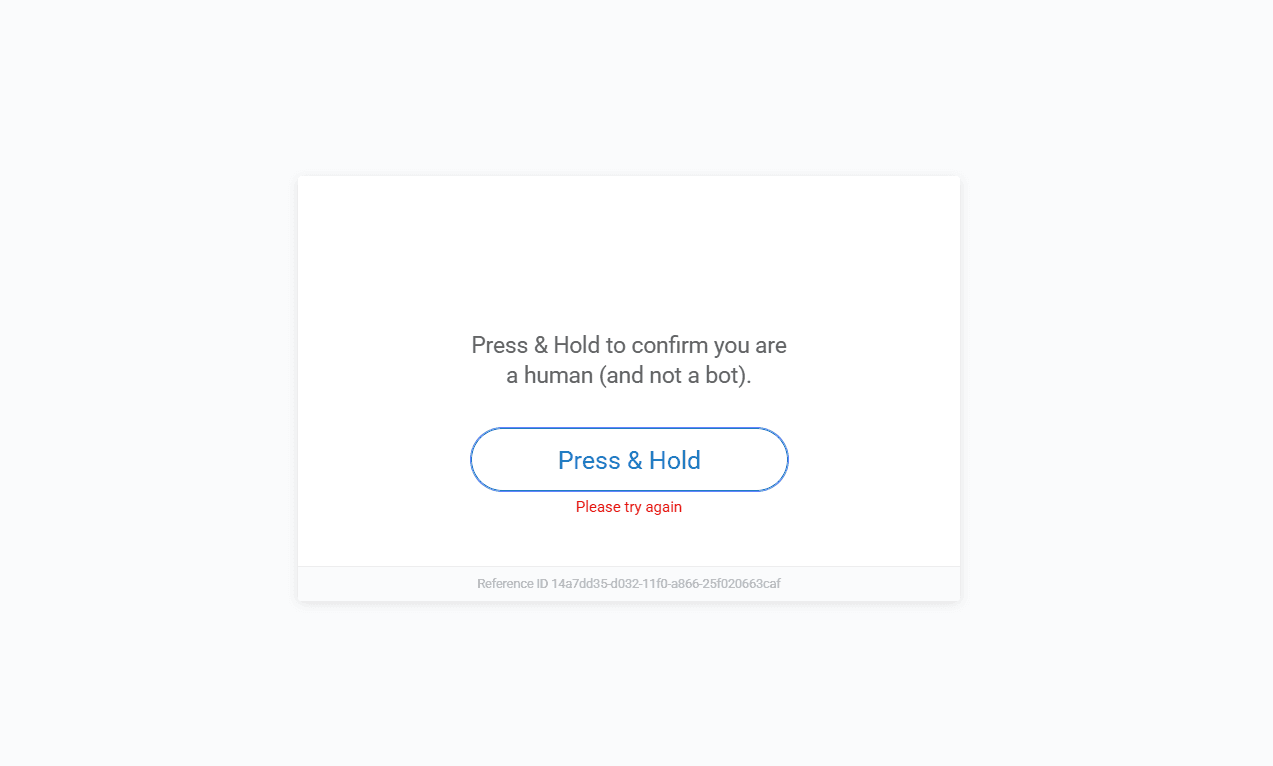
Even after executing the Press & Hold action with a stealth tool, the security measure can still display a "Please try again" or "We were unable to confirm you're human. Please try again" screen, locking you behind the human verification wall. See an example below:
Additionally, Selenium's ActionChains often fail because they don't simulate the high-frequency event stream that modern behavioral engines require.
The real giveaway isn't the lack of interactions or mouse movements. It's the event timing. A human pressing a button generates a specific cadence of hardware interrupts. When we reverse-engineered the sensor data, we found that PerimeterX looks for the lack of sub-millisecond jitter in the
timeStampproperty of the "Press & Hold" event object. If you're running stealth tools on a basic headless Virtual Private Server (VPS) without dedicated GPU resources or hardware-level entropy, you'll be detected.— Jonathan Nebot, Senior Scraping Browser Engineer at ZenRows
To avoid eventual detection, you can use a dedicated web scraping tool, which leads us to the next solution.
2. Use a Web Scraping API for Guaranteed Results
PerimeterX uses many anti-bot techniques to block scrapers, including fingerprinting, behavioral analysis, IP reputation, and more. So, the "Please verify that you are human" challenge could come up at any time when scraping.
Keep in mind that the security level for PerimeterX varies by site. For example, the "Press & Hold" button may be difficult to select, rendered differently across sessions, or subject to additional protection from PerimeterX alternatives. As a result, keeping up with bypass strategies takes time and effort.
Paid solutions like web scraping APIs are the most reliable way to bypass CAPTCHA or human verification from PerimeterX because they consistently keep up with evolving anti-bot measures. Unlike free solutions, scraper APIs deliver a near-100% success rate and automatically handle all bypass tasks, without manual setup or updates.
One of the best web scraping APIs that guarantees success is the ZenRow Universal Scraper API. It's a full-fledged scraping toolkit that helps you bypass any anti-bot measures at scale using a single API call.
ZenRows is also compatible with any programming language and includes headless browsing capabilities for scraping dynamic content. It also prevents the anti-bot measure from detecting your IP address by routing your requests through premium rotating proxies.
With ZenRows's Adaptive Stealth Mode, you get the optimal configuration for the best success rate and at the lowest possible price.
Let's show you how it works against the PerimeterX protection on the previous target site (Zillow):
Sign up and go to the ZenRows Playground. Paste your target URL, then enable Adaptive Stealth Mode.
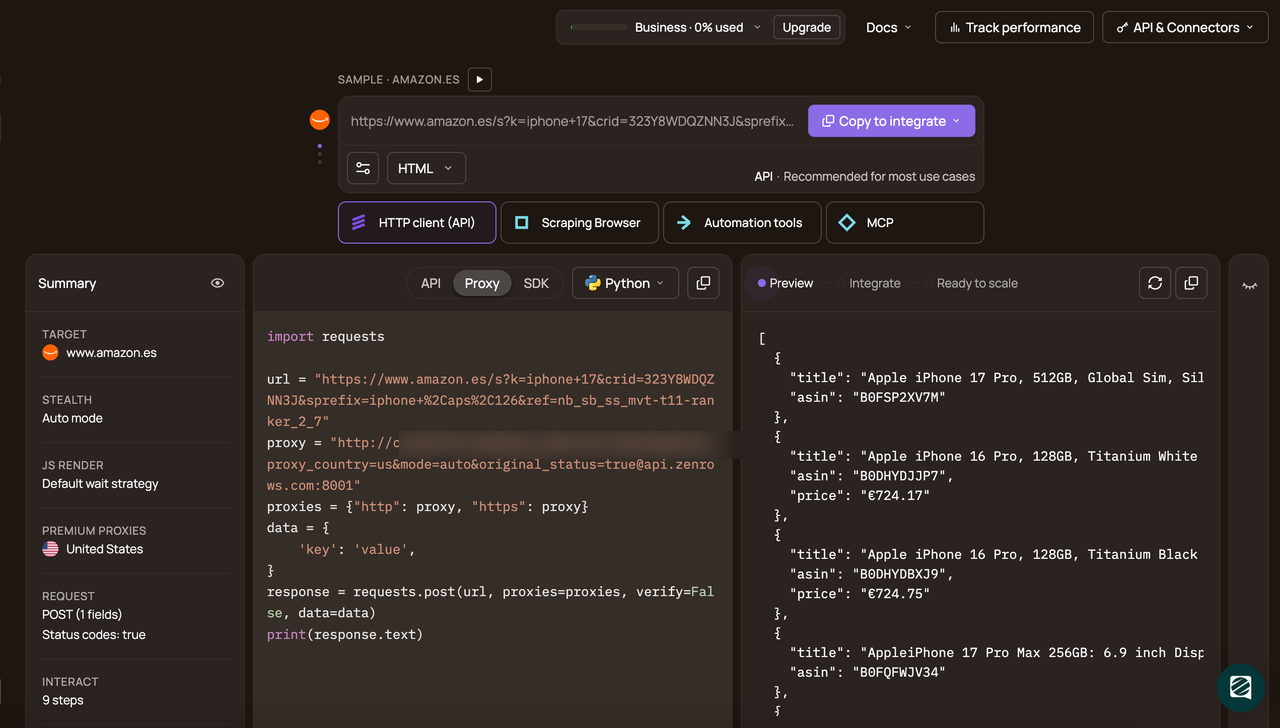
Select Python as your favorite programming language (Python, in this case). Then, choose the API connection mode.
# pip install requests
import requests

url = "https://www.zillow.com/"
apikey = "<YOUR_ZENROWS_API_KEY>"
params = {
    "url": url,
    "apikey": apikey,
    "mode": "auto",
}
response = requests.get("https://api.zenrows.com/v1/", params=params)
print(response.text)
The above code outputs the target website's full-page HTML, showing that you've successfully bypassed PerimeterX:
<html lang="en">
<head>
<!-- ... -->
<title>
Zillow: Real Estate, Apartments, Mortgages & Home Values
</title>
<!-- ... -->
</head>
<body>
<!-- ... -->
</body>
</html>
Congratulations 🎉! Your scraper now bypasses PerimeterX using ZenRows.
Conclusion
You've learned how to effectively navigate human verification required challenges and bypass PerimeterX using two techniques. While free solutions such as fortified headless browsers may help, they don't guarantee success against PerimeterX's anti-bot measures.
The easiest way to bypass the PerimeterX "Please Verify You Are a Human" or "Press & Hold" CAPTCHA is to use a web scraping API like ZenRows. This solution lets you access and scrape any PerimeterX-protected website at scale without limitations.
Try ZenRows for free now or speak with sales!
FAQ
What does verifying you are human mean?
"Verifying you are human" is a security measure used by websites to confirm that a real person, not a bot, is accessing their content. This typically involves solving CAPTCHAs, completing tasks like "Press & Hold," or interacting with the page to prove human behavior. These checks are designed to block automated tools like scrapers while allowing legitimate users to proceed.
How to fix "Verify you are human"?
To fix the "Verify You Are Human" issue:
- Use ZenRows: ZenRows bypasses human verification challenges, including CAPTCHAs and "Press & Hold" screens, with a single API call.
- Simulate Human Behavior: Use headless browsers like Selenium or Puppeteer with stealth plugins to mimic real user interactions.
CAPTCHA Solvers: Employ tools like 2Captcha to handle verification tasks automatically.
Why am I stuck on the " Verify you are human page?
You're stuck on the human verification page because your scraper can't pass the anti-bot check. Even after automating the Click & Hold action, your web scraping tool can still get blocked if the anti-bot detects subtle automation signals, such as leaking fingerprints, misconfigured browser runtime, and more. Since your scraper can't bypass the underlying checks, the website reverts to the human verification phase each time you attempt to bypass it.
Is it legal to scrape websites protected by human verification CAPTCHA?
Yes, it's legal to scrape publicly available information as long as it's not behind a login wall. That said, avoid scraping personal information. And even if you scrape publicly available data, ensure you don't misuse it. Overall, ensure you adhere to scraping best practices.