
What is an MCP Server? And Why AI Agents Need Web Scraping
Discover what MCP servers are and why web scraping is the top tool for AI agents, including a practical guide to adding a scraping MCP server.
An MCP (Model Context Protocol) server connects AI agents to external tools and data sources through a standardized protocol, eliminating the need for custom integrations. Among all MCP use cases, such as file access, databases, code execution, and more, web scraping is the most valuable because it gives agents real-time access to any public webpage. Tools like ZenRows MCP let agents fetch live web data with anti-bot bypass built in.
— TL;DR
AI agents are powerful, but the LLMs (Large Language Models) behind them lack a built-in way to check the live web for up-to-date information. Web scraping MCP (Model Context Protocol) addresses this by providing agents with external tools to access and scrape live web data.
This article explains what an MCP server is, how MCP servers work, why web scraping matters for AI agents, and how to connect a scraping MCP server to your agent.
What is an MCP Server?
An MCP server is a service that connects an AI agent to external tools and data sources. Think of MCP like a power outlet: you don't rewire the wall for every new appliance, and the outlet doesn't need to know whether it's powering a lamp, a microwave, or a charger. In the same way, an MCP server gives compatible agents a standardized way to access services such as web scraping APIs and databases, without requiring a custom connector for each.
How MCP Servers Work
An MCP server works through a client-server model. The AI app you use, such as Claude Desktop, Cursor, or Windsurf, is the MCP host. That host creates an MCP client, which sends requests to the MCP server. The MCP server forwards the request to the connected tool or service and returns the result to the client.
For instance, when a web scraping MCP server is connected to Claude Desktop, you ask Claude to get product details from a target site, such as Amazon. Claude determines it needs live website data and passes the request through its MCP client to the web-scraping MCP server. The MCP server sends that request to the connected web scraping service, which fetches the page and returns the content. Claude then uses that returned data to answer your query.
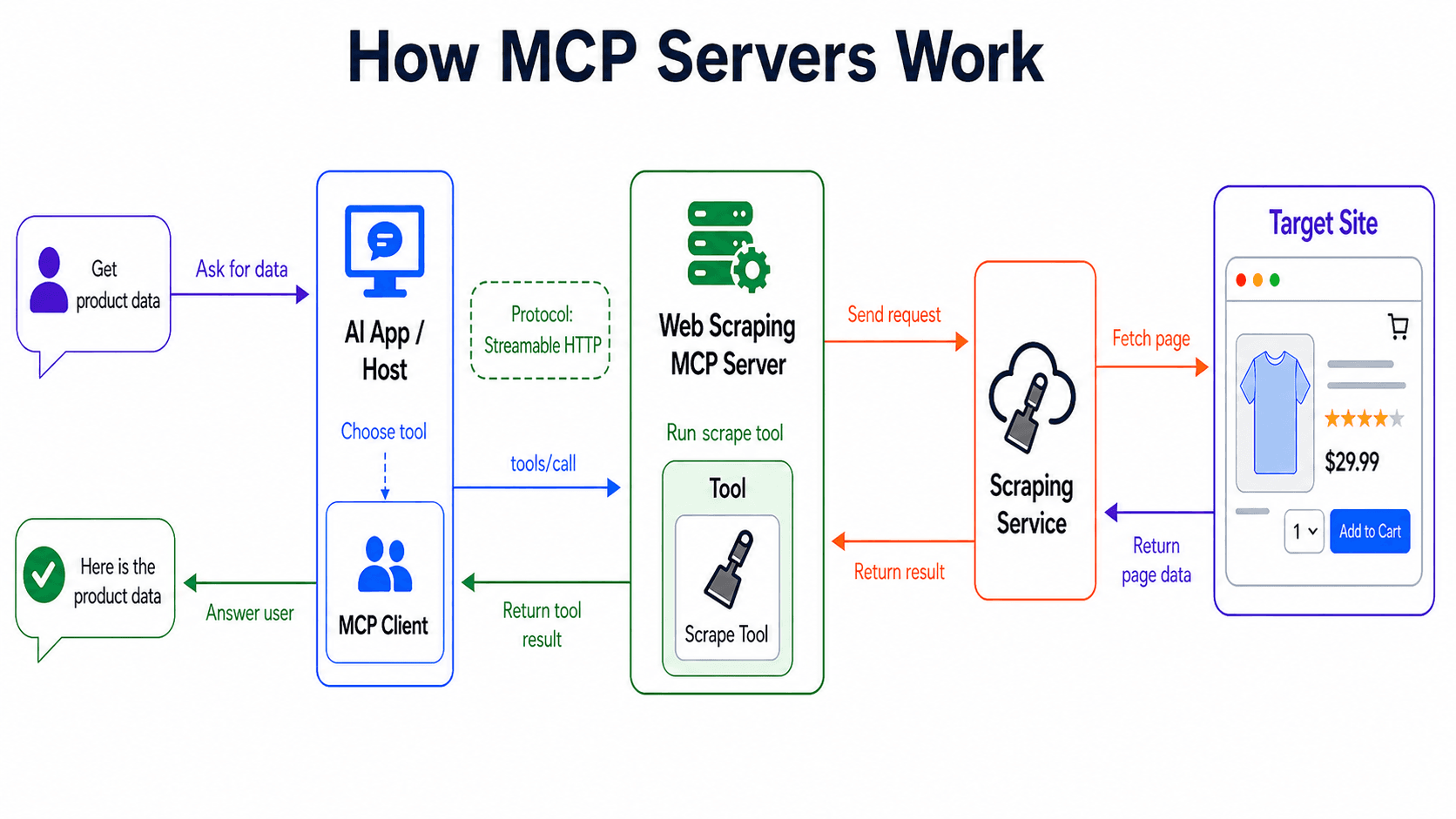
MCP can use two transport types depending on where the server runs: stdio (standard input/output) and Streamable HTTP. stdio enables a local MCP server, which runs on the same computer as the MCP host, to receive requests and send responses locally.
Streamable HTTP lets a remote MCP server, running on another computer and communicating with the MCP host over the web, stream updates to the client as they arrive, rather than waiting to send a single complete response.
Skip the blocks. Try Zenrows free and get clean web data without the anti-bot fight.
MCP Server vs. Traditional API Integrations
Traditional API integrations connect one application to one service at a time. That setup works when a single AI agent needs one tool, but it becomes harder to maintain as more agents and tools are added. For example, ten AI agents connected to 100 tools can require 1,000 separate integrations, each with its own request format, authentication setup, error handling, and maintenance path.
MCP avoids that point-to-point setup by giving agents and tools a shared connection standard. Instead of wiring each agent to each tool separately, the service exposes its capabilities as MCP tools via an MCP server. Any MCP-compatible agent can then call those tools using the same protocol, reducing the need for repeated integration work.
MCP Server Use Cases
MCP servers connect your AI agent to external tools and data sources, enabling a wide range of agentic tasks. Here are the main ones.
- Web scraping: When an agent needs current web data, a scraping MCP server connects it to an AI web scraping tool that fetches target pages and returns their content. The agent can then process live page content rather than relying on uploaded files, old citations, internal databases, etc., which may contain stale data.
- File system access: Instead of uploading files or pasting code into the chat, a file-system MCP server enables the agent to read, write, search, and update files within approved directories. This enables the agent to use your workspace files as context and make file changes directly, without requiring you to upload files or apply suggested changes yourself.
- Database queries: For reporting and analysis, the agent can connect through a database MCP server to inspect schemas and retrieve records from systems such as PostgreSQL or SQLite. Some database MCP servers are read-only, while others support broader database operations depending on their configuration.
- Code execution: Some tasks need tested output, not just suggested code. A code-execution MCP server provides the agent with a runtime environment in which it can validate generated code, process data, and return actual error output if something fails.
- Calendar and email access: With the right permissions, the calendar and email MCP servers let agents use the schedule and inbox context. They can check availability, retrieve meeting details, create calendar events, search email threads, manage labels, or draft replies.
- Web search: For early research, a web search MCP server can return links, titles, snippets, and source candidates. That helps the agent discover possible sources, but doesn’t provide full-page content.
Among these use cases, web scraping is the highest-value MCP use case because it lets agents retrieve live website content outside your internal systems.
Why Web Scraping is the Most Important MCP Tool for AI Agents
Most MCP tools give agents access to your data, such as files, databases, calendars, and email. Web scraping gives AI agents access to any publicly available web page, in real time. That makes a web scraping MCP server useful to any agent that needs live web data your internal systems don’t store, including price monitoring agents, competitive research agents, retrieval-augmented generation (RAG) pipelines that need current sources, sales intelligence bots, etc.
However, not every web scraping MCP server exposes the same capabilities. Before choosing one, check whether it supports anti-bot bypass, JavaScript rendering, geo-targeting, and AI-friendly output formats such as Markdown, JSON, or plain text. Also, check how many tools it exposes, because each tool adds schema overhead to the agent’s context.
To learn more, check out our best MCP servers for web scraping guide.
How to Add a Web Scraping MCP Server to Your AI Agent
In this section, you’ll learn how to integrate a web scraping MCP server with an AI agent using the ZenRows MCP server as the example.
Note
ZenRows is a web scraping solution for extracting data at scale without getting blocked. It includes advanced anti-bot bypass, premium proxies with geotargeting, JavaScript rendering, and an adaptive stealth that automatically applies the best bypass configurations for any given site. It also supports AI-friendly outputs, such as Markdown and JSON.
Step 1: Choose an MCP-Compatible Client
Start with an MCP-compatible client such as Claude Desktop, Claude Code, Cursor, Windsurf, or VS Code. This is where you’ll register the web scraping MCP server. We’ll use Claude Desktop in this guide.
Step 2: Get Your API Key
Sign up for free on ZenRows and copy your API key from the Playground.
Step 3: Add the MCP Server Configuration
In Claude Desktop, navigate to Settings > Developer > Edit Config to open the configuration file. Then add the server configuration and replace <YOUR_ZENROWS_API_KEY> with your actual API key.
{
  "mcpServers": {
    "zenrows": {
      "command": "npx",
      "args": ["-y", "@zenrows/mcp"],
      "env": {
        "ZENROWS_API_KEY": "<YOUR_ZENROWS_API_KEY>"
      }
    }
  }
}
Step 4: Restart the Client and Test the Tool
Save the configuration file and restart Claude Desktop. Then ask the agent to fetch data from a target page with a prompt like this:
Go to https://www.amazon.com/s?k=macbook+pro+14+m4+max and tell me the cheapest MacBook Pro 14 with M4 Max listed on the page.
Here are the results.
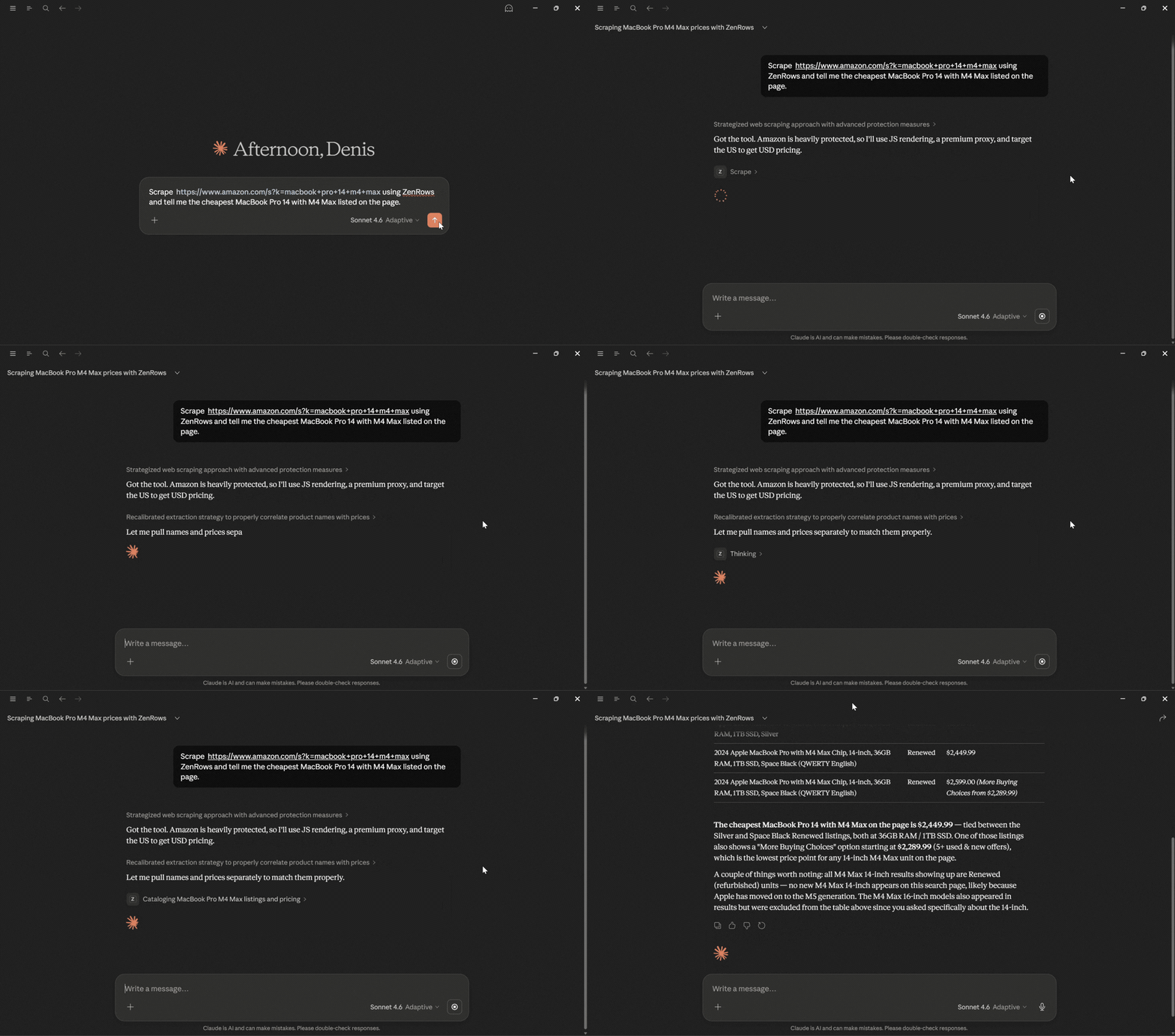
There you go! Your AI assistant used ZenRows MCP to fetch the Amazon search results page, extract the listed MacBook Pro 14 products, and identify the cheapest option from the returned page data. Your AI agent can now use a web scraping MCP server to retrieve live web data without getting blocked.
For a detailed setup guide, see our article on how to give your AI agent real web access with ZenRows MCP.
Conclusion
As AI agents take on more complex tasks, the gap between what they can reason about and what they can actually access becomes the real challenge. A web scraping MCP server closes that gap, giving agents the live web context they need to act on current information, not just what's already in the chat. You've seen why web scraping is a key use case for MCP, giving agents access to real-time web data when a task depends on information outside your own systems.
ZenRows MCP provides your agents with web access via a scraping tool that automatically bypasses anti-bot measures and returns AI-ready output.
Try ZenRows for free now or speak with sales!
FAQ
What exactly is an MCP server?
An MCP server is a service that exposes tools from an external service or data source to AI agents through the Model Context Protocol. The agent can call those tools during a task rather than relying solely on information already in the chat.
For example, MCP can connect AI agents to browser automation through servers such as Playwright MCP and Puppeteer MCP. This lets the agent open web pages, click buttons, fill forms, wait for dynamic content, and extract page data.
Why would I need an MCP server?
You need an MCP server when your AI agent has to get data or take action through an external tool during a task. Without MCP, you often have to paste files, copy page content, or build a custom integration before the agent can use that information. With MCP, the agent can call the connected tool directly, such as a file system, database, calendar, or web scraping service.
What is the difference between a REST API and an MCP server?
A REST API is a direct app-to-service interface. Your application sends requests to specific endpoints and handles response formatting, authentication, error handling, and integration logic. An MCP server is designed for AI clients. It exposes tools and resources in a standard format, allowing compatible agents to discover and invoke them via MCP rather than requiring a custom integration for each agent-tool pair.
Does ChatGPT support MCP?
Yes. ChatGPT supports MCP through developer mode for Pro, Plus, Business, Enterprise, and Education accounts. It connects to remote MCP servers using SSE or streaming HTTP. It doesn't support local stdio MCP servers, so you must expose a local server through a remote HTTP endpoint before ChatGPT can use it.