
Best AI Web Scraping Tools for LLM & RAG Pipelines (2026)
Compare the 7 best AI web scraping tools for LLM and RAG pipelines, including Crawl4AI, Firecrawl, ZenRows, and more, with pros, cons, and when to use each.
Large language models (LLMs) and retrieval-augmented generation (RAG) often need web scraping to access live web data that postdates their training cutoff. But most scraping tools break on JS-heavy or anti-bot-protected pages and return blocked or partial content. The pipeline then ingests incomplete context, degrading retrieval quality and leading to inaccurate downstream answers.
In this article, you'll learn which AI web scraping tools are best for LLM and RAG pipelines in 2026. We'll compare them based on whether they can return the right data, in the right format, with enough reliability for a production pipeline.
What Makes an AI Scraping Tool Suitable for LLM Pipelines?
AI web scraping tools for LLM and RAG pipelines vary in scale, output format, extraction capabilities, and ability to bypass blocks. Here are the factors to consider before choosing one.
Anti-Bot Bypass and JS Rendering
If a tool can't bypass anti-bot protections or render JavaScript-heavy pages, the rest of its features matter less. You can't scale a scraper that's not collecting the target data in the first place, and LLM-ready output won't help if the tool returns blocked pages, empty shells, or partial content. In an LLM pipeline, everything downstream depends on what the scraper captures upstream.
LLM-Ready Output
A scraper can fetch a page, but it can still create extra work if it only returns raw HTML filled with navigation, layout markup, scripts, and other boilerplate. For LLM and RAG workflows, cleaner output, such as Markdown, JSON, or well-structured text, is easier to chunk, store, retrieve, and pass to downstream processing.
Scale and Concurrency
A scraping tool that works on a few pages is not suitable for the RAG or LLM pipeline. Once the workload grows, concurrency limits, queueing, retries, and rate-limit handling start to matter. The right tool should keep working when crawl volume increases, not break down once the job moves beyond a small batch. Stability under load matters because LLM pipelines often rely on recurring ingestion and refresh jobs or large-scale data collection.
Scraping API vs. Scraping Library
A scraping API handles the browser, proxy, and retry logic for you, so the pipeline gets data without your team managing any of that infrastructure. A scraping library gives you more control, but you're responsible for maintaining it. Debug time adds up, anti-bot patches become a recurring task, and data can go stale before the scraper is ready.
Use a scraping API if you need to scrape data at scale reliably. A scraping library is better for research, prototyping, or when a few missing pages during the scrape don't derail the work.
Infrastructure Management
A scraper doesn't become suitable for an LLM pipeline just because it works once. It also needs to fit into scheduled crawls, refresh jobs, and ongoing ingestion without creating too much setup ambiguity or maintenance overhead. A decent LLM scraping tool should have clear configuration, predictable behavior, and low latency, because these affect how reliably the pipeline keeps running over time.
7 Best AI Web Scraping Tools for LLM Pipelines
Now that you know what to look for, let's go through the best AI web scraping tools for LLM and RAG pipelines.
This table gives you a quick snapshot of the tools we'll cover in this article.
| Tool | Choose if |
|---|---|
| Crawl4AI | The goal is a self-hosted crawler for open sites, internal sources, or quick RAG prototypes |
| ZenRows | Your pipeline scrapes protected or JavaScript-heavy pages and needs reliable data in production |
| Firecrawl | Clean Markdown output from open web pages is what the pipeline needs for RAG ingestion |
| ScrapeGraphAI | Pages have changing layouts or mixed content that makes fixed selectors unreliable |
| Browse.ai | No-code extraction and monitoring on a fixed set of pages is enough for the use case |
| Apify | You need results fast from a specific site without building a scraper from scratch |
| Jina AI Reader | The pipeline only needs a quick URL-to-Markdown conversion at low volume |
Let's now cover each tool in detail.
1. Crawl4AI: Best Open-Source LLM Crawler
Crawl4AI is a free, async Python library built for AI-focused crawling. It renders JavaScript via Playwright and returns cleaned HTML, Markdown, fit Markdown, structured extraction output, links, media, and metadata. It also supports splitting content into chunks for vector database storage, indexing, and retrieval.
👍 Pros
- It returns cleaned HTML, Markdown, fit Markdown, and structured fields using LLM-based extraction strategies, so content is ready to chunk and index with minimal cleanup.
- It supports chunking strategies, which help when splitting long pages into retrievable units for later search and retrieval.
- It's built around asynchronous crawling, so it supports batch ingestion and multi-page jobs.
👎 Cons
- Crawl4AI can still get blocked by advanced anti-bot systems, so you end up with block pages or partial content.
- You're responsible for the Playwright browser runtime, updates, and stability, which adds ongoing maintenance work.
- If you use LLM-based extraction, costs can climb fast as crawls grow. Long pages often need to be split into multiple model-sized chunks, so a single page can trigger multiple LLM calls and higher token usage.
- At higher volumes, you'll need to tune concurrency, timeouts, and backoff, or runs can become slow, unstable, or inconsistent.
- If you need cross-region geo-residential access, that's not bundled. It requires integration with an external proxy/provider.
📌 When to Use
Use Crawl4AI when you want a self-hosted crawler that outputs Markdown and structured data for RAG workflows. It works well for internal sources, open sites, and quick prototypes.
To learn more, read our article on web scraping for RAG with Crawl4AI.
2. ZenRows: Best for Anti-Bot Bypass in Production Pipelines
ZenRows is a managed scraping API built for the part of the pipeline that usually breaks first: the page retrieval step. Its Universal Scraper API bundles anti-bot bypass, JavaScript Rendering, Premium Proxies with geo-targeting. Its Adaptive Stealth Mode automatically adjusts to the target's anti-bot measures, ensuring your scraper uses the optimal configuration to succeed at the lowest possible cost. It can return HTML, Markdown, JSON, plaintext, or screenshots, making it easier to pass the response to the next stage of an LLM or RAG pipeline.
ZenRows integrates with common LLM frameworks including LangChain and LlamaIndex, reducing the amount of glue code needed to connect it to the rest of the pipeline.
Related: How to Extract Web Data for AI Training Pipelines
To see how ZenRows works, sign up for ZenRows, open the Playground, paste the Antibot Challenge URL into the URL field, and enable Adaptive Stealth Mode.
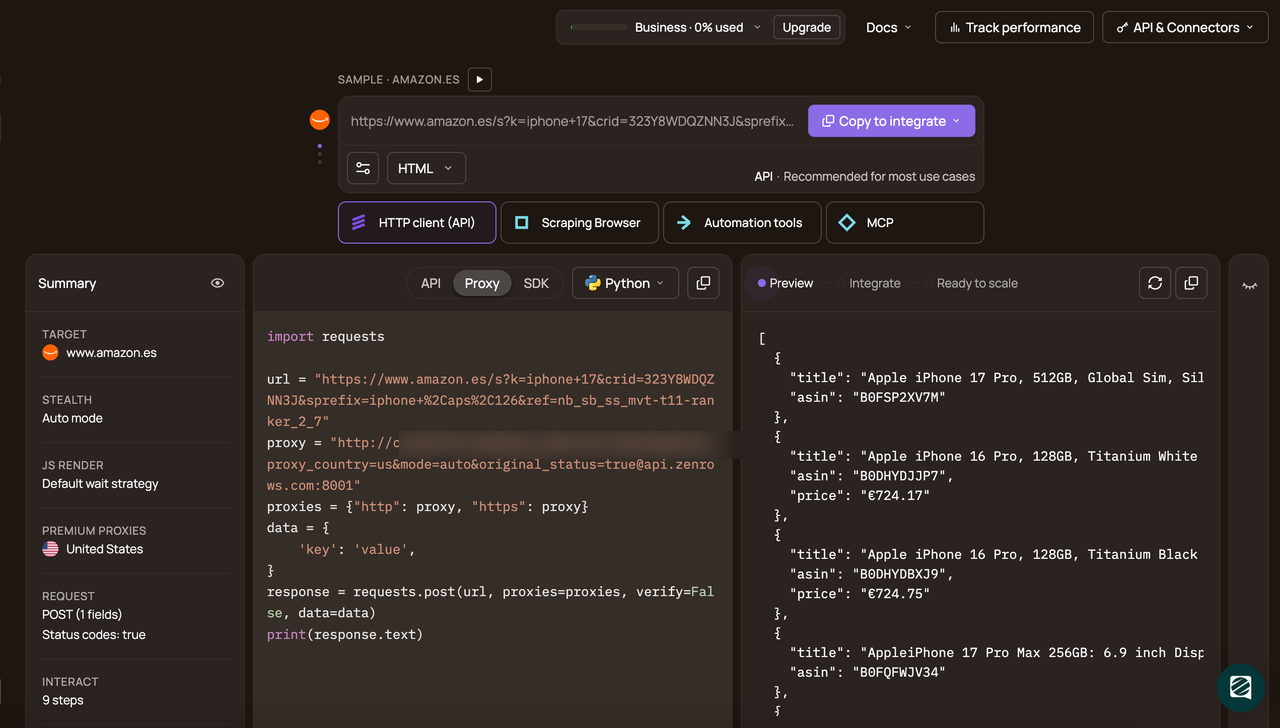
Then select Python as the programming language, choose API as the connection method, and copy the generated code.
The generated code should look like this:
# pip install requests
import requests

url = 'https://www.scrapingcourse.com/antibot-challenge'
apikey = '<YOUR_ZENROWS_API_KEY>'
params = {
    'url': url,
    'apikey': apikey,
    'mode': 'auto',
}
response = requests.get('https://api.zenrows.com/v1/', params=params)
print(response.text)
When you run the code, the output is as follows:
<html lang="en">
<head>
  <!-- ... -->
  <title>Antibot Challenge - ScrapingCourse.com</title>
  <!-- ... -->
</head>
<body>
  <!-- ... -->
  <h2>
    You bypassed the Antibot challenge! :D
  </h2>
  <!-- other content omitted for brevity -->
</body>
</html>
🎉 Great! ZenRows successfully bypassed Cloudflare's anti-bot measures and scraped the AntiBot Challenge page. You can now pass the HTML to tools like Crawl4AI and similar frameworks for further processing, such as chunking, extraction, and downstream RAG preparation.
👍 Pros
- It auto-bypasses anti-bot systems to deliver actual page content instead of challenge screens.
- It features Adaptive Stealth Mode to auto-adapt to site anti-bot changes with zero configuration.
- It features Premium Proxies with geo-targeting to handle pages that serve different content by region.
- It can return multiple output formats, making the retrieved page easier to pass to the next stage of an LLM or RAG pipeline.
- ZenRows supports session handling, which helps keep the same IP across related requests on multi-step targets.
- It features ZenRows Scraping Browser to render JavaScript in a real browser environment for full DOM access on dynamic pages.
- It supports browser actions such as click, scroll, and wait before extraction, which helps with interactive pages.
- ZenRows has a 99.93% success rate on bypassing protected sites.
- It offers 24/7 customer support.
👎 Cons
- You may still need another tool, such as Crawl4AI, for chunking and content processing.
📌 When to Use
Use ZenRows when the target site is protected by advanced anti-bot systems, relies heavily on JavaScript Rendering, or serves different content by region. It fits best as the retrieval layer in production RAG or LLM pipelines, especially when tools like Crawl4Acan't get past anti-bot protections on their own.
3. Firecrawl: Best for LLM-Ready Markdown Output
Firecrawl is a scraping and crawling API that turns URLs into clean Markdown for LLM and RAG ingestion. It supports site-wide collection through URL mapping and crawling. This helps when you're building a corpus from documentation sites or blogs rather than pulling pages one at a time.
When you need structured fields, it can run LLM-based extraction and return JSON shaped by either a schema or a prompt. It also plugs into common LLM stacks via integrations such as LangChain, LlamaIndex, and CrewAI.
👍 Pros
- It converts a URL into clean Markdown that's easier to chunk and index for RAG.
- Firecrawl supports URL mapping and full-site crawling for multi-page ingestion.
- It supports LLM-based extraction and can return structured JSON using a schema or a prompt.
- It has ready integrations for common LLM frameworks, so you write less glue code.
- Firecrawl supports browser actions such as clicking, scrolling, and waiting before extraction, which helps with interactive pages.
👎 Cons
- It can get blocked on heavily protected pages, returning partial content or challenge screens instead.
- Concurrency is plan-bound, and queue time counts against request timeouts, so large runs can fail unless you plan retries and timeouts carefully.
- The self-hosted version lacks some features available in the cloud, including Fire-engine (an advanced anti-bot bypass feature), the Agent endpoint, and the Browser endpoint.
📌 When to Use
Use Firecrawl for URL-to-Markdown conversion for RAG ingestion, with optional LLM-based JSON extraction.
4. ScrapeGraphAI: Best for LLM-Powered Structured Extraction
ScrapeGraphAI is an LLM-based scraping tool built for structured extraction. Its SmartScraper service uses LLMs to understand page structure and extract the fields you ask for, without relying on CSS selectors for each target. It accepts a live URL, raw HTML, or Markdown as input and can return results in formats such as JSON, CSV, or Markdown, with an optional schema for specific fields in a fixed format.
It works well when the target site's schema changes frequently or when the data you need is spread across different parts of the page. Because extraction depends on LLM calls, it also becomes slower and more expensive as volume grows, so it is better suited to targeted extraction than to very large crawl runs.
👍 Pros
- ScrapeGraphAI supports prompt-based extraction, which is useful when data needs to be extracted based on meaning rather than just page structure.
- It accepts a URL, raw HTML, or Markdown as input, making it suitable for different pipeline setups.
- ScrapeGraphAI supports an output schema that helps maintain consistency in field and response structures across runs.
- It supports async execution, which makes it easier to run concurrent extraction jobs.
- It can return JSON, CSV, or Markdown, so the output is easier to move into storage, ETL (Extract, Transform, Load), or later LLM steps.
👎 Cons
- ScrapeGraphAI is priced per page, so costs rise quickly as the number of pages increases.
- Harder pages cost more because stealth mode adds an extra charge per request.
- ScrapeGraphAI's lower plans limit request speed, which can slow recurring ingestion jobs.
- Its raw HTML and Markdown inputs are capped at 2MB, which can be limiting on larger pages or preprocessed documents.
- Some runtime options don't work in Markdown mode, including scrolling controls and stealth mode.
- Results depend more on prompt quality than on a fixed extractor, so repeatable output usually requires tighter prompts and often a schema.
📌 When to Use
Use ScrapeGraphAI when you need structured data from pages with changing layouts or mixed content.
5. Browse.ai: Best No-Code Option
Browse.ai is a no-code platform for extracting and monitoring website data through visual training. You build an extractor by pointing and clicking on the fields you want, then run it on a schedule to track changes over time. When you need to move data into another system, Browse.ai's REST API lets you run extractors and fetch results as structured fields, along with optional screenshots and a debug video showing what happened during a run.
👍 Pros
- It lets you build extractors with point-and-click training instead of writing scraping code.
- It supports scheduled monitoring, so you can detect page changes without rebuilding a pipeline job.
- It returns structured fields via the API and can include screenshots and a debug video for failed runs.
👎 Cons
- The API is task-based, so you need to manage robot IDs, task IDs, and pagination when you scale retrieval.
- Standard requests are capped at 100 per minute per API key, so high-volume pipelines need batching, scheduling, and backpressure handling.
- You need to normalize the extracted text before chunking and indexing.
- It doesn't guarantee anti-bot bypass, so your LLM or RAG pipeline can still ingest block pages or partial data on protected sites.
📌 When to Use
Use Browse.ai when you want no-code extraction and monitoring for a fixed set of pages, and you're fine with task-based scraping and field-based output. If you need large-scale scraping or you're targeting sites protected by advanced anti-bot systems, use a managed scraping API instead.
6. Apify: Best for Pre-Built Scraper Actors
Apify is a platform with a marketplace of pre-built scrapers called Actors. You pick an Actor for a specific site or use case, configure its inputs, run it, and collect the results. Outputs are typically stored in an Apify Dataset, which you can export or pull via the API in formats such as JSON, JSONL, CSV, XLSX, XML, or RSS (Really Simple Syndication).
This tool is useful when you want to quickly retrieve data from a common target without having to build and maintain a scraper from scratch. The main tradeoff for LLM pipelines is that output schemas vary by Actor, and anti-bot handling depends on how that Actor is built and configured.
👍 Pros
- Apify offers site-specific Actors that eliminate the need to build a scraper from scratch.
- It lets you retrieve results from Datasets in multiple export formats through the API.
- It supports scheduling Actors for recurring refresh and ingestion jobs.
- Apify lets you start in the UI and switch to API-based automation once the setup is stable.
👎 Cons
- Output structure isn't standardized across Actors.
- It doesn't have a unified anti-bot layer, so one Actor can work well while another struggles on the same site type.
- You may need to pin an Actor version or re-test runs when inputs or site layouts change.
- At higher volumes, you pay for compute units and proxy traffic, so browser-heavy Actors can become expensive and slow.
📌 When to use
Use Apify when a suitable Actor already exists for the sites you want to scrape, and you want results fast. It also works well when you can accept Actor-specific schemas, and you're prepared to normalize the output before it enters your LLM pipeline.
7. Jina AI Reader: Best for Simple URL-to-Markdown
Jina AI Reader is a lightweight tool that converts web pages into LLM-friendly content without requiring a crawler. It has two modes: Read mode takes a URL and returns the page as Markdown, HTML, or plain text. Search mode accepts a natural-language query and returns the top results with their full-page content, making it useful for research workflows where the starting point is a topic rather than a known set of URLs. It's best for quick, low-volume access to readable content.
👍 Pros
- It converts any URL to Markdown with no crawler setup required.
- It lets you choose the response format, including Markdown, HTML, and text.
- Its search mode returns the top results with full-page content, which is useful for quick, research-style queries.
- It supports caching controls, so repeat requests can be faster when the page hasn't changed.
👎 Cons
- It's not an anti-bot bypass tool. It can be blocked by advanced anti-bot systems, so you may end up with blocked pages or partial content.
- Upgrading tiers won't unlock sites that block the service. It mainly increases throughput and performance.
- It's a reader, not a full crawler, so you still need separate URL discovery for site-wide ingestion.
- You still have to handle RAG traceability. The reader can return the source URL and timestamp in JSON mode, but you still need to manually handle the canonical URL and deduplication.
📌 When to use
Use it when you need a quick URL-to-Markdown for low-volume ingestion. But it's not ideal when anti-bot bypass or large-scale crawling is your main requirement.
Conclusion
In this guide, you've learned which tools fit different use cases of an LLM or RAG scraping pipeline, what they do well, and where they fall short. You've also seen that parsing and retrieval tools still depend on a reliable way to scrape the page itself, especially on protected or JavaScript-heavy targets.
For most production pipelines, the retrieval layer is where things break, especially on protected or JavaScript-heavy targets. Matching the right tool to that constraint is what keeps the rest of the stack, extraction, chunking, indexing, and retrieval, running reliably.
Try ZenRows for free now or speak with sales!
FAQ
Can you use AI for web scraping?
Yes. You can use AI in two main ways. One is using LLM-based extraction tools, such as ScrapeGraphAI, to extract structured fields from a page using prompts and schemas. The other is to use autom-managed scraping tools like ZenRows to bypass detection and retrieve the page when anti-bot systems or JavaScript-heavy targets block normal scrapers.
Can ChatGPT do web scraping?
ChatGPT can browse pages, inspect content, and help with scraping logic, but it's not built to run large-scale scraping jobs or handle anti-bot-protected sites. For that, you still need a dedicated scraper or a managed scraping API.
What is the best free AI web scraper?
For a fully free, open-source option, Crawl4AI is the best choice. For simple URL-to-LLM-friendly text, Jina Reader is the easiest free option. If you need to reliably scrape anti-bot-protected or JavaScript-heavy targets, you'll need a managed scraping API. Most offer a free trial to get started.
How do I scrape websites for LLM training data?
To scrape websites for LLM training data, first retrieve the page content, then convert it to a clean format, such as Markdown or JSON, before chunking, indexing, or adding it to your dataset. On unprotected pages, a lightweight scraper or open-source library may be enough. On protected or JavaScript-heavy sites, a managed scraping API is the better option, as these handle anti-bot bypass automatically without requiring you to maintain the underlying infrastructure.