
How to Extract Web Data for AI Training Pipelines
Learn to slash LLM costs using Markdown extraction, implement production-ready data provenance, and scale your training pipelines with web data.

A model's training data determines its required capabilities. South China University of Technology research reveals that web pages make up a large share of that training data. This makes web extraction a core part of most AI training pipelines.
Collecting web data is not straightforward. Many sites deploy anti-scraping measures to detect and block automated scraping.
In this guide, you'll learn the basics of data collection for AI, the economics of Markdown vs. HTML, how provenance metadata keeps your corpus auditable, and how to scale data extraction for AI training.
Key Takeaways
- Restrictions on major training corpora jumped 500%+ in a single year: custom web scraping is increasingly the only way to stay current.
- Raw HTML wastes up to 90% of your LLM context window. Converting to Markdown preserves structural hierarchy (H1, H2, tables) while slashing inference costs.
- Storing JSON-LD metadata (source URL, timestamp, author) is mandatory for 2026 AI compliance to prevent content decay and allow for verifiable citations.
- Splitting data at logical Markdown headers, rather than arbitrary character limits, ensures that related context is never "cut in half" during retrieval.
- While open-source tools (like Byparr) are great for research-based AI web scraping, production-scale AI pipelines require Managed APIs to handle TLS fingerprinting and evolving anti-bot measures automatically.
What Is AI Data Collection?
AI data collection is the process of finding and gathering the data an AI or machine learning system needs. It involves selecting relevant sources, extracting data from them, loading that data into storage or data-processing systems, and combining it into datasets for training, fine-tuning, or evaluation.
Those sources can include websites, databases, documents, APIs, etc. The goal is to collect data that aligns with the system's intended task, such as text generation, summarization, image recognition, etc. The collected data must be relevant, diverse, and of sufficient quality to train or evaluate the model effectively.
AI Data Types You Can Collect From the Web
Web data comes in various forms, including structured, semi-structured, unstructured, and multimodal data. A single webpage can include more than one of these at the same time.
- Structured data: It consists of information stored in clearly defined fields, with each record following the same pattern. Examples include product specifications, prices, ratings, job listings, directory fields, and metadata-rich pages.
- Semi-structured data: It includes content with some organization but not a strict row-and-column format. Examples include JSON-LD, embedded metadata, help-center markup, forum layouts, and page metadata.
- Unstructured data: This includes long-form or loosely organized content written mainly for human readers. Examples include articles, docs pages, reviews, comments, transcripts, and PDFs.
- Multimodal data: This mode combines text with other media types, such as images or video, along with captions, transcripts, and metadata that describe them.
These data types are scattered across websites and often reside on pages built for human readers, not for training pipelines. To use them for AI training, you need to extract and turn them into a training dataset an AI model can learn from.
Skip the blocks. Try Zenrows free and get clean web data without the anti-bot fight.
Why Scraping Web Data Is Necessary for AI Training Pipelines
Web scraping is not just one way to collect AI training data. In many cases, it's the only way to keep datasets current, control what goes into them, and replace gaps left by public corpora that are becoming harder to depend on.
Public Web Corpora Are Becoming Less Dependable
Public web corpora are becoming less dependable as a sole source of fresh training data. For example, the Data Provenance Initiative reports that restrictions on two major web-text datasets used for AI training, C4 and RefinedWeb, rose by more than 500% from April 2023 to April 2024.
The Data Provenance Initiative also reports that 45% of C4 is now restricted by Terms of Service. It warns that these shifts are narrowing the range of sources and topics in public training datasets and making those datasets harder to keep up to date. That makes it riskier to rely on public corpora alone when you need fresh training data.
AI Pipelines Need Data That Stays Current
Many AI use cases cannot rely on a static snapshot. Models have a knowledge cutoff, meaning they become less relevant as their training data grows older and the web itself keeps changing. When the content of a web page is updated, the training data pulled from it needs to be refreshed to reflect those changes.
For example, newer models such as GPT-5.4 have a more recent knowledge cutoff than older models such as GPT-3.5 Turbo. This makes them better positioned to handle newer language, references, and topics.
Scraping Gives You More Control Over Source Selection
Scraping lets you decide what goes into the dataset. Instead of inheriting the source mix of a public corpus, you can choose the domains, page types, and topics that match your use case. That makes it easier to build a dataset around the quality, relevance, and coverage your model needs.
Why Extracting Web Data for AI Training Pipelines Is Hard
Despite being a recommended way to get data for AI, web scraping usually fails for the same reasons across most targets. Let's break down the main failure points you’ll run into when collecting training data from the web.
Anti-Bot Blocking
When sites employ anti-bot systems, automated traffic triggers blocks, rate limits, or verification flows. The server returns HTML, but the page is a bot check, a JavaScript detection step, or a CAPTCHA, rather than the content you requested. This can make data extraction unstable at scale because a crawl can shift from target pages to verification pages as request rate, IP reputation, and session behavior change.
JavaScript Rendering
Some sites don't send the page content in the first HTML response. The response contains placeholder markup and scripts; the page then fetches the real data via JavaScript requests and inserts it into the DOM. If you scrape with an HTTP-only tool, you end up collecting the placeholder HTML and missing the fields you actually need. This is why browser-based scraping is required on targets where the content is populated after JavaScript runs.
Structural Changes That Break Extraction Rules
Websites change their structure over time. A redesign can move fields into different sections, rename element attributes and selectors, or change how content is loaded. A parsing logic that was working can start returning missing fields, partial text, or the wrong value without throwing an obvious error.
Boilerplate in Raw HTML
Raw HTML includes boilerplate that is not part of the main content. This includes navigation menus, headers, footers, ads, and cookie banners that are repeated across many pages on the same site. If you store raw HTML as training data, that boilerplate makes up a large share of the dataset, diluting the page-specific text and fields you actually want.
The Challenge of Token Efficiency and Context Windows
Boilerplate in raw HTML does more than lower data quality. It increases the token count across the extracted dataset. Scripts, CSS, navigation, cookie banners, headers, footers, and other repeated assets and layout blocks all add tokens while contributing little training signal.
At scale, that means more text to clean, preprocess, and deduplicate before the data is ready for training.
It also affects training efficiency. LLM training datasets are commonly organized into fixed-length token sequences, often by concatenating documents and segmenting them into blocks. When a large share of those tokens comes from markup and repeated layout, each sequence carries less useful page content. As a result, the model sees less informative text per training example, making the dataset less efficient.
Optimizing Extracted Web Data for Model Input
To reduce token overhead and increase the share of useful text in each training sequence, you have to turn extracted web data into cleaner text. You also need to preserve headings, lists, tables, and other content structures, and keep the metadata that makes each sample traceable.
Markdown vs. Raw HTML
When scraping web data for AI data pipelines, Markdown is a more efficient output format than raw HTML because it preserves useful structure while reducing markup overhead.
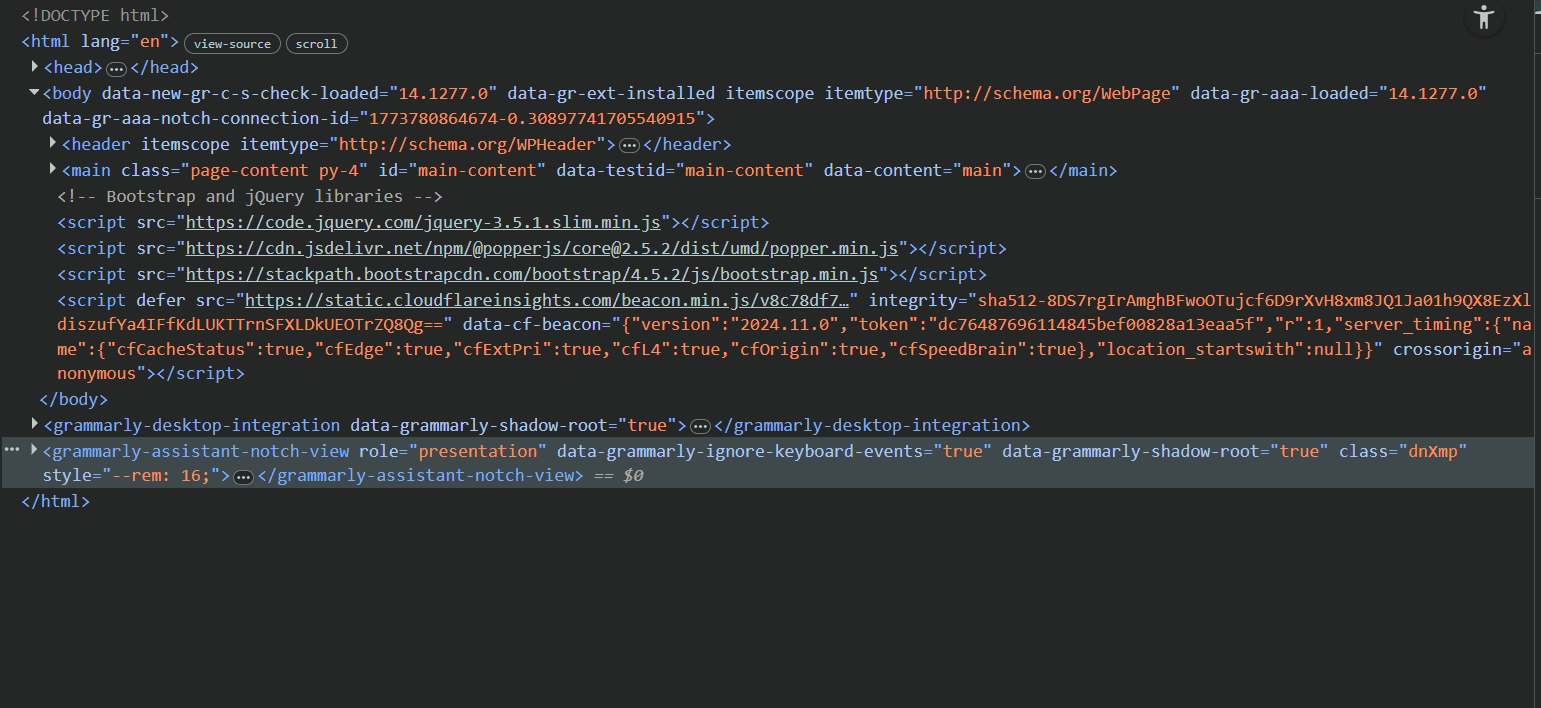
See the difference between the HTML and Markdown representations of the Antibot Challenge Page.
HTML representation:
Markdown representation:
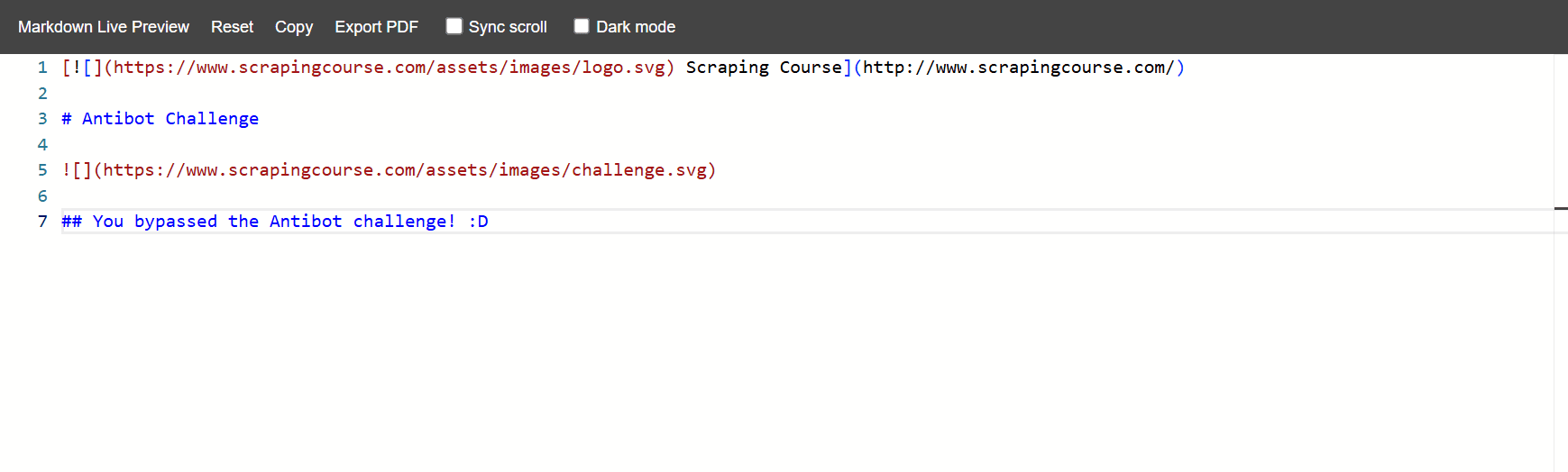
Researchers at the University of Science and Technology of China report that, on their Common Crawl benchmark, raw HTML averaged 74,291 tokens while Markdown averaged 7,664. That makes Markdown a more efficient format for preserving page content while reducing token overhead.
Document Segmentation
Once a page is in cleaner text, it still needs to be split in a way that preserves structure. If you cut it at arbitrary token limits, headings can get separated from the sections they introduce, and related content can be split across different training sequences. Segmenting by headings and other clear section breaks keeps each unit more coherent before it's packed into fixed-length sequences.
Metadata and Provenance
Data provenance is the record of where a training sample came from and when it was collected. Keeping the source URL, timestamp, licence, and attribution with each sample lets you filter stale or restricted documents, rerun the same crawl, and audit exactly what entered the corpus.
An EPFL pretraining study found that prepending metadata, such as URLs and timestamps, to training documents speeds up LLM pretraining, and that finer-grained metadata, such as quality signals and time markers, performs better than coarse labels.
Pages often expose part of this metadata through JSON-LD (JavaScript Object Notation for Linked Data), including fields such as author, "datePublished", and "dateModified". Keeping those fields with each sample makes it easier to compare page versions, remove stale content, and keep the corpus auditable over time.
Let’s now see how to collect web data for AI training pipelines.
How to Extract Web Data for AI Training Pipelines
Among the various approaches to web data extraction, two are particularly common in AI training pipelines, especially when the goal is to collect data at scale and avoid anti-bot measures. One is using open-source stealth browsers, where you manage the browser stack yourself. The other is a managed scraping API, which handles rendering, proxies, and anti-bot bypass for you.
Using Open-Source Stealth Browsers
Open-source stealth browsers are browser automation setups that try to make scraper traffic look like normal user traffic during anti-bot checks.
They still use a real browser engine through tools such as Playwright, Puppeteer, or Selenium, but are modified to hide the automation clues that default headless sessions often expose. They do this by altering the signals that sites inspect, such as browser properties, header patterns, and fingerprint data.
To show how to extract web data for AI training pipelines with a stealth browser, we’ll use Byparr. This is because in our stealth browsers benchmark, it achieved a 92.16% success rate, the highest anti-bot bypass rate among the open-source tools we tested for 2026.
Byparr is an anti-bot bypass server that exposes an HTTP API. It runs a real browser through Camoufox behind a FastAPI server. This lets scrapers send requests through it to bypass anti-bot systems protecting the target site.
Step 1. Run Byparr Locally
Start by running Byparr in Docker. This gives you a local API on port 8191, so requests go through Byparr before reaching the target page.
docker run -d --name byparr -p 8191:8191 ghcr.io/thephaseless/byparr:latest
If the container already exists but is stopped, start it again with:
docker start byparr
Then, open http://localhost:8191/ in your browser. If Byparr is running, you should see the FastAPI docs page.
Step 2. Install the Required Python Libraries
Now install the Python libraries needed for the extraction process.
pip3 install requests html-to-markdown
requests sends the request to Byparr, and html-to-markdown converts the rendered HTML into Markdown.
Step 3. Import the Required Libraries
Import the libraries you installed, as well as the datetime standard library.
from datetime import datetime, timezone
import requests
from html_to_markdown import ConversionOptions, convert
You will use datetime to record when a page was extracted.
Step 4. Define the Byparr Endpoint and Target Page
Now set the local Byparr URL and the target page (ScrapingCourse's JS Rendering in this case).
# ...
BYPARR_URL = "http://localhost:8191/v1"
TARGET_URL = "https://www.scrapingcourse.com/javascript-rendering"
If your Byparr instance is running on a different port, replace 8191 in BYPARR_URL with that port.
Step 5. Send the Request Through Byparr
Send the target page to Byparr. In the request, include a payload that tells Byparr to open the page with a GET request and wait for the page to render before returning the response.
# ...
# tell Byparr to load the target page
payload = {
    "cmd": "request.get",
    "url": TARGET_URL,
    "maxTimeout": 120000
}

# send the request to the local Byparr api
resp = requests.post(
    BYPARR_URL,
    headers={"Content-Type": "application/json"},
    json=payload,
    timeout=130
)
resp.raise_for_status()

# read the rendered HTML from the Byparr response
data = resp.json()
solution = data.get("solution", {}) or {}
html = solution.get("response", "") or ""

# stop if no HTML came back
if not html:
    raise RuntimeError("Byparr returned no HTML.")
This code will return the rendered raw HTML.
Step 6. Convert the Rendered HTML to Markdown
Turn the returned HTML into a Markdown version of the page, add provenance metadata, and save the results.
# convert the rendered HTML to markdown
options = ConversionOptions(
    heading_style="atx",
    list_indent_width=2,
)

markdown_body = convert(html, options).strip()

# record when the page was collected
collected_at = datetime.now(timezone.utc).isoformat()

# add provenance metadata and the converted markdown
lines = [
    "---",
    f'source_url: "{TARGET_URL}"',
    f'collected_at: "{collected_at}"',
    'extraction_method: "Byparr + html-to-markdown"',
    'content_type: "rendered web page"',
    "---",
    "",
    markdown_body,
    "",
]

# join the lines into one markdown document
markdown_text = "\n".join(lines)

# write the markdown output to a file
with open("javascript_rendering_page.md", "w", encoding="utf-8") as f:
    f.write(markdown_text)

print("saved markdown to javascript_rendering_page.md")
This code uses html-to-markdown to convert the rendered HTML returned by Byparr into Markdown. It then records the collection time and adds provenance fields for the source URL, collection timestamp, extraction method, and content type. Finally, it saves the result as javascript_rendering_page.md.
Here is the complete code.
from datetime import datetime, timezone
import requests
from html_to_markdown import ConversionOptions, convert

# set the local Byparr endpoint and the target page
BYPARR_URL = "http://localhost:8191/v1"
TARGET_URL = "https://www.scrapingcourse.com/javascript-rendering"

# tell Byparr to load the target page
payload = {
    "cmd": "request.get",
    "url": TARGET_URL,
    "maxTimeout": 120000
}

# send the request to the local Byparr api
resp = requests.post(
    BYPARR_URL,
    headers={"Content-Type": "application/json"},
    json=payload,
    timeout=130
)
resp.raise_for_status()

# read the rendered html from the Byparr response
data = resp.json()
solution = data.get("solution", {}) or {}
html = solution.get("response", "") or ""

# stop if no HTML came back
if not html:
    raise RuntimeError("Byparr returned no HTML.")

# convert the rendered HTML to markdown
options = ConversionOptions(
    heading_style="atx",
    list_indent_width=2,
)

markdown_body = convert(html, options).strip()

# record when the page was collected
collected_at = datetime.now(timezone.utc).isoformat()

# add provenance metadata and the converted markdown
lines = [
    "---",
    f'source_url: "{TARGET_URL}"',
    f'collected_at: "{collected_at}"',
    'extraction_method: "Byparr + html-to-markdown"',
    'content_type: "rendered web page"',
    "---",
    "",
    markdown_body,
    "",
]

# join the lines into one markdown document
markdown_text = "\n".join(lines)

# write the markdown output to a file
with open("javascript_rendering_page.md", "w", encoding="utf-8") as f:
    f.write(markdown_text)

print("saved markdown to javascript_rendering_page.md")
When you run the code, the generated markdown looks like this:
---
source_url: "https://www.scrapingcourse.com/javascript-rendering"
collected_at: "2026-03-19T06:09:23.187174+00:00"
extraction_method: "Byparr + html-to-markdown"
content_type: "rendered web page"
---
---
meta-viewport: width=device-width, initial-scale=1.0
title: JS Rendering Challenge to Learn Web Scraping - ScrapingCourse.com
---
# JS Rendering

[Chaz Kangeroo Hoodie Chaz Kangeroo Hoodie $52](https://scrapingcourse.com/ecommerce/product/chaz-kangeroo-hoodie)
<!-- rest of output omitted for brevity-->
The output is cleaner than raw HTML because it keeps only the content you want to train on. It removes markup noise, while still preserving structure and traceability through headings and metadata.
Bravo, you’ve extracted JavaScript-rendered content. Now, let’s see how the stealth browser handles pages protected by anti-bots. We'll use the Antibot Challenge page as an example. You only need to change the TARGET_URL and the output filename to match the Antibot Challenge page.
# ...
TARGET_URL = "https://www.scrapingcourse.com/antibot-challenge"

# ...

with open("antibot_challenge_page.md", "w", encoding="utf-8") as f:
    f.write(markdown_text)

print("saved markdown to antibot_challenge_page.md")
When you run the code, the output is as follows:
---
source_url: "https://www.scrapingcourse.com/antibot-challenge"
collected_at: "2026-03-19T13:30:22.525473+00:00"
extraction_method: "Byparr + html-to-markdown"
content_type: "rendered web page"
---
---
meta-viewport: width=device-width, initial-scale=1.0
title: Antibot Challenge - ScrapingCourse.com
---
# Antibot Challenge

## You bypassed the Antibot challenge! :D
Byparr successfully bypasses the anti-bot challenge page and returns the real content. But open-source stealth browsers still have limitations, especially when you start scaling.
Limitations of Open-Source Stealth Browsers
AI training pipelines need large amounts of web data. So the scraping method you choose must scale without resorting to constant retries, timeouts, or blocks. It also has to scrape reliably and consistently bypass anti-bots. Open-source stealth browsers can help, but they come with trade-offs that show up during large-scale scraping.
- No guaranteed anti-bot bypass: These tools can improve your odds on protected pages, but they cannot guarantee access every time. The Byparr README shares this view and notes that Byparr does not guarantee that any challenge will be bypassed. It only increases the chance of bypassing anti-bot measures.
- Per-target tuning is still required: Proxies, sessions, retries, and request pacing still need to be tuned per site. A setup that works on one domain can fail on another because the detection checks differ, and success can change as IP reputation and request rates change.
- Markdown output is usually not native: Most open-source stealth browser setups return raw HTML along with session artifacts such as cookies and headers. That means you still need an extraction and formatting layer to turn pages into Markdown or another training-friendly format before storing them.
- Browser overhead increases costs: Stealth browsers run real browser instances, which increase memory overhead, add latency, and cap the number of concurrent sessions you can run. As scrape volume grows, that overhead pushes up compute and infrastructure costs.
- Maintenance grows over time: Anti-bot measures keep changing, and open-source stealth browser setups do not automatically keep up with those updates. As a result, bypass reliability can drop, and you have to keep updating the scraper to restore performance.
For AI training workloads, open-source stealth browsers are a good way to prototype and validate targets, but they become unreliable when you need to scrape data at scale.
Using Managed Scraping API Solutions
A web scraping API moves the browser and anti-bot work out of your code. You send the target URL to a single endpoint, and the API automatically handles JavaScript rendering, proxy rotation, sessions, retries, and anti-bot bypass behind the scenes.
A good example of a managed scraping API is ZenRows. Its Universal Scraper API features Adaptive Stealth Mode, which adapts the request strategy per target, so you don’t have to keep switching settings as the target's anti-bot measures. It supports JavaScript rendering, Premium Proxies with geo-targeting, and multiple response formats, including Markdown, HTML, JSON, and screenshots.
With ZenRows' built-in support for Markdown output, you don’t need to write your own logic to convert raw HTML into an AI training-friendly format. Your AI training pipelines also don't break, as ZenRows automatically evolves to counter anti-bot measures as they are updated.
Let’s see how ZenRows handles scraping products from the JavaScript rendering page.
Sign up for ZenRows. Then, proceed to the Playground and paste the ScrapingCourse's JS Rendering as your target URL.
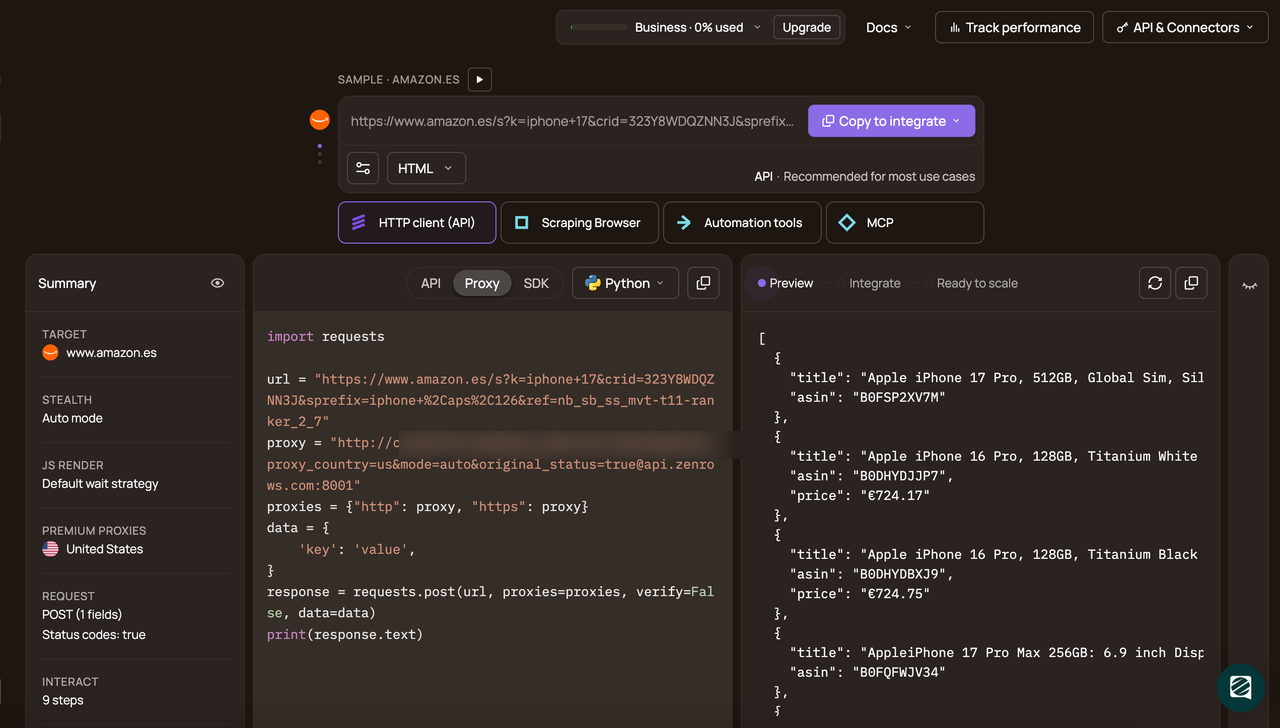
Enable Adaptive Stealth Mode and set Markdown as your preferred response format. Finally, choose your programming language (Python in this case) and API as your connection mode.
Copy the generated code into your coding environment.
# pip install requests
import requests

url = 'https://www.scrapingcourse.com/javascript-rendering'
apikey = '<YOUR_ZENROWS_API_KEY>'
params = {
    'url': url,
    'apikey': apikey,
    'mode': 'auto',
    'response_type': 'markdown',
}
response = requests.get('https://api.zenrows.com/v1/', params=params)
print(response.text)
When you run the code, the output is as follows:
[ Scraping Course](http://www.scrapingcourse.com/)
# JS Rendering

[
\
Chaz Kangeroo Hoodie
$52](https://scrapingcourse.com/ecommerce/product/chaz-kangeroo-hoodie)
<!-- rest of output omitted for brevity -->
The returned page content is in Markdown rather than raw HTML. That gives you model-ready text you can chunk and use for downstream tasks.
Now, let’s see how ZenRows handles anti-bot-protected pages using the Antibot Challenge page as the target.
Reuse the same request we used for the JavaScript rendering page and just swap the previous target URL with the Antibot Challenge page URL. That is another advantage of ZenRows Universal Scraper API. You don’t need to rewrite your full extraction logic for each site.
# pip install requests
import requests

url = 'https://www.scrapingcourse.com/antibot-challenge'
apikey = '<YOUR_ZENROWS_API_KEY>'
params = {
    'url': url,
    'apikey': apikey,
    'mode': 'auto',
    'response_type': 'markdown',
}
response = requests.get('https://api.zenrows.com/v1/', params=params)
print(response.text)
Here is what the returned response should look like after running the code.
[ Scraping Course](http://www.scrapingcourse.com/)
# Antibot Challenge

## You bypassed the Antibot challenge! :D
Congratulations 🎉 You’ve bypassed all anti-bot checks with ZenRows and received the page as Markdown, giving your AI pipeline training-ready content that is easier to store, chunk, and process than raw HTML.
Conclusion
In this article, you learned what AI data collection involves, why web data matters for AI training pipelines, and why raw HTML is a poor format for model input. You also saw two ways to collect that data: open-source stealth browsers and managed scraping APIs.
Open-source stealth browsers can be useful for debugging, research, and smaller jobs, but they require more tuning and maintenance. For recurring AI data collection at scale, a managed scraping API like ZenRows is a better fit because it handles rendering, anti-bot bypass, proxy rotation, and Markdown output through a single endpoint.
Try ZenRows for free now or speak with sales!
FAQ
Can I scrape data for AI?
Yes. Scraping is a common way to collect web data for AI systems. It lets you gather current data from pages such as product listings, docs, reviews, forums, and knowledge bases, then turn that content into training or retrieval datasets.
How can I store data for AI?
Store AI data as cleaned text plus provenance metadata. At minimum, keep the content, source URL, collection timestamp, and any license or attribution fields you can capture. Metadata helps you audit what was entered into the corpus, rerun collections, and remove stale or restricted documents later.
How do you make data for an AI model?
You can build data for AI by selecting relevant sources, extracting the content, cleaning it, structuring it, attaching metadata, and then segmenting it into units the model can use. For web data, that usually means rendering pages on demand, removing boilerplate, converting the useful content to a lighter format, and then chunking it before storage or training.
What is the best data format for LLMs?
Data format for LLM can vary per use case. However, for text-heavy web content, Markdown is usually the better default than raw HTML. It preserves headings, lists, and other structure while removing most markup overhead, which makes it easier to chunk and process.
Why is Markdown better than JSON for text-heavy AI training?
Markdown is better than JSON for AI training when the main value is the page text and document structure. It keeps headings, paragraphs, and lists in reading order, which makes the content easier to chunk and feed into training or retrieval systems. JSON is better when you need a strict field-level structure, but for long text pages, it often adds unnecessary schema decisions and nesting.