
Web Scraping for RAG with Crawl4AI
Learn RAG data ingestion with Crawl4AI. Convert messy HTML to LLM-ready Markdown, implement semantic chunking, and bypass anti-bots at production scale.
Web scraping for retrieval-augmented generation (RAG) is not just about extracting content from a webpage. After scraping, you need to convert the raw HTML into a structured format, such as Markdown, and remove boilerplate elements like menus, sidebars, footers, etc. You then need to split the content into chunks that retrieval systems can match to a query.
In this article, you’ll learn what Crawl4AI is, which features make it useful for RAG scraping, and how to use it to scrape web data for RAG pipelines. You’ll also learn where Crawl4AI falls short on anti-bot-protected targets and how to overcome those limits when scraping at scale.
Key Takeaways
- Crawl4AI's primary value is converting raw HTML into LLM-friendly formats like Markdown and structured JSON. This reduces noise (menus, footers) and lowers token costs in downstream AI tasks.
- Using strategies like BM25 filtering, Crawl4AI can prune a webpage to retain only the sections most relevant to your specific query, ensuring your vector database is populated with high-signal data.
- The library supports advanced chunking, which ensures that related information stays together. This prevents the context-splitting problem where a query matches a fragment of information but misses the surrounding context.
- While Crawl4AI includes basic stealth features, it is an open-source tool that can still be blocked by advanced systems like PerimeterX, Akamai, DataDome, or Cloudflare when scraping at scale.
- For production-grade RAG pipelines, the most reliable architecture uses a Managed API (e.g., ZenRows) to handle anti-bot bypass and Crawl4AI to handle Markdown chunking.
What Is Crawl4AI?
Crawl4AI is an open-source Python web scraping and crawling library that converts web content into AI-ready outputs such as Markdown and structured JSON, rather than leaving it as raw HTML. It's built for workflows such as retrieval-augmented generation (RAG), AI agents, and data pipelines, where content must be extracted in a format suited for indexing, embedding, and retrieval.
Beyond extraction, Crawl4AI also helps prepare scraped content for downstream use. It uses Fit Markdown to remove boilerplate, such as repetitive sidebars and other non-essential page sections. It also supports splitting the remaining text into smaller chunks, making the content easier to pass to an embedding model and store in a vector database for retrieval.
Key Features of Crawl4AI
Crawl4AI has several features that make it useful for scraping content for RAG. Here are the main ones.
Markdown Generation
Markdown generation is one of Crawl4AI’s core strengths. Instead of passing raw HTML downstream, it converts the page into structured Markdown that preserves readable content while stripping tags and markup that don't aid embedding or retrieval. That gives you output that's easier to inspect, clean, split, and store than a full HTML document.
Fit Markdown
Fit Markdown is a filtered version of the page’s Markdown. It's designed to keep the parts of the page that matter most and reduce sections that add little value, such as repeated sidebars and shallow text blocks. Crawl4AI supports two main approaches to this: pruning and BM25.
Pruning removes sections that appear less content-rich or more boilerplate-like based on the page structure. For BM25, you provide a query such as a keyword, phrase, or topic, and Crawl4AI keeps the sections whose text is most relevant to that query.
Structured Data Extraction
When the page follows a repeatable structure, Crawl4AI's selector-based extraction is the most reliable approach. It supports CSS- and XPath-based strategies that let you define a container and pull fields such as titles, links, prices, authors, dates, and nested values into a structured JSON object.
LLM Extraction
Large Language Model (LLM) extraction is for cases where the task depends on meaning rather than Document Object Model (DOM) position. Crawl4AI uses an LLM to extract information from complex text, map content into a schema, summarize sections, classify pages, or transform unstructured text into a more usable output.
Chunking Strategies
Chunking matters when the page is too long to treat as one unit. Crawl4AI supports several strategies that split content by structure, sentence boundaries, topic shifts, or a sliding window. This gives you control over how the text is divided before embedding. In a RAG workflow, smaller sections are easier to match against a query embedding. They also give the LLM more focused input, rather than a single long block that mixes unrelated ideas.
Session Reuse and Stateful Crawling
Some scraping workflows need a state to persist across steps. You may need to click a “Load more” button, move through pagination, keep cookies active, or stay on the same page after a JavaScript interaction changes what is visible.
Crawl4AI’s session management lets you reuse the same browser profile across a multi-step crawl, so each action builds on the state created by the last one instead of starting from a fresh page. This is useful for sequential workflows.
Local Raw HTML Conversion
Crawl4AI doesn't have to be the tool that fetched the page. It can also process local HTML files and raw HTML strings directly, meaning another browser, API, or fetch layer can handle access first. Then Crawl4AI handles Markdown generation, filtering, and extraction afterward. That separation is useful when you need Crawl4AI’s content-processing features but want another system to handle protected or hard-to-reach pages.
Skip the blocks. Try Zenrows free and get clean web data without the anti-bot fight.
Crawling, Extraction, and Chunking Strategies in Crawl4AI
Crawl4AI supports multiple strategies for crawling, extraction, and chunking. The right choice depends on whether you need to discover pages across a site, pull fixed fields from a stable layout, match simple text patterns, or split long content into smaller sections for retrieval and LLM processing.
- BFSDeepCrawlStrategy: A breadth-first crawling strategy that explores all links at one depth before moving deeper. It fits documentation sites, knowledge bases, and blog sections where you want to build a multi-page corpus for RAG instead of scraping a single URL.
- RegexExtractionStrategy: A pattern-based extractor that pulls text matching regular expressions. It's suitable for simple values such as URLs, email addresses, dates, phone numbers, prices, and other short patterns that are easy to describe with a regular expression (regex) rule.
- JsonCssExtractionStrategy: A selector-based extractor that pulls structured fields from repeated HTML elements into JSON. It works well for pages with a stable layout, such as listings, product cards, tables, and directories, where the same fields appear in the same structure across many items.
- LLMExtractionStrategy: A model-based extractor that reads content semantically instead of relying on fixed DOM positions. Use it for pages where important details are nested, inconsistently phrased, or spread across multiple sections, and it also works for tasks such as summarization, classification, and schema mapping.
- RegexChunking: A rule-based chunker that splits text using natural separators defined by regex patterns. It suits content where blank lines, headings, or similar text boundaries already divide the page into sensible sections.
- SlidingWindowChunking: A chunking method that moves a fixed-size window through the text by a defined step size. It's useful for long technical content where you want control over how far each chunk advances, since the step can create overlap, no overlap, or wider jumps depending on your settings.
- OverlappingWindowChunking: A chunking method that creates fixed-size chunks with a specific overlap between adjacent chunks. It’s ideal for workflows that require predictable chunk lengths and a guaranteed amount of shared context between chunks.
On stable pages, start with selector-based extraction and use chunking only when the content is long enough to benefit from smaller sections. Switch to LLM extraction when the content is unstructured or the task requires semantic interpretation.
How to Use Crawl4AI for Web Scraping for RAG
In this section, you’ll learn how to use Crawl4AI for RAG scraping. You’ll start by scraping the React documentation page, converting it to Markdown, filtering the output, and splitting it into chunks. After that, you’ll move to Zillow, which has more aggressive anti-bot systems, to see how the same workflow handles a protected target.
Getting Started With Crawl4AI
Before installing Crawl4AI, make sure you have an up-to-date version of Python installed on your computer. Then install Crawl4AI with pip:
pip3 install crawl4ai
Next, run the setup command to install the Playwright browser dependencies that Crawl4AI needs for browser-based crawling.
crawl4ai-setup
Now, run crawl4ai-doctor to verify that your Python version, Playwright installation, and local environment are ready for a crawl.
crawl4ai-doctor
If everything is installed correctly, Crawl4AI will run a health check and test its crawling capabilities. The output should look similar to this:
[INIT].... → Running Crawl4AI health check...
[INIT].... → Crawl4AI 0.8.5
[TEST].... ℹ Testing crawling capabilities...
[EXPORT].. ℹ Exporting media (PDF/MHTML/screenshot) took 0.05s
[FETCH]... ↓ https://crawl4ai.com
| ✓ | ⏱: 10.08s
[SCRAPE].. ◆ https://crawl4ai.com
| ✓ | ⏱: 0.02s
[COMPLETE] ● https://crawl4ai.com
| ✓ | ⏱: 10.12s
[COMPLETE] ● ✅ Crawling test passed!
Once you see a successful crawling test, you can move on to building the actual RAG scraping pipeline.
Building the RAG Scraping Pipeline With Crawl4AI
Let's see step by step how to create a RAG scraping pipeline with Crawl4AI.
Step 1. Import the Necessary Libraries and Set the Pipeline Variables
Start by importing the libraries the pipeline needs, then define the target page, the BM25 query, the chunk settings, and the output folders.
# pip3 install crawl4ai
# crawl4ai-setup
import asyncio, hashlib, json
from datetime import datetime, timezone
from pathlib import Path

from crawl4ai import AsyncWebCrawler, BrowserConfig, CrawlerRunConfig, CacheMode
from crawl4ai.user_agent_generator import UserAgentGenerator
from crawl4ai.content_filter_strategy import BM25ContentFilter
from crawl4ai.markdown_generation_strategy import DefaultMarkdownGenerator
from crawl4ai.chunking_strategy import SlidingWindowChunking

TARGET_URL  = "https://react.dev/learn"
TOPIC       = "React Quick Start Documentation"
BM25_QUERY  = "component state props hooks useState render JSX function button event handler"
WINDOW_SIZE = 120  # each chunk is 120 words
STEP_SIZE   = 60  #window advances 60 words each step

# all output folders
OUT = Path("scrape_output")
for d in ("raw_md", "fit_md", "chunks"):
    (OUT / d).mkdir(parents=True, exist_ok=True)
In the code above, TARGET_URL specifies the page Crawl4AI will scrape (React docs in this case), while TOPIC labels the content so that each chunk retains its source context later in the pipeline. BM25_QUERY defines the terms Crawl4AI should treat as more relevant when filtering the page into fit_markdown, so the query should use words that actually appear on the target page.
WINDOW_SIZE and STEP_SIZE control how the cleaned text will be chunked later. In this case, each chunk will contain 120 words, and the window will advance by 60 words each time, maintaining some overlap between adjacent chunks. This ensures that context spanning two chunks is preserved during retrieval.
Step 2. Configure Browser Identity and Stealth Settings
Next, configure the browser that Crawl4AI will use to scrape the target page.
# ...
async def main():
    browser_config = BrowserConfig(
        headless=False,
        enable_stealth=True,     #patches low-level browser properties that identify playwright automation.
        viewport_width=1920,
        viewport_height=1080,
        user_agent=UserAgentGenerator().generate(device_type="desktop", browser_type="chrome"),
    )
The code sets the browser identity before the crawl begins. It enables stealth mode to reduce common anti-bot signals such as WebDriver and navigator-related clues, uses a standard desktop resolution of 1920x1080, and generates a realistic Chrome desktop user agent instead of falling back to a generic browser profile. Stealth tooling works by patching browser fingerprints and other automation-related clues to make the session appear more like a normal, user-driven browser session.
Step 3. Configure Markdown Generation, Filtering, and Crawl Behavior
Define how Crawl4AI should process the page after it loads in the browser.
# ...
    config = CrawlerRunConfig(
        # defaultmarkdowngenerator converts HTML to markdown.

        markdown_generator=DefaultMarkdownGenerator(
            content_filter=BM25ContentFilter(user_query=BM25_QUERY, bm25_threshold=0.5)
        ),
        magic=True,             # enables crawl4ai's built-in stealth bundle
        simulate_user=True,     # injects random mouse movements and scroll so the browser behaves like a human
        override_navigator=True,  # patches navigator.webdriver and other js properties bot detectors probe
        wait_until="load",      # wait for the full page load event before reading the DOM
        delay_before_return_html=3.0,
        cache_mode=CacheMode.BYPASS,
        excluded_tags=["script", "style", "nav", "footer", "header"],  # strip these before converting to markdown
        word_count_threshold=10,
        page_timeout=60000,       # give the page 60 seconds to load before timing out
        verbose=True,
    )
Crawl4AI waits for the page’s load event, then pauses for 3 more seconds to allow client-side content to finish rendering. It fetches a fresh copy, removes scripts, styles, navigation, headers, and footers before Markdown conversion, and skips blocks with fewer than 10 words.
It then converts the remaining content to Markdown and applies BM25 with a threshold of 0.5, so the filtered output keeps sections whose wording matches your query more closely. Magic mode and simulated user mode are stealth configurations that help Crawl4AI sessions appear more human-like.
Step 4. Run the Crawl and Capture the Markdown Output
With the browser and crawl settings in place, run the crawl and extract the page title, raw Markdown, and filtered Markdown from the result.
# ...
    async with AsyncWebCrawler(config=browser_config) as crawler:
        result = await crawler.arun(url=TARGET_URL, config=config)

    if not result.success:
        print(f"{result.error_message}")
        return

    title  = (result.metadata or {}).get("title", "page")
    # raw_markdown is the full page converted to markdown -- includes all noise
    raw_md = result.markdown.raw_markdown if result.markdown else ""
    # fit_markdown is raw_markdown after bm25 filtering -- only relevant blocks remain
    fit_md = result.markdown.fit_markdown  if result.markdown else ""
    # if bm25 filtered too aggressively (query mismatch), fall back to raw markdown
    if len(fit_md.strip()) < 100:
        fit_md = raw_md

    # save each stage so you can inspect and debug the pipeline step by step
    (OUT / "raw_md"     / "page.md"  ).write_text(raw_md, encoding="utf-8")
    (OUT / "fit_md"     / "page.md"  ).write_text(fit_md, encoding="utf-8")
The crawler opens the target page with the browser and crawl settings you defined, then stores the result in result. From there, the script reads the page title, the full Markdown output, and the BM25-filtered Markdown. If the filtered Markdown is shorter than 100 characters after trimming whitespace, the script falls back to the full Markdown so the next steps still have enough content to work with.
Step 5. Split the Cleaned Markdown Into Chunks
Now turn the filtered Markdown into smaller chunks.
# ...
    def build_chunks(fit_md: str, url: str, title: str) -> list[dict]:
        # sliding window splits fit_md into overlapping chunks.
        # each chunk gets a unique ID, word count, source URL, and crawl timestamp
        raw_chunks = SlidingWindowChunking(window_size=WINDOW_SIZE, step=STEP_SIZE).chunk(fit_md)
        chunks     = [c.strip() for c in raw_chunks if len(c.split()) >= 20]
        ts         = datetime.now(timezone.utc).isoformat()
        return [
            {
                "id":         hashlib.md5(f"{url}-{i}".encode()).hexdigest()[:12],
                "text":       chunk,         # the actual text your embeddings model will encode
                "word_count": len(chunk.split()),
                "source_url": url,           # lets you link back to the original page.
                "page_title": title,
                "topic":      TOPIC,
                "crawled_at": ts,
                "strategy":   f"SlidingWindow-{WINDOW_SIZE}w-{STEP_SIZE}step",
            }
            for i, chunk in enumerate(chunks)
        ]
When called, the function splits the filtered Markdown using a sliding window, keeps only chunks with at least 20 words, and adds metadata to each. That metadata makes each chunk easier to work with after you store and index it in a vector database. It gives downstream RAG retrieval tasks the information needed to filter results by source, sort or group chunks, and return answers with links back to the original page.
Step 6. Save the Final Chunked JSON
Use the build_chunks() function to create the final chunk list from the cleaned Markdown, save it to chunks/page.json, and print the output directory so you can find the generated files after the crawl finishes.
# ...
    # chunk the cleaned content and save
    #chunks/page.json is your final indexing input
    chunks = build_chunks(fit_md, TARGET_URL, title)
    (OUT / "chunks" / "page.json").write_text(json.dumps(chunks, indent=2, ensure_ascii=False), encoding="utf-8")

    print(f"  Output  : {OUT.resolve()}")

if __name__ == "__main__":
    asyncio.run(main())
Here is the full code:
# pip3 install crawl4ai
# crawl4ai-setup
import asyncio, hashlib, json
from datetime import datetime, timezone
from pathlib import Path

from crawl4ai import AsyncWebCrawler, BrowserConfig, CrawlerRunConfig, CacheMode
from crawl4ai.user_agent_generator import UserAgentGenerator
from crawl4ai.content_filter_strategy import BM25ContentFilter
from crawl4ai.markdown_generation_strategy import DefaultMarkdownGenerator
from crawl4ai.chunking_strategy import SlidingWindowChunking

TARGET_URL  = "https://react.dev/learn"
TOPIC       = "React Quick Start Documentation"
BM25_QUERY  = "component state props hooks useState render JSX function button event handler"
WINDOW_SIZE = 120  # each chunk is 120 words
STEP_SIZE   = 60   #window advances 60 words each step

# all output folders
OUT = Path("scrape_output")
for d in ("raw_md", "fit_md", "chunks"):
    (OUT / d).mkdir(parents=True, exist_ok=True)


async def main():
    browser_config = BrowserConfig(
        headless=False,
        enable_stealth=True,  # patches low-level browser properties that identify playwright automation.
        viewport_width=1920,
        viewport_height=1080,
        user_agent=UserAgentGenerator().generate(device_type="desktop", browser_type="chrome"),
    )

    config = CrawlerRunConfig(
        # defaultmarkdowngenerator converts HTML to clean markdown.
        markdown_generator=DefaultMarkdownGenerator(
            content_filter=BM25ContentFilter(user_query=BM25_QUERY, bm25_threshold=0.5)
        ),
        magic=True,             # enables crawl4ai's built-in stealth bundle
        simulate_user=True,     # injects random mouse movements and scroll so the browser behaves like a human
        override_navigator=True,  # patches navigator.webdriver and other js properties bot detectors probe
        wait_until="load",      # wait for the full page load event before reading the DOM
        delay_before_return_html=3.0,
        cache_mode=CacheMode.BYPASS,
        excluded_tags=["script", "style", "nav", "footer", "header"],  # strip these before converting to markdown
        word_count_threshold=10,
        page_timeout=60000,
        verbose=True,
    )

    async with AsyncWebCrawler(config=browser_config) as crawler:
        result = await crawler.arun(url=TARGET_URL, config=config)

    if not result.success:
        print(f"{result.error_message}")
        return

    title  = (result.metadata or {}).get("title", "page")

    raw_md = result.markdown.raw_markdown if result.markdown else ""
    # bm25 filtering -- only relevant blocks remain
    fit_md = result.markdown.fit_markdown  if result.markdown else ""
    # if bm25 filtered too aggressively (query mismatch), fall back to raw markdown
    if len(fit_md.strip()) < 100:
        fit_md = raw_md

    # save each stage so you can inspect and debug the pipeline step by step
    (OUT / "raw_md"     / "page.md"  ).write_text(raw_md, encoding="utf-8")
    (OUT / "fit_md"     / "page.md"  ).write_text(fit_md, encoding="utf-8")

    def build_chunks(fit_md: str, url: str, title: str) -> list[dict]:
        # sliding window splits fit_md into overlapping chunks.
        # each chunk gets a unique ID, word count, source URL, and crawl timestamp
        # so your vector database can filter, sort, and cite sources at query time.
        raw_chunks = SlidingWindowChunking(window_size=WINDOW_SIZE, step=STEP_SIZE).chunk(fit_md)
        chunks     = [c.strip() for c in raw_chunks if len(c.split()) >= 20]
        ts         = datetime.now(timezone.utc).isoformat()
        return [
            {
                "id":         hashlib.md5(f"{url}-{i}".encode()).hexdigest()[:12],
                "text":       chunk,         # the actual text your embeddings model will encode
                "word_count": len(chunk.split()),
                "source_url": url,           # lets you link back to the original page
                "page_title": title,
                "topic":      TOPIC,
                "crawled_at": ts,
                "strategy":   f"SlidingWindow-{WINDOW_SIZE}w-{STEP_SIZE}step",
            }
            for i, chunk in enumerate(chunks)
        ]

    # chunk the cleaned content and save -- chunks/page.json is your final indexing input
    chunks = build_chunks(fit_md, TARGET_URL, title)
    (OUT / "chunks" / "page.json").write_text(json.dumps(chunks, indent=2, ensure_ascii=False), encoding="utf-8")

    print(f"  Output  : {OUT.resolve()}")

if __name__ == "__main__":
    asyncio.run(main())
When you run the code, the final chunked data in chunks/page.json looks like this:
[
  {
    "id": "6a4aaca6d692",
    "text": "* How to create and nest components * How to render conditions and lists... <!--rest of text omitted for brevity-->",
    "word_count": 120,
    "source_url": "https://react.dev/learn",
    "page_title": "Quick Start - React",
    "topic": "React Quick Start Documentation",
    "crawled_at": "2026-03-21T00:17:14.803554+00:00",
    "strategy": "SlidingWindow-120w-60step"
  },

<!--rest of output omitted for brevity-->
]
Bravo! Your RAG scraping pipeline works, and you've used it to scrape and chunk a React documentation quickstart page. Now, let’s see how the same pipeline performs on Zillow, which uses a more aggressive anti-bot system.
Testing the Crawl4AI RAG Pipeline on a Protected Site
Since the browser identity and anti-bot settings are already in place, the only changes you need to make are to update the target URL, topic, and BM25 query to match Zillow before rerunning the script.
TARGET_URL = "https://www.zillow.com/san-francisco-ca/"
TOPIC = "Zillow SF Real Estate"
BM25_QUERY = "house condo sale bds ba sqft bedroom bathroom price San Francisco"
When you rerun the code, the output is as follows:
[INIT].... → Crawl4AI 0.8.5
[FETCH]... ↓ https://www.zillow.com/san-francisco-ca/
| ✓ | ⏱: 5.05s
[SCRAPE].. ◆ https://www.zillow.com/san-francisco-ca/
| ✓ | ⏱: 0.01s
[COMPLETE] ● https://www.zillow.com/san-francisco-ca/
| ✗ | ⏱: 5.06s
✗ Blocked by anti-bot protection: PerimeterX block
Crawl4AI is blocked from accessing Zillow by PerimeterX, even with stealth enabled. This is a critical limitation, because if the browser session cannot get past the protection layer first, the rest of the pipeline never gets a usable page to convert into Markdown, filter, or chunk.
Limitations of Crawl4AI
Crawl4AI is good at turning a page into cleaner, more usable content for RAG. However, the limits surface when scraping targets protected by advanced anti-bots, extraction relies on LLM calls, or browser-based crawling must run at scale.
- Advanced anti-bot systems can still block access: Stealth mode and an undetected browser improve Crawl4AI's chances against bot detection, but neither guarantees a successful scrape on heavily protected targets. Crawl4AI's own documentation acknowledges this, noting that bypassing advanced anti-bot services is not guaranteed.
- LLM extraction gets expensive as crawls grow: Long pages may need to be split into multiple model-sized pieces before extraction. That means a single page can trigger multiple LLM calls, increasing token usage and costs across large-scale scraping jobs.
- Browser overhead increases costs: Browser-based scraping is resource-heavy because each session runs a full browser. That increases memory usage, increases latency, and limits the number of sessions you can run at once. As crawl volume grows, those extra demands raise compute and infrastructure costs.
These limitations become more serious when the target site is critical to your pipeline and access failures are unacceptable. In that case, you’ll need a managed scraping API to handle page access more reliably, while Crawl4AI handles the downstream content processing.
Solving Crawl4AI’s Limitations With a Managed Web Scraping API
A managed web scraping API is a hosted service that handles browser emulation, proxy rotation, JavaScript rendering, retries, fingerprinting evasion, and anti-bot bypass for you through a single endpoint. Instead of building and maintaining that stack yourself, you send the target URL to the API and get back the page response for the next step in your pipeline.
A good example of a managed scraping API is ZenRows. Its Universal Scraper API supports JavaScript rendering, Premium Proxies with geotargeting, and Adaptive Stealth Mode, which automatically adapts to the target’s anti-bot measures. It also supports multiple response formats to match your use case, including HTML, Markdown, JSON, and screenshots.
Let's see how it handles the Zillow target that Crawl4AI couldn't scrape.
Sign up for ZenRows, then open the Playground. Paste the Zillow URL into the URL field, and enable Adaptive Stealth Mode.
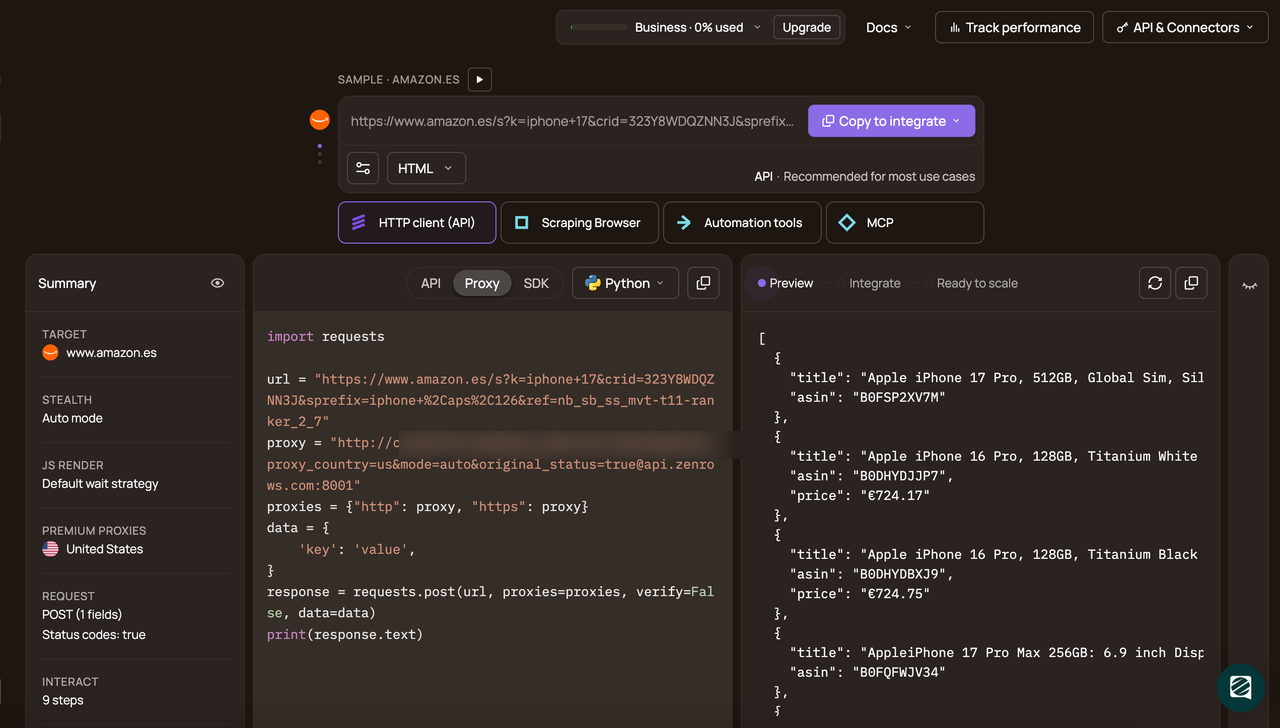
Select your programming language (Python in this example) and choose the API mode as the connection method, and copy the generated code.
The generated code looks like this:
# pip install requests
import requests

url = 'https://www.zillow.com/san-francisco-ca/'
apikey = '<YOUR_ZENROWS_API_KEY>'
params = {
    'url': url,
    'apikey': apikey,
    'mode': 'auto',
}
response = requests.get('https://api.zenrows.com/v1/', params=params)
print(response.text)
When you run the code, the output is as follows:
<html lang="en">
<head>
<!-- ... -->
<title>San Francisco CA Real Estate & Homes For Sale | Zillow</title>
<!-- ... -->
</head>
<body>
<!-- ... -->
<article data-testid="property-card" aria-label="21 Lagunitas Dr, San Francisco, CA 94132">
<span data-testid="property-card-price">$2,395,000</span>
<!-- ... -->
<address>21 Lagunitas Dr, San Francisco, CA 94132</address>
</article>
<!-- other properties omitted for brevity -->
</body>
</html>
Great! ZenRows bypassed Zillow’s anti-bot protection and returned the real page content in the response. This means you can use ZenRows as the anti-bot bypass layer on protected sites, then pass the returned HTML to Crawl4AI to use its filtering and chunking strategies for RAG.
Note
Crawl4AI doesn't accept Markdown from another tool as input. It works with web URLs, local HTML files, and raw HTML strings, then generates Markdown and
fit_markdownfrom that HTML. That’s why we chose HTML as the response format here, even though ZenRows also supports Markdown output.
Integrating ZenRows With Crawl4AI for Reliable Web Scraping for RAG
ZenRows integrates with and powers many scraping workflows across tools and platforms, including LangChain, LlamaIndex, and n8n.
To integrate it into the Crawl4AI RAG pipeline, move the page request to ZenRows and keep Crawl4AI focused on content processing. That means adding requests and the ZenRows request settings, removing the local browser setup and local stealth settings, and passing the HTML response into Crawl4AI instead of asking Crawl4AI to open the protected URL itself.
# add: requests for zenrows api calls
import asyncio, hashlib, json, requests
# ...

# ...

# add: zenrows credentials and request options
ZENROWS_APIKEY = "<YOUR_ZENROWS_API_KEY>"
ZENROWS_PARAMS = {
    "url":    TARGET_URL,
    "apikey": ZENROWS_APIKEY,
    "mode":   "auto",
}

# ...

async def main():
    # add: zenrows fetches the HTML -- replaces playwright entirely for protected sites
    print(f"fetching via zenrows: {TARGET_URL}")
    resp = requests.get("https://api.zenrows.com/v1/", params=ZENROWS_PARAMS)
    resp.raise_for_status()
    html = resp.text

    # change: removed BrowserConfig, enable_stealth, UserAgentGenerator, magic,
    # simulate_user, override_navigator, wait_until, delay_before_return_html, page_timeout.
    # zenrows handles all of that on its end -- no local browser config needed.
    config = CrawlerRunConfig(
        markdown_generator=DefaultMarkdownGenerator(
            content_filter=BM25ContentFilter(user_query=BM25_QUERY, bm25_threshold=0.5)
        ),
        cache_mode=CacheMode.BYPASS,
        excluded_tags=["script", "style", "nav", "footer", "header"],
        word_count_threshold=10,
        verbose=True,
    )

    # change: no browser_config argument -- AsyncWebCrawler() with no args
    # change: url=f"raw:{html}" instead of url=TARGET_URL -- crawl4ai processes
    # the HTML string directly via the raw: prefix, Playwright never opens
    async with AsyncWebCrawler() as crawler:
        result = await crawler.arun(url=f"raw:{html}", config=config)

    # ...
With this integration, ZenRows handles anti-bot bypass and scrapes the protected site, while Crawl4AI retains BM25-based fit_markdown generation and chunking functions. This ensures the RAG pipeline is always reliable and is not blocked by anti-bots.
Here is the full integration code.
import asyncio, hashlib, json, requests
from datetime import datetime, timezone
from pathlib import Path

from crawl4ai import AsyncWebCrawler, CrawlerRunConfig, CacheMode
from crawl4ai.content_filter_strategy import BM25ContentFilter
from crawl4ai.markdown_generation_strategy import DefaultMarkdownGenerator
from crawl4ai.chunking_strategy import SlidingWindowChunking

TARGET_URL  = "https://www.zillow.com/san-francisco-ca/"
TOPIC       = "Zillow SF Real Estate"
BM25_QUERY  = "house condo sale bds ba sqft bedroom bathroom price San Francisco"
WINDOW_SIZE = 120  # each chunk is 120 words
STEP_SIZE   = 60   # window advances 60 words each step

ZENROWS_APIKEY = "<YOUR_ZENROWS_API_KEY>"
ZENROWS_PARAMS = {
    "url":    TARGET_URL,
    "apikey": ZENROWS_APIKEY,
    "mode":   "auto",
}

# all output folders
OUT = Path("scrape_output")
for d in ("raw_md", "fit_md", "chunks"):
    (OUT / d).mkdir(parents=True, exist_ok=True)


async def main():
    # step 1: zenrows fetches the fully rendered HTML.
    # raise_for_status() raises an error if the api key is invalid or credits are exhausted.
    print(f"fetching via zenrows: {TARGET_URL}")
    resp = requests.get("https://api.zenrows.com/v1/", params=ZENROWS_PARAMS)
    resp.raise_for_status()
    html = resp.text
    print(f"  html received: {len(html):,} chars")

    # step 2: pass the raw HTML to crawl4ai using the raw: prefix.
    # crawl4ai skips browser navigation entirely and processes the HTML string directly.
    # no browserconfig or stealth flags needed -- zenrows already handled all of that.
    config = CrawlerRunConfig(
        # defaultmarkdowngenerator converts HTML to clean markdown.
        # bm25contentfilter then scores each block against BM25_QUERY
        # and removes blocks with a score below the threshold -- this is fit_markdown.
        markdown_generator=DefaultMarkdownGenerator(
            content_filter=BM25ContentFilter(user_query=BM25_QUERY, bm25_threshold=0.5)
        ),
        cache_mode=CacheMode.BYPASS,
        excluded_tags=["script", "style", "nav", "footer", "header"],  # strip these before converting to markdown
        word_count_threshold=10,
        verbose=True,
    )

    async with AsyncWebCrawler() as crawler:
        result = await crawler.arun(url=f"raw:{html}", config=config)

    if not result.success:
        print(f"{result.error_message}")
        return

    title  = (result.metadata or {}).get("title", "page")
    # raw_markdown is the full page converted to markdown -- includes all noise
    raw_md = result.markdown.raw_markdown if result.markdown else ""
    # fit_markdown is raw_markdown after bm25 filtering -- only relevant blocks remain
    fit_md = result.markdown.fit_markdown  if result.markdown else ""
    # if bm25 filtered too aggressively (query mismatch), fall back to raw markdown
    if len(fit_md.strip()) < 100:
        fit_md = raw_md

    # save each stage so you can inspect and debug the pipeline step by step
    (OUT / "raw_md"     / "page.md"  ).write_text(raw_md, encoding="utf-8")
    (OUT / "fit_md"     / "page.md"  ).write_text(fit_md, encoding="utf-8")

    def build_chunks(fit_md: str, url: str, title: str) -> list[dict]:
        # sliding window splits fit_md into overlapping chunks.
        # each chunk gets a unique ID, word count, source URL, and crawl timestamp
        raw_chunks = SlidingWindowChunking(window_size=WINDOW_SIZE, step=STEP_SIZE).chunk(fit_md)
        chunks     = [c.strip() for c in raw_chunks if len(c.split()) >= 20]
        ts         = datetime.now(timezone.utc).isoformat()
        return [
            {
                "id":         hashlib.md5(f"{url}-{i}".encode()).hexdigest()[:12],
                "text":       chunk,         # the actual text your embeddings model will encode
                "word_count": len(chunk.split()),
                "source_url": url,           # lets you link back to the original page
                "page_title": title,
                "topic":      TOPIC,
                "crawled_at": ts,
                "strategy":   f"SlidingWindow-{WINDOW_SIZE}w-{STEP_SIZE}step",
            }
            for i, chunk in enumerate(chunks)
        ]

    # chunk the cleaned content and save -- chunks/page.json is your final indexing input
    chunks = build_chunks(fit_md, TARGET_URL, title)
    (OUT / "chunks" / "page.json").write_text(json.dumps(chunks, indent=2, ensure_ascii=False), encoding="utf-8")

    print(f"  Output  : {OUT.resolve()}")

if __name__ == "__main__":
    asyncio.run(main())
When you run the code, the final chunked data in chunks/page.json looks like this:
[
  {
    "id": "1eb7e6490a0e",
    "text": "For Sale Price # San Francisco CA Real Estate & Homes For Sale * **3** bds * **3** ba * **2,650** ... <!--rest of text omitted for brevity-->",
    "word_count": 120,
    "source_url": "https://www.zillow.com/san-francisco-ca/",
    "page_title": "San Francisco CA Real Estate - San Francisco CA Homes For Sale | Zillow",
    "topic": "Zillow SF Real Estate",
    "crawled_at": "2026-03-21T03:05:49.152602+00:00",
    "strategy": "SlidingWindow-120w-60step"
  },
<!--rest of output omitted for brevity-->
]
Congratulations 🎉 You’ve successfully integrated ZenRows with Crawl4AI to bypass advanced anti-bot systems and generate chunked JSON output ready for downstream storage, indexing, and retrieval.
Conclusion
In this article, you've learned what Crawl4AI is, which features make it useful for RAG scraping, and how to use it to turn web content into Markdown, filtered text, and chunks. You also saw where it works well and where anti-bots can break the pipeline.
Crawl4AI is useful for turning web content into Markdown, filtered text, and chunks for RAG pipelines. But when you need to bypass anti-bot systems more reliably and scrape at scale, integrating it with ZenRows gives you a stronger setup. ZenRows handles protected-target retrieval, while Crawl4AI processes the returned content for downstream RAG tasks.
Try ZenRows for free now or speak with sales!
FAQ
Can I combine Crawl4AI with managed scraping solutions?
Yes. That's often the better setup on protected targets. A managed scraping API bypasses anti-bots, retrieves the content first, and Crawl4AI can then process the returned HTML using the same Markdown, filtering, and chunking pipeline.
Which Crawl4AI extraction strategy should I use for RAG?
Use JsonCssExtractionStrategy for stable layouts, RegexExtractionStrategy for simple patterns such as URLs or dates, and LLMExtractionStrategy for unstructured or semantic extraction tasks such as summarization or schema mapping.
What is the best way to scrape web data for RAG on protected sites?
Use a split setup. Let a managed scraping API like ZenRows handle protected-target retrieval, then pass the returned HTML into Crawl4AI for Markdown conversion, filtering, and chunking. That's the more reliable option when anti-bot systems are blocking your scraping requests.