
How to Scrape Google Play
Learn to scrape Google Play data; app reviews, ratings, version history and more. Discover potential limitations and how to achieve unbroken scalability.
Ever tried scraping Google Play and ended up with missing ratings, empty review fields, or CSV rows that don’t match what you see in the browser? Google Play loads much of its content after the initial HTML and spreads key details across different views. It also rate-limits traffic that looks automated and serves CAPTCHA when it suspects bots.
This guide explains how the platform serves that data and how you can scrape Google Play’s apps and reviews so your CSVs stay consistent over time.
What Makes Google Play Data Challenging to Scrape
Google Play reviews keep shifting over time. New reviews appear, older ones get edited or move down the list, and most of the content sits behind "See all reviews" and "Show more" buttons. If a scraper doesn’t handle scrolling and pagination, it ends up with overlapping batches, gaps, or the same top reviews on every run.
On top of that, responses depend on region, language, and device. The same app ID can return different ratings, summaries, and fields depending on IP location, locale, and device profile. Mixing those into one dataset makes comparisons harder.
Finally, Google Play also tracks request volume and behavior, then responds with rate limits, CAPTCHA pages, or 403s when traffic looks automated. To target a specific market and avoid blocks and CAPTCHA, use high-quality residential proxies in the right country.
Skip the blocks. Try Zenrows free and get clean web data without the anti-bot fight.
Google Play Architecture
Google Play works as a single-page app. The HTML you see is mostly a frame for the layout, navigation, and basic metadata. The actual app details appear later, once the browser finishes running JavaScript and wiring up the page.
Behind the scenes, most data travels in background JSON calls with Protobuf encoding. As the page loads, the browser makes internal fetch or RPC-style requests to Google Play endpoints that return structured payloads for app cards, detail panels, and review lists. The DOM you inspect in DevTools is built from those responses, not from the original HTML, which is why a simple requests.get() often shows far less than the live page.
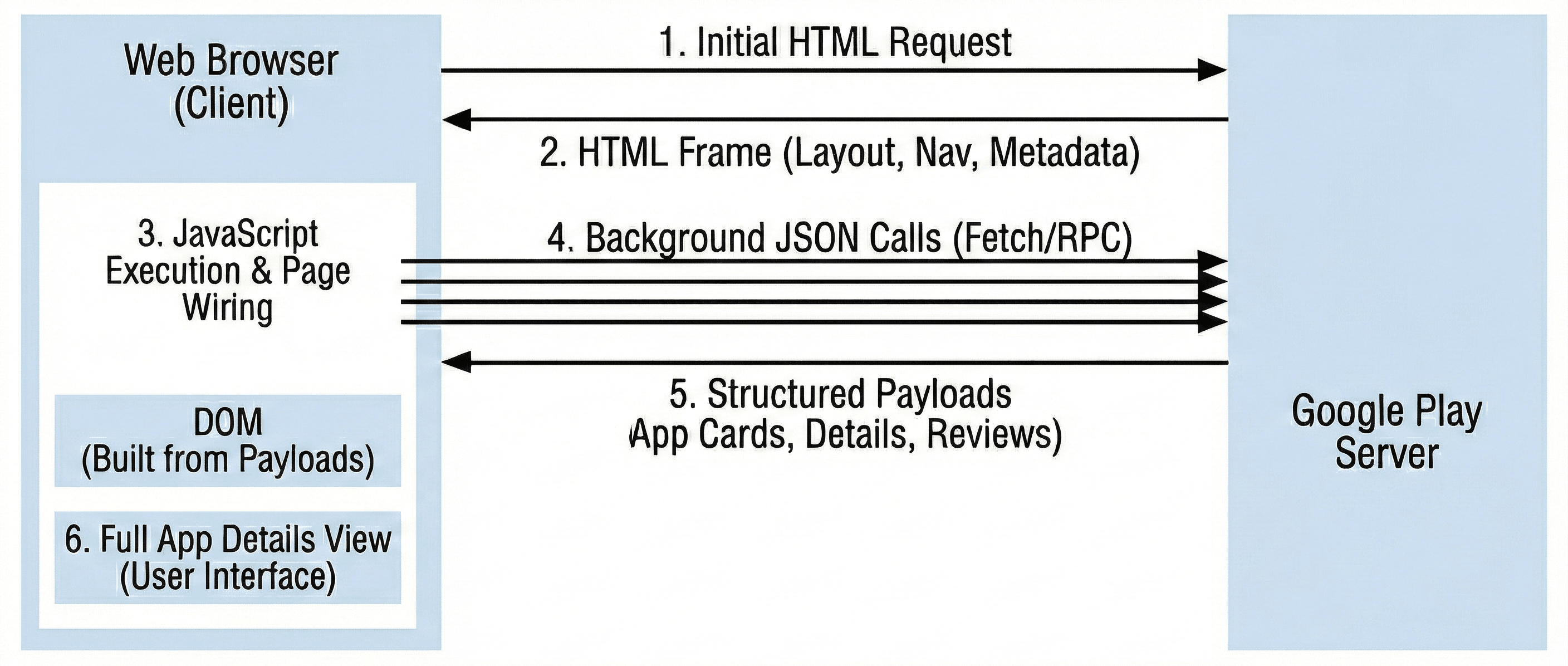
Because of this, your scraper has to mimic real browser behavior. To see the same data a user sees, a scraper either runs JavaScript in a real browser environment or imitates those internal calls, along with the headers, cookies, and timing patterns that make the traffic look normal.
What Data Types Can You Extract From Google Play?
Google Play hosts millions of apps with user ratings, reviews, install metrics, and developer details. Depending on your goal, different data points serve different purposes.
The table below categorizes the data points that can be extracted from Google Play into example use cases:
| Data Type | Use Cases |
|---|---|
| App name, description, category, content rating | App discovery, competitive analysis, market research, app store optimization |
| Rating, review count, install count, version history | Popularity metrics, market demand analysis, app performance benchmarking |
| User reviews, ratings, reviewer names, review dates | Sentiment analysis, user feedback aggregation, reputation management |
| Developer name, developer contact, developer website | Lead generation, partnership identification, developer outreach |
| App permissions, required Android OS, file size | Security analysis, device compatibility research, app requirements tracking |
| Screenshots, app icons, promotional images, video previews | Visual cataloging, app marketing research, UI/UX analysis |
| In-app purchases, pricing details, subscription options | Monetization strategy analysis, pricing comparison, revenue estimation |
| Install trends, regional availability, language support | Geographic market analysis, localization insights, expansion opportunities |
Now, let's scrape data from Google Play in the next section.
Building a Simple Google Play Scraper With Requests and BeautifulSoup
Before implementing any sophisticated scraper, start by exploring what plain HTML scraping can do on its own and where it falls short.
If you prefer, you can skip ahead to the working solution that shows how you can scrape Google Play reliably and at scale.
Step 1: Inspecting the Target Page
Start by going to the Google Play Store and searching for "chess game". This article uses that query as the example, but the scraper will work with any search term.
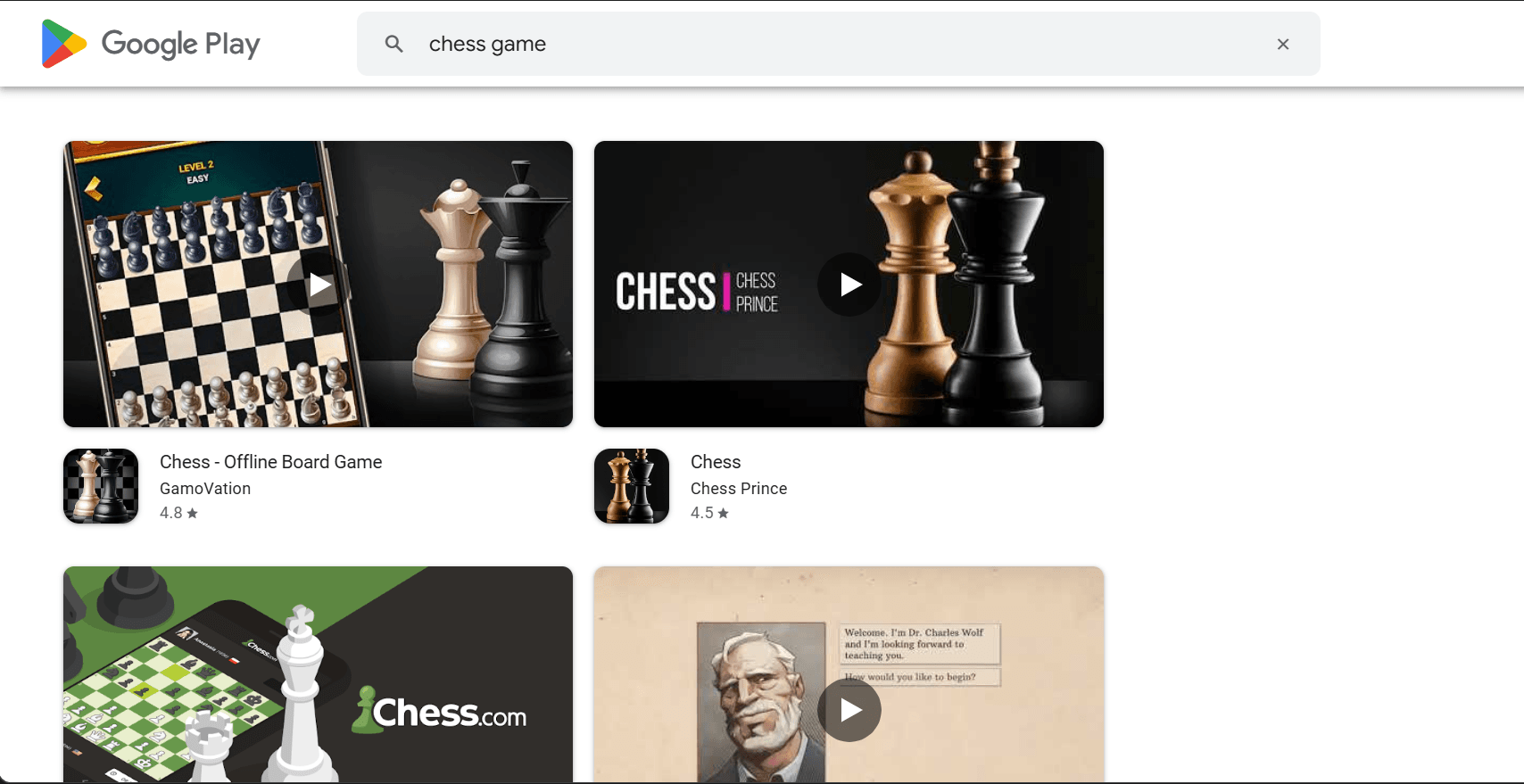
On the results page, right-click an app title and choose Inspect. In the Elements panel, you will see the app name inside a span with a selector named span.DdYX5.
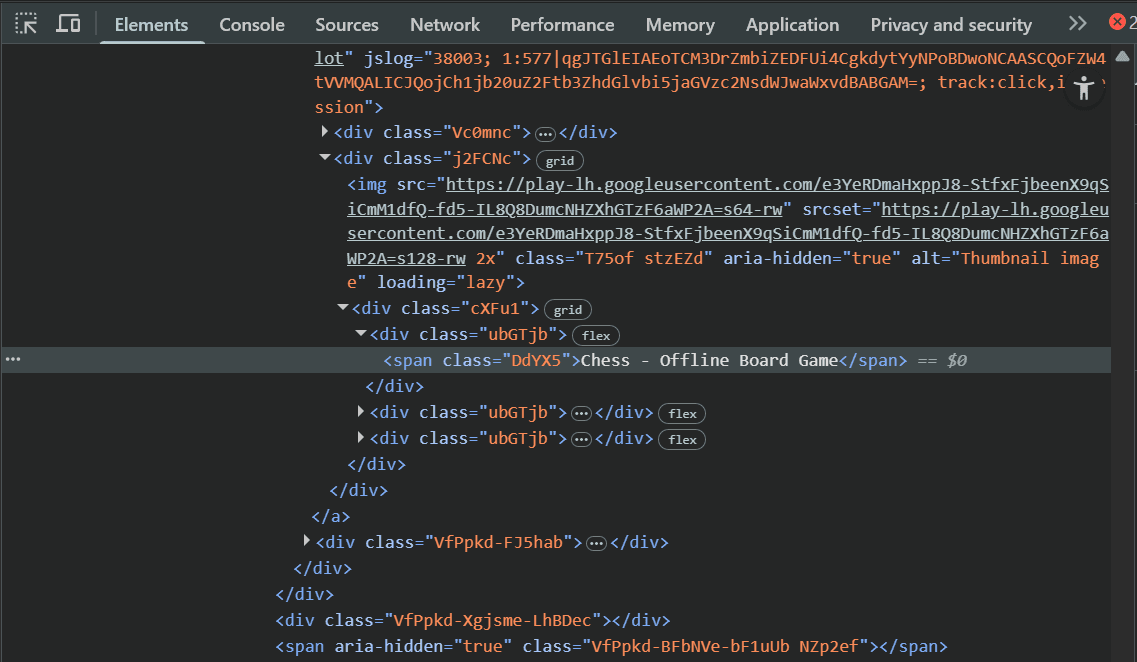
Note the selector, then repeat the same process for the rating, installs, category, and description fields. Write down the selectors you find in a small list; you will plug those names into the Python scraper later.
Step 2: Install the Required Libraries
Next, install the libraries that will fetch and parse the HTML.
pip3 install requests beautifulsoup4
The requests library will send GET requests to Google Play and return the raw HTML for each page. Then beautifulsoup4 will parse that HTML and apply the CSS selectors you identified.
Step 3: Import the Libraries and Add Basic Helpers
Create a new Python file named google_play_basic_scraper.py. This file will hold the scraper code. Start by importing the libraries you just installed, along with the standard modules you will use to save data and control timing between requests.
import requests
from bs4 import BeautifulSoup
import csv
import time
The csv module will write the scraped records into CSV files, and time will let you add short pauses between requests.
Next, define a headers dictionary to include a browser-like User-Agent so your request looks more like real traffic.
# ...
HEADERS = {'User-Agent': 'Mozilla/5.0 (Windows NT 10.0; Win64; x64) AppleWebKit/537.36'}
Finally, define a helper function that will grab text or an attribute from a BeautifulSoup element. It keeps the scraper clean and avoids errors when elements are missing or slightly off.
# ...
def get_text(elem, selector='', attr=''):
    """extract text or attribute from element"""
    if not elem: return ''
    # if selector provided, find child element first, otherwise use element itself
    target = elem.select_one(selector) if selector else elem
    # if attr specified, get attribute value, otherwise get text content
    return (target.get(attr, '') if attr else target.text).strip() if target else ''
This function takes an element, optionally looks for a child using a CSS selector, and returns either the text or an attribute like src.
Step 4: Discover Apps From the Search Page and Scrape Details
Define a function that takes a search term and loads the search results. It then finds each app page and pulls as many fields as possible from the static HTML. This builds an in-memory list of apps with metadata and reviews to send to CSV later.
# ...
def scrape_google_play(query, scrape_limit=10):
    """scrape google play store apps. discovers all, scrapes details for scrape_limit."""
    try:
        # construct search URL with query and make GET request
        soup = BeautifulSoup(requests.get(
            f'https://play.google.com/store/search?q={query.replace(" ", "+")}&c=apps',
            headers=HEADERS).text, 'html.parser')

        # find all app links in search results using CSS selector
        links = soup.select('a[href*="/store/apps/details"]')
        print(f"found {len(links)} apps, scraping {min(scrape_limit, len(links))} in detail")

        apps = []
        # only iterate through the number specified by scrape_limit
        for i, link in enumerate(links[:scrape_limit]):
            # construct full URL by prepending base domain
            url = 'https://play.google.com' + link.get('href', '')

            # check both link and parent element for title/developer (google play structure varies)
            parent = link.parent or link
            title = link.select_one('span.DdYX5') or parent.select_one('span.DdYX5')
            dev = link.select_one('span.wMUdtb') or parent.select_one('span.wMUdtb')

            # initialize app dictionary with reviews field
            app = {
                'app_name': get_text(title),
                'app_link': url,
                'developer': get_text(dev),
                'icon_url': get_text(link.select_one('img'), attr='src'),
                'developer_url': '',
                'rating': '',
                'ratings_count': '',
                'description': '',
                'content_rating': '',
                'category': '',
                'last_updated': '',
                'reviews': []
            }

            print(f"[{i+1}/{scrape_limit}] {app['app_name']}")
            try:
                # fetch the individual app's detail page for complete information
                ds = BeautifulSoup(requests.get(url, headers=HEADERS).text, 'html.parser')

                # extract rating
                app['rating'] = get_text(ds, 'div.TT9eCd')

                # extract metadata
                app['ratings_count'] = get_text(ds, 'div.EHUI5b')
                app['description'] = get_text(ds, "div[data-g-id='description']")
                app['content_rating'] = get_text(ds, 'div.wVqUob:nth-child(3) div.g1rdde span span')
                app['category'] = get_text(ds, "a[href^='/store/apps/category/']")
                app['last_updated'] = get_text(ds, 'div.xg1aie')

                # construct developer URL if found
                dev_url = ds.select_one("a[href^='/store/apps/dev?id=']")
                app['developer_url'] = 'https://play.google.com' + dev_url.get('href', '') if dev_url else ''

                # extract reviews
                # find all review data
                review_names = ds.select('div.gSGphe > div')
                review_dates = ds.select('header > div.Jx4nYe > span')
                review_texts = ds.select('div.h3YV2d')
                dev_feedbacks = ds.select('div.ocpBU > div.ras4vb > div')

                # get max length to handle uneven data
                max_reviews = max(len(review_names), len(review_dates), len(review_texts), len(dev_feedbacks))

                # build review list from arrays
                for idx in range(max_reviews):
                    app['reviews'].append({
                        'reviewer_name': get_text(review_names[idx]) if idx < len(review_names) else '',
                        'review_date': get_text(review_dates[idx]) if idx < len(review_dates) else '',
                        'review_text': get_text(review_texts[idx]) if idx < len(review_texts) else '',
                        'developer_feedback': get_text(dev_feedbacks[idx]) if idx < len(dev_feedbacks) else ''
                    })

                # wait 1 second between requests to avoid overwhelming the server
                time.sleep(1)
            except Exception as e:
                print(f"  error: {e}")

            apps.append(app)
        return apps
    except Exception as e:
        print(f"error: {e}")
        return []
The function builds a search URL by replacing spaces with plus signs and setting the category to apps. It sends a GET request using the browser headers, parses the HTML with BeautifulSoup, and looks for links to app detail pages. Each link becomes a full app URL. The scraper then extracts the app name, developer name, and icon using the CSS selectors you found earlier.
These values are stored in a dictionary, with space left for other fields like rating, category, and reviews. The function loads each app’s detail page and looks for values like average rating, total ratings, description, content rating, and update date. If a developer link exists, it builds the full URL from the relative path. All of this data is added to the app dictionary.
For reviews, it collects names, dates, texts, and any developer replies. The layout isn’t always consistent, so the helper fills in any missing parts. It also pauses briefly between requests to avoid hitting rate limits.
Step 5: Save the Results to CSV
Now add a function that takes the apps list from scrape_google_play, writes one CSV file for app-level data, and another for reviews.
# ...
def save_to_csv(apps, query):
    """save apps and reviews to separate CSV files"""
    # generate filenames from search query
    apps_filename = f"{query.replace(' ', '_').lower()}_apps.csv"
    reviews_filename = f"{query.replace(' ', '_').lower()}_reviews.csv"

    # prepare apps data without reviews
    apps_data = [{k: v for k, v in app.items() if k != 'reviews'} for app in apps]

    # save apps CSV
    if apps_data:
        fieldnames = ['app_name', 'app_link', 'developer', 'icon_url', 'developer_url',
                      'rating', 'ratings_count', 'description', 'content_rating',
                      'category', 'last_updated']
        with open(apps_filename, 'w', newline='', encoding='utf-8') as f:
            writer = csv.DictWriter(f, fieldnames=fieldnames)
            writer.writeheader()
            writer.writerows(apps_data)
        print(f"\nsaved {len(apps_data)} apps to {apps_filename}")

    # flatten reviews from all apps into single list
    reviews_rows = []
    for app in apps:
        for idx, review in enumerate(app['reviews'], 1):
            reviews_rows.append({
                'app_id': app['app_link'].split('id=')[-1] if 'id=' in app['app_link'] else '',
                'app_name': app['app_name'],
                'review_number': idx,
                'reviewer_name': review.get('reviewer_name', ''),
                'review_date': review.get('review_date', ''),
                'review_text': review.get('review_text', ''),
                'developer_feedback': review.get('developer_feedback', ''),
                'separator': '---'
            })

    # save reviews CSV
    if reviews_rows:
        fieldnames = ['app_id', 'app_name', 'review_number', 'reviewer_name', 'review_date',
                      'review_text', 'developer_feedback', 'separator']
        with open(reviews_filename, 'w', newline='', encoding='utf-8') as f:
            writer = csv.DictWriter(f, fieldnames=fieldnames)
            writer.writeheader()
            writer.writerows(reviews_rows)
        print(f"saved {len(reviews_rows)} reviews to {reviews_filename}")

    return apps_filename, reviews_filename
The function above builds two filenames from the query. It flattens each app’s dictionary to remove the reviews list, then uses csv.DictWriter to save that flat data with consistent column headers. It then loops through the reviews, adds app metadata like app ID and name, assigns a review number, and flattens each review into a row.
Step 6: Running and Testing the Basic Scraper
Create a main block that will run when the file is executed directly.
# ...
if __name__ == "__main__":
    # scrape apps with all available reviews
    apps = scrape_google_play("chess game", scrape_limit=25)
    if apps:
        save_to_csv(apps, "chess game")
This code calls the scraping function with the query and results limits. If the function returns an empty list, the script skips saving. Otherwise, it writes one CSV with app metadata and another with reviews.
Here is the full code for the basic Google Play scraper.
import requests
from bs4 import BeautifulSoup
import csv
import time

HEADERS = {'User-Agent': 'Mozilla/5.0 (Windows NT 10.0; Win64; x64) AppleWebKit/537.36'}

def get_text(elem, selector='', attr=''):
    """extract text or attribute from element"""
    if not elem: return ''
    # if selector provided, find child element first, otherwise use element itself
    target = elem.select_one(selector) if selector else elem
    # if attr specified, get attribute value, otherwise get text content
    return (target.get(attr, '') if attr else target.text).strip() if target else ''

def scrape_google_play(query, scrape_limit=10):
    """scrape google play store apps. discovers all, scrapes details for scrape_limit."""
    try:
        # construct search URL with query and make GET request
        soup = BeautifulSoup(requests.get(
            f'https://play.google.com/store/search?q={query.replace(" ", "+")}&c=apps',
            headers=HEADERS).text, 'html.parser')

        # find all app links in search results using CSS selector
        links = soup.select('a[href*="/store/apps/details"]')
        print(f"found {len(links)} apps, scraping {min(scrape_limit, len(links))} in detail")

        apps = []
        # only iterate through the number specified by scrape_limit
        for i, link in enumerate(links[:scrape_limit]):
            # construct full URL by prepending base domain
            url = 'https://play.google.com' + link.get('href', '')

            # check both link and parent element for title/developer (google play structure varies)
            parent = link.parent or link
            title = link.select_one('span.DdYX5') or parent.select_one('span.DdYX5')
            dev = link.select_one('span.wMUdtb') or parent.select_one('span.wMUdtb')

            # initialize app dictionary with reviews field
            app = {
                'app_name': get_text(title),
                'app_link': url,
                'developer': get_text(dev),
                'icon_url': get_text(link.select_one('img'), attr='src'),
                'developer_url': '',
                'rating': '',
                'ratings_count': '',
                'description': '',
                'content_rating': '',
                'category': '',
                'last_updated': '',
                'reviews': []
            }

            print(f"[{i+1}/{scrape_limit}] {app['app_name']}")
            try:
                # fetch the individual app's detail page for complete information
                ds = BeautifulSoup(requests.get(url, headers=HEADERS).text, 'html.parser')

                # extract rating
                app['rating'] = get_text(ds, 'div.TT9eCd')

                # extract metadata
                app['ratings_count'] = get_text(ds, 'div.EHUI5b')
                app['description'] = get_text(ds, "div[data-g-id='description']")
                app['content_rating'] = get_text(ds, 'div.wVqUob:nth-child(3) div.g1rdde span span')
                app['category'] = get_text(ds, "a[href^='/store/apps/category/']")
                app['last_updated'] = get_text(ds, 'div.xg1aie')

                # construct developer URL if found
                dev_url = ds.select_one("a[href^='/store/apps/dev?id=']")
                app['developer_url'] = 'https://play.google.com' + dev_url.get('href', '') if dev_url else ''

                # extract reviews
                # find all review data
                review_names = ds.select('div.gSGphe > div')
                review_dates = ds.select('header > div.Jx4nYe > span')
                review_texts = ds.select('div.h3YV2d')
                dev_feedbacks = ds.select('div.ocpBU > div.ras4vb > div')

                # get max length to handle uneven data
                max_reviews = max(len(review_names), len(review_dates), len(review_texts), len(dev_feedbacks))

                # build review list from arrays
                for idx in range(max_reviews):
                    app['reviews'].append({
                        'reviewer_name': get_text(review_names[idx]) if idx < len(review_names) else '',
                        'review_date': get_text(review_dates[idx]) if idx < len(review_dates) else '',
                        'review_text': get_text(review_texts[idx]) if idx < len(review_texts) else '',
                        'developer_feedback': get_text(dev_feedbacks[idx]) if idx < len(dev_feedbacks) else ''
                    })

                # wait 1 second between requests to avoid overwhelming server
                time.sleep(1)
            except Exception as e:
                print(f"  error: {e}")

            apps.append(app)
        return apps
    except Exception as e:
        print(f"error: {e}")
        return []


def save_to_csv(apps, query):
    """save apps and reviews to separate CSV files"""
    # generate filenames from search query
    apps_filename = f"{query.replace(' ', '_').lower()}_apps.csv"
    reviews_filename = f"{query.replace(' ', '_').lower()}_reviews.csv"

    # prepare apps data without reviews
    apps_data = [{k: v for k, v in app.items() if k != 'reviews'} for app in apps]

    # save apps CSV
    if apps_data:
        fieldnames = ['app_name', 'app_link', 'developer', 'icon_url', 'developer_url',
                      'rating', 'ratings_count', 'description', 'content_rating',
                      'category', 'last_updated']
        with open(apps_filename, 'w', newline='', encoding='utf-8') as f:
            writer = csv.DictWriter(f, fieldnames=fieldnames)
            writer.writeheader()
            writer.writerows(apps_data)
        print(f"\nsaved {len(apps_data)} apps to {apps_filename}")

    # flatten reviews from all apps into single list
    reviews_rows = []
    for app in apps:
        for idx, review in enumerate(app['reviews'], 1):
            reviews_rows.append({
                'app_id': app['app_link'].split('id=')[-1] if 'id=' in app['app_link'] else '',
                'app_name': app['app_name'],
                'review_number': idx,
                'reviewer_name': review.get('reviewer_name', ''),
                'review_date': review.get('review_date', ''),
                'review_text': review.get('review_text', ''),
                'developer_feedback': review.get('developer_feedback', ''),
                'separator': '---'
            })

    # save reviews CSV
    if reviews_rows:
        fieldnames = ['app_id', 'app_name', 'review_number', 'reviewer_name', 'review_date',
                      'review_text', 'developer_feedback', 'separator']
        with open(reviews_filename, 'w', newline='', encoding='utf-8') as f:
            writer = csv.DictWriter(f, fieldnames=fieldnames)
            writer.writeheader()
            writer.writerows(reviews_rows)
        print(f"saved {len(reviews_rows)} reviews to {reviews_filename}")

    return apps_filename, reviews_filename


# example usage
if __name__ == "__main__":
    # scrape apps with all available reviews
    apps = scrape_google_play("chess game", scrape_limit=2)
    if apps:
        save_to_csv(apps, "chess game")
When you run the scraper, the results should be similar to this:
found 30 apps, scraping 25 in detail
[1/25] Chess - Play and Learn Online
[2/25] Chess - Offline Board Game
# [3/25] to [24/25] omitted for brevity
[25/25] Chess Rush - Puzzle Master
saved 25 apps to chess_game_apps.csv
saved 69 reviews to chess_game_reviews.csv
Here is sample data from the saved app-level data.
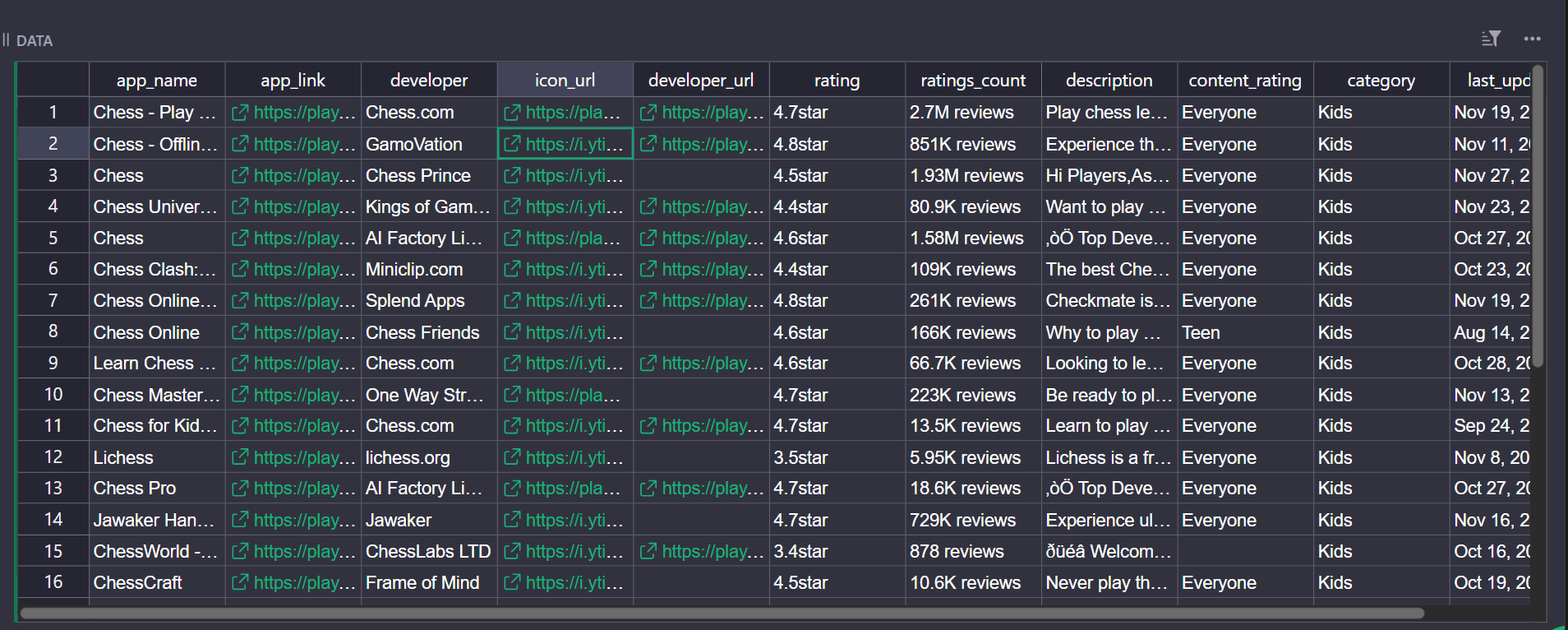
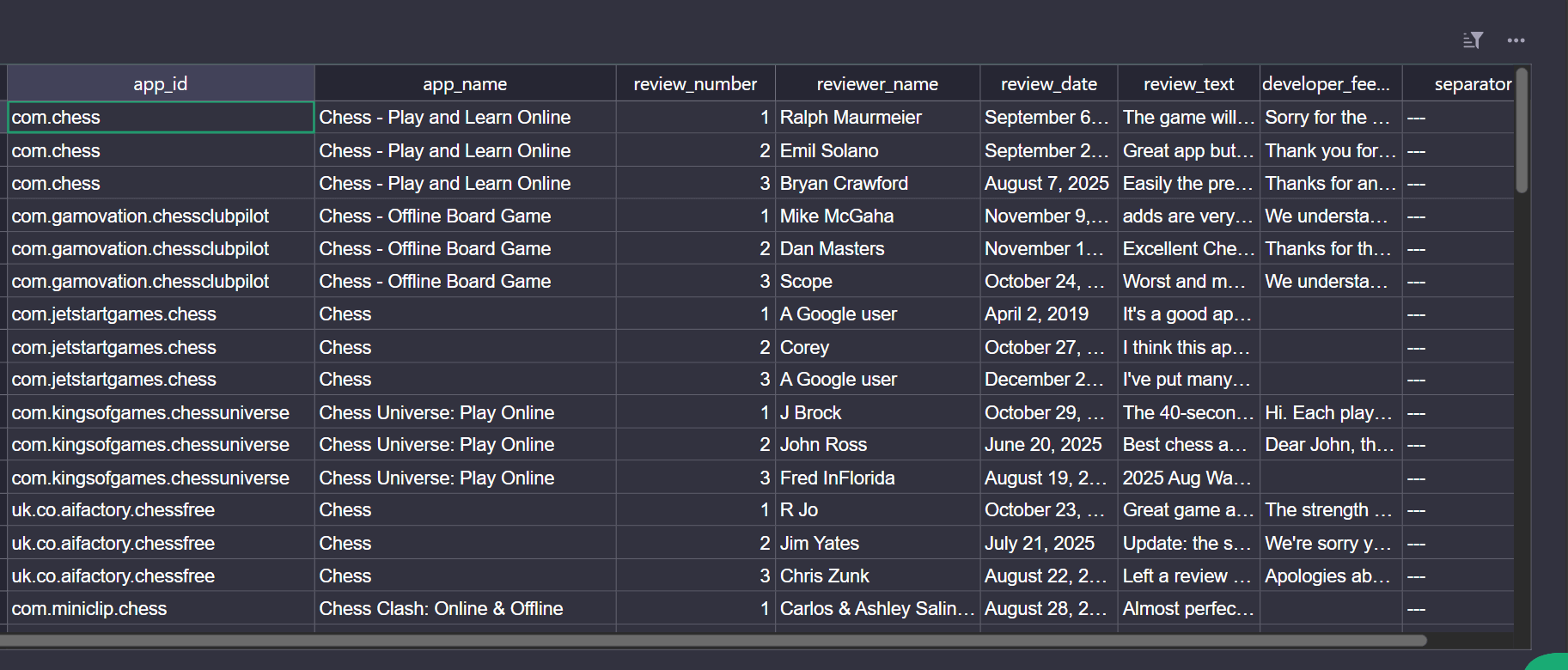
As for the review data, it looks like this. Notice there are only three reviews per app.
Those three reviews per app aren't a CSV problem. They're a side effect of how Google Play serves reviews. The initial HTML only contains a short preview section. To see more reviews in the browser, you have to click See all reviews, which opens a pop-up window, and then keep scrolling so JavaScript can load additional batches.
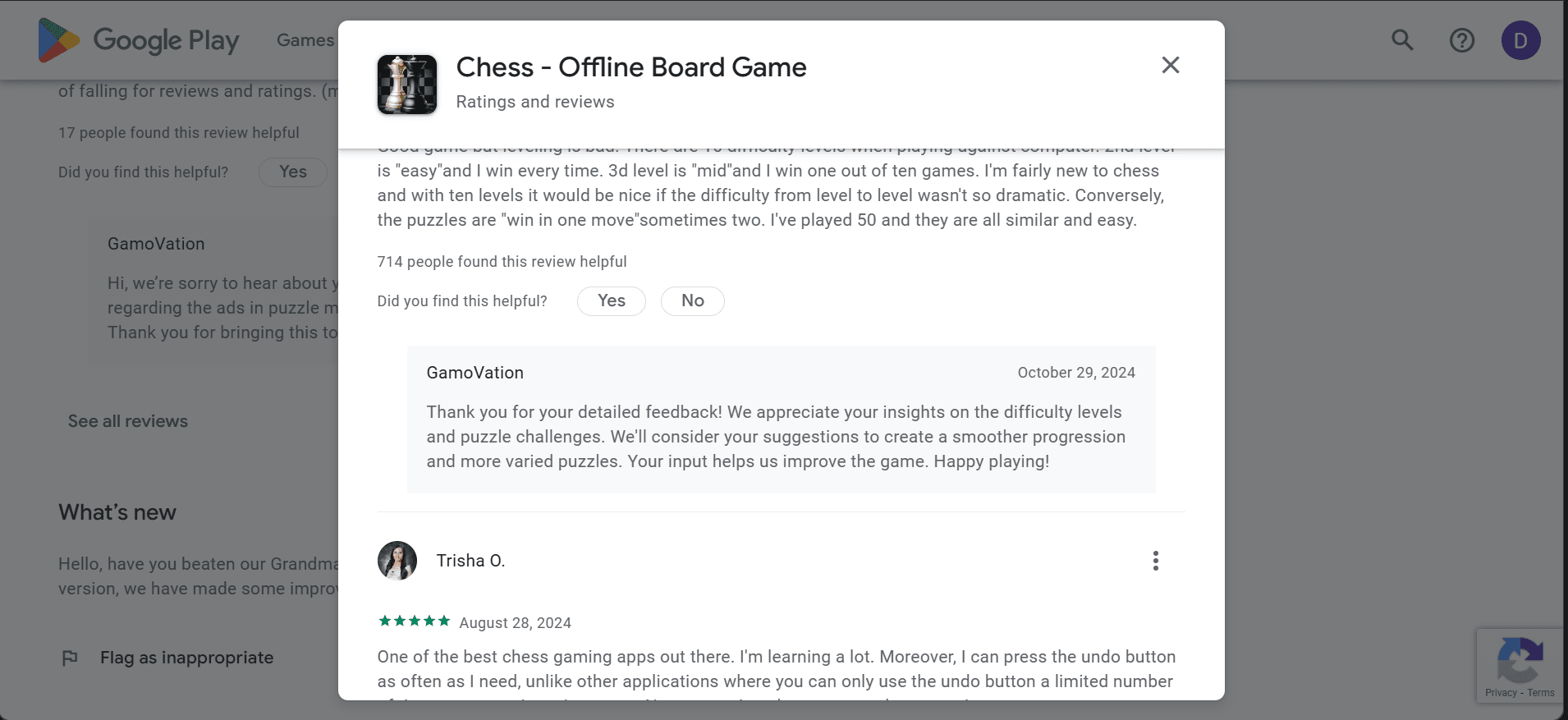
The requests.get() call never clicks that button or scrolls the modal, so it only ever sees the small preview. If the script keeps running from the same addresses and you don't have a large pool of residential IPs, Google Play also starts answering with CAPTCHAs, 429s, and 403s, so later runs return even less data.
You could try to cover that by using tools like Selenium and your own proxy rotation. But that means maintaining drivers, browsers, IPs, and custom logic for CAPTCHA, all on top of the scraping code.
The best option is to offload that work to a platform built for these kinds of targets, such as ZenRows' Universal Scraper API. ZenRows runs real browsers with JavaScript enabled, supports custom instructions like scrolling review pop-ups, routes traffic through residential proxies, bypasses CAPTCHA, and more. It exposes this through the Universal Scraper API, where you send a Google Play URL and CSS selectors and receive JSON with app data and reviews ready to save.
Scraping Google Play Data With ZenRows
Instead of calling requests.get() on Google Play pages, you call the ZenRows Universal Scraper API and let it return JSON with the fields you care about.
Step 1: Set Up the Request in the ZenRows Request Builder
Sign up if you haven't already. Then, proceed to the Universal Scraper API Request Builder. Then paste your search URL into the URL field.
https://play.google.com/store/search?q=chess+game&c=apps
Enable Premium Proxies and select the United States as the proxy country. Then, turn on JS Rendering so ZenRows loads the dynamic content that appears after JavaScript runs.
On the right-hand side, select Python at the top of the code panel and switch to the API tab. The panel now shows a Python snippet that calls the Universal Scraper API with the Google Play URL, JS rendering, and Premium Proxies already configured.
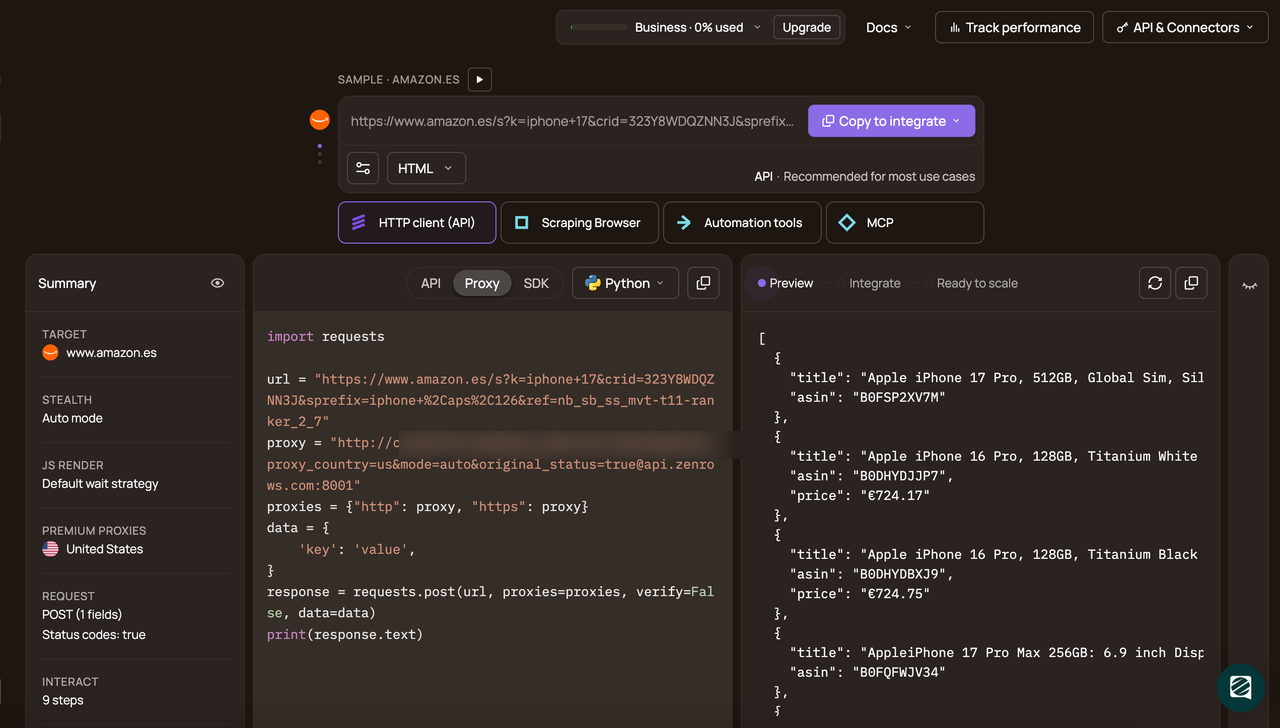
Click Copy code and paste it into a new scraper file (google_play_zenrows_scraper.py) as the starting point for the ZenRows-based version.
# pip install requests
import requests

url = 'https://play.google.com/store/search?q=chess+game&c=apps'
apikey = "<YOUR_ZENROWS_API_KEY>"
params = {
    'url': url,
    'apikey': apikey,
    'js_render': 'true',
    'premium_proxy': 'true',
    'proxy_country': 'us',
}
response = requests.get('https://api.zenrows.com/v1/', params=params)
print(response.text)
When you run the code, the results are as follows:
<!-- omitted for brevity -->
class="T75of nIMMJc" aria-hidden="true" alt="Screenshot image" loading="lazy"><div class="aCy7Gf"><button aria-label="Play Chess - Offline Board Game" class="FN1l2 XdjT2b" jscontroller="M2Qezd" jsaction="click:e7xSJf" jsmodel="hQqEkb" jsname="OvWdXe" data-video-
<!-- omitted for brevity -->
The response looks similar to the raw HTML you saw in the browser. This confirms the connection to ZenRows is working, but the output is still unstructured markup. Next, turn this snippet into a structured scraper by telling ZenRows which parts of the page to extract.
Step 2: Define CSS Selectors for Apps and Reviews
Tell ZenRows which fields to return by adding a CSS extractor configuration. This maps the selectors you used earlier (span.DdYX5 for app name, span.wMUdtb for developer, and so on) to clear field names, so the API can send back JSON instead of full HTML.
Update google_play_zenrows_scraper.py to import json and define selector mapping.
import requests
import csv
import time
import json

API_KEY = "<YOUR_ZENROWS_API_KEY>"

# css selectors for extracting data from the search results page
SEARCH_SELECTORS = {
    'app_name': 'span.DdYX5',
    'developer': 'span.wMUdtb',
    'app_link': "a[href^='/store/apps/details?id='] @href",
    'icon': 'img @src'
}

# css selectors for extracting app details from individual app pages
DETAIL_SELECTORS = {
    'developer_url': "a[href^='/store/apps/dev?id='] @href",
    'rating': 'div.TT9eCd',
    'ratings_count': 'div.EHUI5b',
    'description': "div[data-g-id='description']",
    'content_rating': 'div.wVqUob:nth-child(3) div.g1rdde span span',
    'category': "a[href^='/store/apps/category/']",
    'last_updated': 'div.xg1aie'
}

# css selectors for extracting review data from app pages
REVIEW_SELECTORS = {
    'reviewer_name': 'div.gSGphe > div',
    'review_date': 'header > div.Jx4nYe > span',
    'review_text': 'div.h3YV2d',
    'developer_feedback': 'div.ocpBU > div.ras4vb > div'
}
With the selectors in place, the remaining work is to wire them into a reusable ZenRows call and add a script to scroll the review popup so more reviews are available to extract.
Note
The CSS selectors used in this guide may change over time, as Google Play’s layout and structure are frequently updated. If you encounter missing data or errors, double-check the selectors using your browser’s inspect tool and update them as needed.
Step 3: Add Helper Functions for ZenRows Calls and Review Scrolling
Add a JavaScript snippet and two helper functions. The JavaScript will click See all reviews and scroll the pop-up so ZenRows can see more than the preview block. The helpers will wrap the Universal Scraper API call and normalize the response.
# ...
# javascript code to scroll and load all reviews by clicking "show more" buttons
JS_SCROLL_CODE = """
(async function() {
    const wait = (ms) => new Promise(r => setTimeout(r, ms));
    function findScrollContainer() {
        const allDivs = document.querySelectorAll('div');
        let bestContainer = null;
        let maxScroll = 0;
        for (const div of allDivs) {
            if (div.scrollHeight > div.clientHeight && div.scrollHeight > maxScroll && div.clientHeight > 0 && div.scrollHeight > 500) {
                bestContainer = div;
                maxScroll = div.scrollHeight;
            }
        }
        return bestContainer;
    }
    const seeAllBtn = Array.from(document.querySelectorAll('button')).find(b => b.innerText.includes('See all reviews'));
    if (seeAllBtn) {
        seeAllBtn.click();
        await wait(3000);
    }
    let scrollContainer = findScrollContainer();
    if (!scrollContainer) return;
    let lastHeight = scrollContainer.scrollHeight;
    let sameCount = 0;
    for (let i = 0; i < 35; i++) {
        scrollContainer.scrollTo(0, scrollContainer.scrollHeight);
        await wait(400);
        const btn = document.querySelector('button[jscontroller="soHxf"]') ||
                    Array.from(document.querySelectorAll('button')).find(b => b.innerText.includes('Show more'));
        if (btn && btn.offsetParent !== null) {
            btn.click();
            await wait(600);
            sameCount = 0;
        }
        if (scrollContainer.scrollHeight === lastHeight) {
            sameCount++;
            if (sameCount >= 3) break;
        } else {
            sameCount = 0;
            lastHeight = scrollContainer.scrollHeight;
        }
    }
})();
"""


def get_first(field):
    """extract first non-empty value from list or return string as-is"""
    if not field:
        return ''
    if isinstance(field, list):
        return next((str(x).strip() for x in field if x and str(x).strip()), '')
    return str(field).strip()

def make_request(url, selectors, scrape_reviews=False):
    """make api request with unified parameters, scroll to load reviews when scraping app details"""
    # base parameters always include js_render and premium_proxy
    params = {
        'url': url,
        'apikey': API_KEY,
        'css_extractor': json.dumps(selectors),
        'premium_proxy': 'true',
        'js_render': 'true'
    }

    # add scroll instructions when scraping reviews
    if scrape_reviews:
        params['js_instructions'] = json.dumps([
            {"wait_event": "networkidle"},
            {"wait": 1500},
            {"evaluate": JS_SCROLL_CODE}
        ])

    return requests.get('https://api.zenrows.com/v1/', params=params).json()
ZenRows runs JS_SCROLL_CODE inside a real browser environment. This script clicks the See all reviews button, scrolls through the pop-up, and triggers any Show more buttons. This makes the ZenRows scraper load far more reviews than what’s available in the preview HTML or what the basic scraper could.
The get_first helper handles ZenRows’ extractor output, which often returns lists. It picks the first non-empty string, so the scraper doesn’t have to deal with conditionals downstream.
The make_request function wraps calls to the Universal Scraper API. It enables JavaScript rendering, mobile emulation, and premium proxies by default. It passes CSS selectors through the css_extractor field and, when scraping reviews, adds the JavaScript scroll instructions. The API returns parsed JSON ready for further processing.
Step 4: Scrape Google Play Apps and Reviews With ZenRows
Define a function that searches Google Play for a query, builds an app list from the search page, then calls ZenRows again for each app to fetch metadata and a larger batch of reviews. This function follows the same scraping logic as the basic scraper. The only difference is that now you are using Zenrows Universal scraper API for scraping.
# ...
def scrape_google_play_apps(search_query, limit=None):
    """scrape google play apps and their reviews for given search query"""
    formatted_query = search_query.replace(' ', '+')
    print(f"searching for '{search_query}'...")

    # fetch search results
    search_data = make_request(
        f'https://play.google.com/store/search?q={formatted_query}&c=apps',
        SEARCH_SELECTORS
    )

    # extract app data from search results
    app_names = search_data.get('app_name', [])
    app_links = search_data.get('app_link', [])
    developers = search_data.get('developer', [])
    icons = search_data.get('icon', [])

    # determine max length to handle uneven data arrays
    max_len = max(len(app_names), len(app_links), len(developers), len(icons))
    print(f"found {max_len} apps\n")

    # build list of app objects from search data
    apps = []
    for i in range(max_len):
        link = app_links[i] if i < len(app_links) else ''
        # prepend base url if link is relative
        if link and not link.startswith('http'):
            link = 'https://play.google.com' + link

        apps.append({
            'app_name': app_names[i] if i < len(app_names) else '',
            'app_link': link,
            'developer': developers[i] if i < len(developers) else '',
            'icon_url': icons[i] if i < len(icons) else '',
            'developer_url': '',
            'rating': '',
            'ratings_count': '',
            'description': '',
            'content_rating': '',
            'category': '',
            'last_updated': '',
            'reviews': []
        })

    # limit number of apps to scrape if specified
    apps_to_scrape = apps[:limit] if limit else apps
    print(f"scraping details for {len(apps_to_scrape)} apps...\n")

    # scrape detailed info and reviews for each app
    for idx, app in enumerate(apps_to_scrape):
        if not app['app_link']:
            continue

        print(f"[{idx+1}/{len(apps_to_scrape)}] {app['app_name']}")

        try:
            # fetch app page and scrape reviews with scrolling
            detail_data = make_request(
                app['app_link'],
                {**DETAIL_SELECTORS, **REVIEW_SELECTORS},
                scrape_reviews=True
            )

            # check for api error response
            if 'title' in detail_data:
                print(f"  error: {detail_data['title']}")
                time.sleep(1)
                continue

            # extract and normalize developer url
            app['developer_url'] = get_first(detail_data.get('developer_url'))
            if app['developer_url'] and not app['developer_url'].startswith('http'):
                app['developer_url'] = 'https://play.google.com' + app['developer_url']

            # extract app metadata
            app['rating'] = get_first(detail_data.get('rating'))
            app['ratings_count'] = get_first(detail_data.get('ratings_count'))
            app['description'] = get_first(detail_data.get('description'))
            app['content_rating'] = get_first(detail_data.get('content_rating'))
            app['category'] = get_first(detail_data.get('category'))
            app['last_updated'] = get_first(detail_data.get('last_updated'))

            # extract review arrays
            names = detail_data.get('reviewer_name', [])
            dates = detail_data.get('review_date', [])
            texts = detail_data.get('review_text', [])
            dev_feedbacks = detail_data.get('developer_feedback', [])

            # find max review count to handle uneven arrays
            max_reviews = max(len(names), len(dates), len(texts), len(dev_feedbacks))

            # build review objects from arrays
            for i in range(max_reviews):
                app['reviews'].append({
                    'reviewer_name': names[i] if i < len(names) else '',
                    'review_date': dates[i] if i < len(dates) else '',
                    'review_text': texts[i] if i < len(texts) else '',
                    'developer_feedback': dev_feedbacks[i] if i < len(dev_feedbacks) else ''
                })

            print(f"  found {len(app['reviews'])} reviews")
            time.sleep(1)
        except Exception as e:
            print(f"  error: {e}")

    return apps_to_scrape
The returned list is a full Google Play dataset, with app-level fields and more reviews than the basic scraper could reach, ready to be written to CSV.
Step 5: Save the ZenRows results to CSV
Create a function to save the scraped data to CSV. Reuse the same pattern as before: one CSV for app-level fields and another for reviews.
# ...
def save_to_csv(apps, search_query):
    """save scraped apps and reviews to separate csv files"""
    # generate filenames from search query
    apps_filename = f"zenrows_{search_query.replace(' ', '_').lower()}_apps.csv"
    reviews_filename = f"zenrows_{search_query.replace(' ', '_').lower()}_reviews.csv"

    # prepare apps data without reviews array
    apps_data = [{k: v for k, v in app.items() if k != 'reviews'} for app in apps]

    # save apps to csv
    if apps_data:
        fieldnames = ['app_name', 'app_link', 'developer', 'icon_url', 'developer_url',
                      'rating', 'ratings_count', 'description', 'content_rating',
                      'category', 'last_updated']
        with open(apps_filename, 'w', newline='', encoding='utf-8') as f:
            writer = csv.DictWriter(f, fieldnames=fieldnames)
            writer.writeheader()
            writer.writerows(apps_data)
        print(f"\nsaved {len(apps_data)} apps to {apps_filename}")

    # flatten reviews from all apps into single list
    reviews_rows = []
    for app in apps:
        for idx, review in enumerate(app['reviews'], 1):
            reviews_rows.append({
                'app_id': app['app_link'].split('id=')[-1] if 'id=' in app['app_link'] else '',
                'app_name': app['app_name'],
                'review_number': idx,
                'reviewer_name': review.get('reviewer_name', ''),
                'review_date': review.get('review_date', ''),
                'review_text': review.get('review_text', ''),
                'developer_feedback': review.get('developer_feedback', ''),
                'separator': '---'
            })

    # save reviews to csv
    if reviews_rows:
        fieldnames = ['app_id', 'app_name', 'review_number', 'reviewer_name', 'review_date',
                      'review_text', 'developer_feedback', 'separator']
        with open(reviews_filename, 'w', newline='', encoding='utf-8') as f:
            writer = csv.DictWriter(f, fieldnames=fieldnames)
            writer.writeheader()
            writer.writerows(reviews_rows)
        print(f"saved {len(reviews_rows)} reviews to {reviews_filename}")

    return apps_filename, reviews_filename
Step 6: Run the ZenRows Scraper and Check the Results
Add a main block to run the scraper when the script is executed directly:
# ...
if __name__ == "__main__":
    apps = scrape_google_play_apps("chess game", limit=5)
    save_to_csv(apps, "chess game")
Here is the full code for the ZenRows' Google Play scraper.
import requests
import csv
import time
import json

API_KEY = '74917e9b41c951b169ea63d34dd9c66ad0e9d4a1'

# css selectors for extracting data from search results page
SEARCH_SELECTORS = {
    'app_name': 'span.DdYX5',
    'developer': 'span.wMUdtb',
    'app_link': "a[href^='/store/apps/details?id='] @href",
    'icon': 'img @src'
}

# css selectors for extracting app details from individual app pages
DETAIL_SELECTORS = {
    'developer_url': "a[href^='/store/apps/dev?id='] @href",
    'rating': 'div.TT9eCd',
    'ratings_count': 'div.EHUI5b',
    'description': "div[data-g-id='description']",
    'content_rating': 'div.wVqUob:nth-child(3) div.g1rdde span span',
    'category': "a[href^='/store/apps/category/']",
    'last_updated': 'div.xg1aie'
}

# css selectors for extracting review data from app pages
REVIEW_SELECTORS = {
    'reviewer_name': 'div.gSGphe > div',
    'review_date': 'header > div.Jx4nYe > span',
    'review_text': 'div.h3YV2d',
    'developer_feedback': 'div.ocpBU > div.ras4vb > div'
}

# javascript code to scroll and load all reviews by clicking "show more" buttons
JS_SCROLL_CODE = """
(async function() {
    const wait = (ms) => new Promise(r => setTimeout(r, ms));
    function findScrollContainer() {
        const allDivs = document.querySelectorAll('div');
        let bestContainer = null;
        let maxScroll = 0;
        for (const div of allDivs) {
            if (div.scrollHeight > div.clientHeight && div.scrollHeight > maxScroll && div.clientHeight > 0 && div.scrollHeight > 500) {
                bestContainer = div;
                maxScroll = div.scrollHeight;
            }
        }
        return bestContainer;
    }
    const seeAllBtn = Array.from(document.querySelectorAll('button')).find(b => b.innerText.includes('See all reviews'));
    if (seeAllBtn) {
        seeAllBtn.click();
        await wait(3000);
    }
    let scrollContainer = findScrollContainer();
    if (!scrollContainer) return;
    let lastHeight = scrollContainer.scrollHeight;
    let sameCount = 0;
    for (let i = 0; i < 35; i++) {
        scrollContainer.scrollTo(0, scrollContainer.scrollHeight);
        await wait(400);
        const btn = document.querySelector('button[jscontroller="soHxf"]') ||
                    Array.from(document.querySelectorAll('button')).find(b => b.innerText.includes('Show more'));
        if (btn && btn.offsetParent !== null) {
            btn.click();
            await wait(600);
            sameCount = 0;
        }
        if (scrollContainer.scrollHeight === lastHeight) {
            sameCount++;
            if (sameCount >= 3) break;
        } else {
            sameCount = 0;
            lastHeight = scrollContainer.scrollHeight;
        }
    }
})();
"""


def get_first(field):
    """extract first non-empty value from list or return string as-is"""
    if not field:
        return ''
    if isinstance(field, list):
        return next((str(x).strip() for x in field if x and str(x).strip()), '')
    return str(field).strip()

def make_request(url, selectors, scrape_reviews=False):
    """make api request with unified parameters, scroll to load reviews when scraping app details"""
    # base parameters always include js_render and premium_proxy
    params = {
        'url': url,
        'apikey': API_KEY,
        'css_extractor': json.dumps(selectors),
        'premium_proxy': 'true',
        'js_render': 'true'
    }

    # add scroll instructions when scraping reviews
    if scrape_reviews:
        params['js_instructions'] = json.dumps([
            {"wait_event": "networkidle"},
            {"wait": 1500},
            {"evaluate": JS_SCROLL_CODE}
        ])

    return requests.get('https://api.zenrows.com/v1/', params=params).json()

def scrape_google_play_apps(search_query, limit=None):
    """scrape google play apps and their reviews for given search query"""
    formatted_query = search_query.replace(' ', '+')
    print(f"searching for '{search_query}'...")

    # fetch search results
    search_data = make_request(
        f'https://play.google.com/store/search?q={formatted_query}&c=apps',
        SEARCH_SELECTORS
    )

    # extract app data from search results
    app_names = search_data.get('app_name', [])
    app_links = search_data.get('app_link', [])
    developers = search_data.get('developer', [])
    icons = search_data.get('icon', [])

    # determine max length to handle uneven data arrays
    max_len = max(len(app_names), len(app_links), len(developers), len(icons))
    print(f"found {max_len} apps\n")

    # build list of app objects from search data
    apps = []
    for i in range(max_len):
        link = app_links[i] if i < len(app_links) else ''
        # prepend base url if link is relative
        if link and not link.startswith('http'):
            link = 'https://play.google.com' + link

        apps.append({
            'app_name': app_names[i] if i < len(app_names) else '',
            'app_link': link,
            'developer': developers[i] if i < len(developers) else '',
            'icon_url': icons[i] if i < len(icons) else '',
            'developer_url': '',
            'rating': '',
            'ratings_count': '',
            'description': '',
            'content_rating': '',
            'category': '',
            'last_updated': '',
            'reviews': []
        })

    # limit number of apps to scrape if specified
    apps_to_scrape = apps[:limit] if limit else apps
    print(f"scraping details for {len(apps_to_scrape)} apps...\n")

    # scrape detailed info and reviews for each app
    for idx, app in enumerate(apps_to_scrape):
        if not app['app_link']:
            continue

        print(f"[{idx+1}/{len(apps_to_scrape)}] {app['app_name']}")

        try:
            # fetch app page and scrape reviews with scrolling
            detail_data = make_request(
                app['app_link'],
                {**DETAIL_SELECTORS, **REVIEW_SELECTORS},
                scrape_reviews=True
            )

            # check for api error response
            if 'title' in detail_data:
                print(f"  error: {detail_data['title']}")
                time.sleep(1)
                continue

            # extract and normalize developer url
            app['developer_url'] = get_first(detail_data.get('developer_url'))
            if app['developer_url'] and not app['developer_url'].startswith('http'):
                app['developer_url'] = 'https://play.google.com' + app['developer_url']

            # extract app metadata
            app['rating'] = get_first(detail_data.get('rating'))
            app['ratings_count'] = get_first(detail_data.get('ratings_count'))
            app['description'] = get_first(detail_data.get('description'))
            app['content_rating'] = get_first(detail_data.get('content_rating'))
            app['category'] = get_first(detail_data.get('category'))
            app['last_updated'] = get_first(detail_data.get('last_updated'))

            # extract review arrays
            names = detail_data.get('reviewer_name', [])
            dates = detail_data.get('review_date', [])
            texts = detail_data.get('review_text', [])
            dev_feedbacks = detail_data.get('developer_feedback', [])

            # find max review count to handle uneven arrays
            max_reviews = max(len(names), len(dates), len(texts), len(dev_feedbacks))

            # build review objects from arrays
            for i in range(max_reviews):
                app['reviews'].append({
                    'reviewer_name': names[i] if i < len(names) else '',
                    'review_date': dates[i] if i < len(dates) else '',
                    'review_text': texts[i] if i < len(texts) else '',
                    'developer_feedback': dev_feedbacks[i] if i < len(dev_feedbacks) else ''
                })

            print(f"  found {len(app['reviews'])} reviews")
            time.sleep(1)
        except Exception as e:
            print(f"  error: {e}")

    return apps_to_scrape

def save_to_csv(apps, search_query):
    """save scraped apps and reviews to separate csv files"""
    # generate filenames from search query
    apps_filename = f"zenrows_{search_query.replace(' ', '_').lower()}_apps.csv"
    reviews_filename = f"zenrows_{search_query.replace(' ', '_').lower()}_reviews.csv"

    # prepare apps data without reviews array
    apps_data = [{k: v for k, v in app.items() if k != 'reviews'} for app in apps]

    # save apps to csv
    if apps_data:
        fieldnames = ['app_name', 'app_link', 'developer', 'icon_url', 'developer_url',
                      'rating', 'ratings_count', 'description', 'content_rating',
                      'category', 'last_updated']
        with open(apps_filename, 'w', newline='', encoding='utf-8') as f:
            writer = csv.DictWriter(f, fieldnames=fieldnames)
            writer.writeheader()
            writer.writerows(apps_data)
        print(f"\nsaved {len(apps_data)} apps to {apps_filename}")

    # flatten reviews from all apps into single list
    reviews_rows = []
    for app in apps:
        for idx, review in enumerate(app['reviews'], 1):
            reviews_rows.append({
                'app_id': app['app_link'].split('id=')[-1] if 'id=' in app['app_link'] else '',
                'app_name': app['app_name'],
                'review_number': idx,
                'reviewer_name': review.get('reviewer_name', ''),
                'review_date': review.get('review_date', ''),
                'review_text': review.get('review_text', ''),
                'developer_feedback': review.get('developer_feedback', ''),
                'separator': '---'
            })

    # save reviews to csv
    if reviews_rows:
        fieldnames = ['app_id', 'app_name', 'review_number', 'reviewer_name', 'review_date',
                      'review_text', 'developer_feedback', 'separator']
        with open(reviews_filename, 'w', newline='', encoding='utf-8') as f:
            writer = csv.DictWriter(f, fieldnames=fieldnames)
            writer.writeheader()
            writer.writerows(reviews_rows)
        print(f"saved {len(reviews_rows)} reviews to {reviews_filename}")

    return apps_filename, reviews_filename

if __name__ == "__main__":
    apps = scrape_google_play_apps("chess game", limit=5)
    save_to_csv(apps, "chess game")
When you run the script, the output is as follows:
searching for 'chess game'...
found 62 apps
scraping details for 5 apps...
[1/5] Chess - Play and Learn Online
  found 23 reviews
[2/5] Chess - Offline Board Game
  found 163 reviews
[3/5] Chess Universe: On & Offline
  found 163 reviews
[4/5] Chess Online & Offline
  found 123 reviews
[5/5] Chess Online
  found 163 reviews
saved 5 apps to zenrows_chess_game_apps.csv
saved 635 reviews to zenrows_chess_game_reviews.csv
Here is sample data from the saved app-level data.
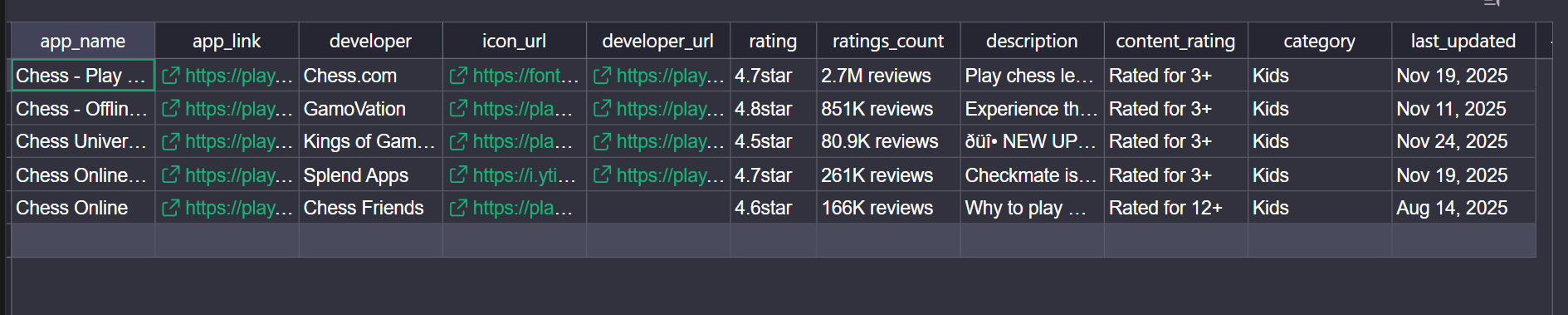
As for the review data, it looks like this:
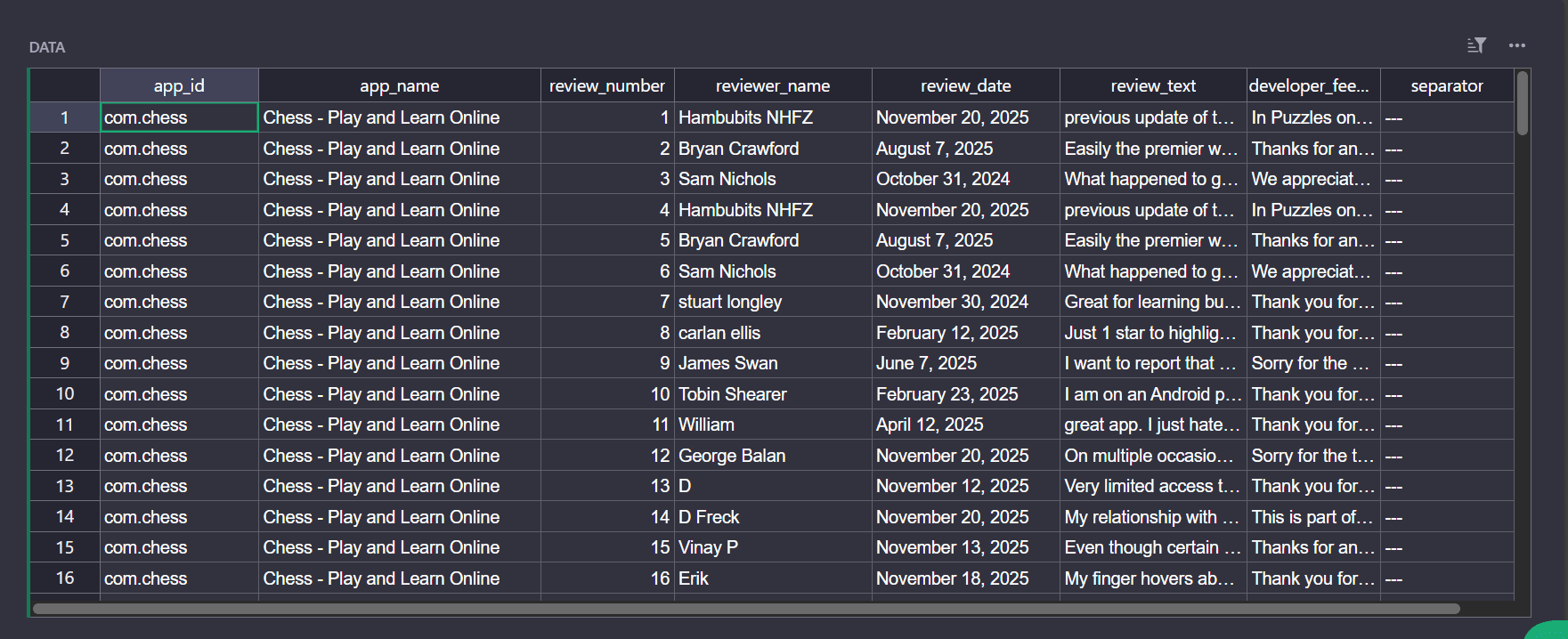
Compared to the basic scraper, the difference shows up immediately. The search step discovers more apps, and the detail step pulls hundreds of reviews per app instead of stopping at three.
Congratulations! 🎉 You just scraped real Google Play apps and reviews using Python and ZenRows. You now have a reliable way to pull structured store data into your own analyses and workflows.
Conclusion
The basic Google Play scraper breaks as soon as reviews move into pop-up windows, content depends on JavaScript, and Google Play starts responding with CAPTCHA or 4xx errors. A ZenRows-based scraper keeps the same Python structure but runs a real browser behind a single API call, scrolls the review window, and routes traffic through residential proxies so you get consistent app and review data instead of partial snapshots.
From here, you can swap the search query, schedule runs, or plug the output into dashboards and models while ZenRows handles the scraping infrastructure layer in the background.
Try ZenRows for free and start pulling Google Play app and review data into your projects today.
FAQ
Why does my scraper fail to get Google Play data?
Google Play is a single-page app. Most of its content travels in background JSON calls with Protobuf encoding, built into the DOM only after JavaScript runs. Static HTML parsing captures just the frame. You need JavaScript rendering to see what users see.
ZenRows' Universal Scraper API handles this automatically with the JavaScript Rendering feature.
How does ZenRows handle Google Play's anti-bot protection?
ZenRows combines residential proxy rotation across 190+ countries, automatic CAPTCHA handling, fingerprint management to simulate genuine browser behavior, IP auto-rotation, and more. This layered approach bypasses rate limits and detection mechanisms that block traditional scrapers.
Why do my Google Play CSS selectors stop working?
Google Play frequently updates its DOM structure and class names. Selectors that worked previously may become invalid when the page changes. Periodically inspect the target page using your browser's DevTools and update your selectors accordingly.