
How to Rotate Proxies in Selenium Python: 2026 Tutorial
Learn how to implement proxy rotation in Selenium Python to enhance your scraping strategies and bypass IP bans effortlessly.

Web scrapers that send too many requests from a single IP address get blocked quickly. Rotating proxies solves this by cycling through different IP addresses, making your requests appear to come from different users.
In this tutorial, you'll learn how to implement proxy rotation in Selenium Python, including how to handle authenticated premium proxies.
Use Selenium Wire to rotate proxies in Selenium Python. Install it with
pip install selenium-wire blinker==1.7.0 pyOpenSSL==22.1.0, build a proxy list, and switch proxies by updating thedriver.proxybetween requests. For premium authenticated proxies, pass credentials directly in the proxy URL. For a managed solution that automatically handles rotation, use a premium residential proxy service with built-in auto-rotation.— TL;DR
Why You Need to Rotate Proxies for Web Scraping
Rotating proxies allows you to actually use a different IP address for each request during your scraping. While you can use a single static proxy, the bad side is that it sticks to a single IP and will eventually get you blocked.
Proxy rotation is critical when web scraping with Selenium since it routes your request through different IPs, improving your chances of bypassing anti-bots and IP bans.
Related: How to Bypass IP Ban When Scraping in 2026
You'll see how to rotate proxies in the next section. Before that, you should visit our tutorial on setting up a single proxy in Selenium.
Skip the blocks. Try Zenrows free and get clean web data without the anti-bot fight.
How to Rotate Proxies in Selenium Python
Selenium supports basic proxy configuration natively, but most real-world proxies, including premium residential proxies, require authentication, which Selenium doesn't handle natively. But there's an extension called Selenium Wire that simplifies it. So we'll use it throughout this tutorial.
Although this library is no longer actively maintained, it's the most valid option for Selenium proxy rotation in Python. Selenium Wire also requires blinker 1.7 and pyOpenSSL to function properly with recent Python versions.
So, before moving on to the steps, install Selenium Wire and the supporting libraries using pip. This also installs vanilla Selenium:
pip3 install selenium-wire blinker==1.7.0 pyOpenSSL==22.1.0
Now, let's get started with proxy rotation with Selenium Wire.
Step 1: Build Your Script With Selenium Wire
Selenium Wire has the same syntax as the vanilla version. Let's see the code to set it up.
First, import the WebDriver and selector classes from Selenium Wire and set up a driver instance:
# pip3 install selenium-wire blinker==1.7.0 pyOpenSSL==22.1.0
from seleniumwire import webdriver
from selenium.webdriver.common.by import By

# set up a driver instance
driver = webdriver.Chrome()
Next, send a request to https://httpbin.io/ip and obtain the body element text to view your default IP address:
# ...

# send a request to view your current IP address
driver.get('https://httpbin.io/ip')

ip_address = driver.find_element(By.TAG_NAME, 'body').text

# print the IP address
print(ip_address)
Merge the snippets, and your final code should look like this:
# pip3 install selenium-wire blinker==1.7.0 pyOpenSSL==22.1.0
from seleniumwire import webdriver
from selenium.webdriver.common.by import By

# set up a driver instance
driver = webdriver.Chrome()

# send a request to view your current IP address
driver.get('https://httpbin.io/ip')

ip_address = driver.find_element(By.TAG_NAME, 'body').text

# print the IP address
print(ip_address)
The code outputs the current IP address, as shown:
{
  "origin": "101.118.0.XXX:YYY"
}
Nicely done! You just learned how to set up Selenium Wire. Next, let's get a list of proxies to rotate.
Step 2: Get a proxy list
The next step is to create a proxy list. Grab some free ones from the Free Proxy List and add them as an array in your scraper file, as shown below:
# create a proxy array
proxy_list = [
    {'http': '103.160.150.251:8080', 'https': '103.160.150.251:8080'},
    {'http': '38.65.174.129:80', 'https': '38.65.174.129:80'},
    {'http': '46.105.50.251:3128', 'https': '46.105.50.251:3128'},
    {'http': '103.23.199.24:8080', 'https': '103.23.199.24:8080'},
    {'http': '223.205.32.121:8080', 'https': '103.23.199.24:8080'}
]
You'll rotate these proxies in the next section.
Info
These proxies will likely not work at the time of reading because they're free and unreliable.
Step 3: Implement and Test Proxy Rotation
Rotating your proxies is easy once you have your proxy list. Selenium Wire is handy here because it lets you reload the target web page with a different IP address while the browser instance runs.
Let's rotate the previous proxies to see how that works.
Import the required libraries and add your proxy list to your scraper file:
# pip3 install selenium-wire blinker==1.7.0 pyOpenSSL==22.1.0
from seleniumwire import webdriver
from selenium.webdriver.common.by import By

# create a proxy array
proxy_list = [
    {"http": "http://103.160.150.251:8080", "https": "https://103.160.150.251:8080"},
    {"http": "http://38.65.174.129:80", "https": "https://38.65.174.129:80"},
    {"http": "http://46.105.50.251:3128", "https": "https://46.105.50.251:3128"},
]
Next, initiate a browser instance with the first proxy on your list by pointing to its index using the options parameter. Send your first request with that proxy and print your current IP address from the body element:
# ...

# initiate the driver instance with the first proxy
driver = webdriver.Chrome(seleniumwire_options= {
    'proxy': proxy_list[0],
    })

# visit a website to trigger a request
driver.get('https://httpbin.io/ip')

# get proxy value element
ip = driver.find_element(By.TAG_NAME, 'body').text

# print the current IP address
print(ip)
Switch to the second proxy by setting the driver.proxy value on the first index. This switches to the second proxy on the list. Repeat your request to use the new proxy:
# ...

# switch to the second proxy:
driver.proxy = proxy_list[1]

# reload the page with the same instance
driver.get('https://httpbin.io/ip')

# get proxy value element
ip2 = driver.find_element(By.TAG_NAME, 'body').text

# print the second IP address
print(ip2)
Now, call the third proxy from its index, and reload the website to view the IP address and quit the browser:
# ...

# switch to the third proxy:
driver.proxy = proxy_list[2]

# reload the page with the same instance
driver.get('https://httpbin.io/ip')

# get proxy value element
ip3 = driver.find_element(By.TAG_NAME, 'body').text

print(ip3)

driver.quit()
Put it all together, and your final code should look like this:
pip3 install selenium-wire blinker==1.7.0 pyOpenSSL==22.1.0
from seleniumwire import webdriver
from selenium.webdriver.common.by import By

# create a proxy array
proxy_list = [
    {"http": "http://103.160.150.251:8080", "https": "https://103.160.150.251:8080"},
    {"http": "http://38.65.174.129:80", "https": "https://38.65.174.129:80"},
    {"http": "http://46.105.50.251:3128", "https": "https://46.105.50.251:3128"},
]

driver = webdriver.Chrome(seleniumwire_options= {
    'proxy': proxy_list[0],
    })

# visit a website to trigger a request
driver.get('https://httpbin.io/ip')

# get proxy value element
ip = driver.find_element(By.TAG_NAME, 'body').text

# print the current IP address
print(ip)

# switch to the second proxy:
driver.proxy = proxy_list[1]

# reload the page with the same instance
driver.get('https://httpbin.io/ip')

# get proxy value element
ip2 = driver.find_element(By.TAG_NAME, 'body').text

# print the second IP address
print(ip2)

# switch to the third proxy:
driver.proxy = proxy_list[2]

# reload the page with the same instance
driver.get('https://httpbin.io/ip')

# get proxy value element
ip3 = driver.find_element(By.TAG_NAME, 'body').text

# print the second IP address
print(ip3)

driver.quit()
The code rotates the proxies and outputs a different IP address per page reload based on the list index:
{
  "origin": "103.160.150.251:8080"
}

{
  "origin": "38.65.174.129:3128"
}

{
  "origin": "46.105.50.251:8888"
}
Good job! Your scraper now rotates proxies manually. Let's see a case where your chosen proxy requires authentication.
Step 4: Adding Proxy Authentication
Free proxies won't work long-term for your scraper. The best option is to use premium web scraping proxies for a higher success rate.
Premium proxies require authentication to boost security and reliability. Let's modify the previous script to see how proxy authentication works.
Warning
Selenium Wire was archived in January 2024 and may break with future Python updates. If you prefer an actively maintained alternative, SeleniumBase natively supports authenticated proxy rotation.
First, create a list of premium proxy services and configure them in a list. Each service usually takes a username and a password, depending on the authentication requirements.
Ensure you replace the
# pip3 install selenium-wire blinker==1.7.0 pyOpenSSL==22.1.0
from seleniumwire import webdriver
from selenium.webdriver.common.by import By

# create a proxy list and add your authentication credentials
proxy_list = [
    {
        'http': 'http://<YOUR_USERNAME>:<YOUR_PASSWORD>@192.168.10.100:8001',
        'https': 'https://<YOUR_USERNAME>:<YOUR_PASSWORD>@192.168.10.100:8001'
    },

    {
        'http': 'http://<YOUR_USERNAME>:<YOUR_PASSWORD>@134.796.13.101:8888',
        'https': 'https://<YOUR_USERNAME>:<YOUR_PASSWORD>@145.796.13.101:8888',
    },

    # ... more proxies
]
Now, rotate the proxies in your code:
# ...

driver = webdriver.Chrome(seleniumwire_options= {
    'proxy': proxy_list[0],
    })

# visit a website to trigger a request
driver.get('https://httpbin.io/ip')

# get proxy value element
ip = driver.find_element(By.TAG_NAME, 'body').text

# print the current IP address
print(ip)

# switch to the second proxy:
driver.proxy = proxy_list[1]

# reload the page with the same instance
driver.get('https://httpbin.io/ip')

# get proxy value element
ip2 = driver.find_element(By.TAG_NAME, 'body').text

# print the second IP address
print(ip2)

driver.quit()
Here's the final code:
# import the required libraries
from seleniumwire import webdriver
from selenium.webdriver.common.by import By

# create a proxy list and add your authentication credentials
proxy_list = [
    {
        'http': 'http://<YOUR_USERNAME>:<YOUR_PASSWORD>@192.168.10.100:8001',
        'https': 'https://<YOUR_USERNAME>:<YOUR_PASSWORD>@192.168.10.100:8001'
    },

    {
        'http': 'http://<YOUR_USERNAME>:<YOUR_PASSWORD>@134.796.13.101:8888',
        'https': 'https://<YOUR_USERNAME>:<YOUR_PASSWORD>@145.796.13.101:8888',
    },

    # ... more proxies
]

driver = webdriver.Chrome(seleniumwire_options= {
    'proxy': proxy_list[0],
    })

# visit a website to trigger a request
driver.get('https://httpbin.io/ip')

# get proxy value element
ip = driver.find_element(By.TAG_NAME, 'body').text

# print the current IP address
print(ip)

# switch to the second proxy:
driver.proxy = proxy_list[1]

# reload the page with the same instance
driver.get('https://httpbin.io/ip')

# get proxy value element
ip2 = driver.find_element(By.TAG_NAME, 'body').text

# print the second IP address
print(ip2)

driver.quit()
The code above will authenticate and route your requests through your proxy services. However, proxy management is often challenging while scaling up. How can you deal with that?
Premium Proxy to Avoid Getting Blocked
Free proxies are problematic for scraping tasks. Their inconsistent performance, security vulnerabilities, and poor IP reputation make them unsuitable for professional web scraping. These proxies frequently get flagged and blocked by websites, which can disrupt your workflow.
Premium proxies offer a superior solution for avoiding detection. By utilizing residential IPs from real users, premium proxies can authentically replicate user traffic patterns. Advanced features such as IP rotation and location targeting make them particularly effective for Selenium-based web scraping.
ZenRows' Residential Proxies is a top-tier premium proxy service, providing access to an extensive network of 55M+ residential IPs across more than 185 countries. With capabilities including dynamic IP rotation, intelligent proxy selection, and customizable geo-targeting, all backed by 99.9% network reliability, it's an excellent choice for scraping projects.
Let's see how to integrate ZenRows' Residential Proxies with Selenium Python using selenium-wire.
First, sign up, and you'll get redirected to the Proxy Generator dashboard. Your proxy credentials will be generated automatically.
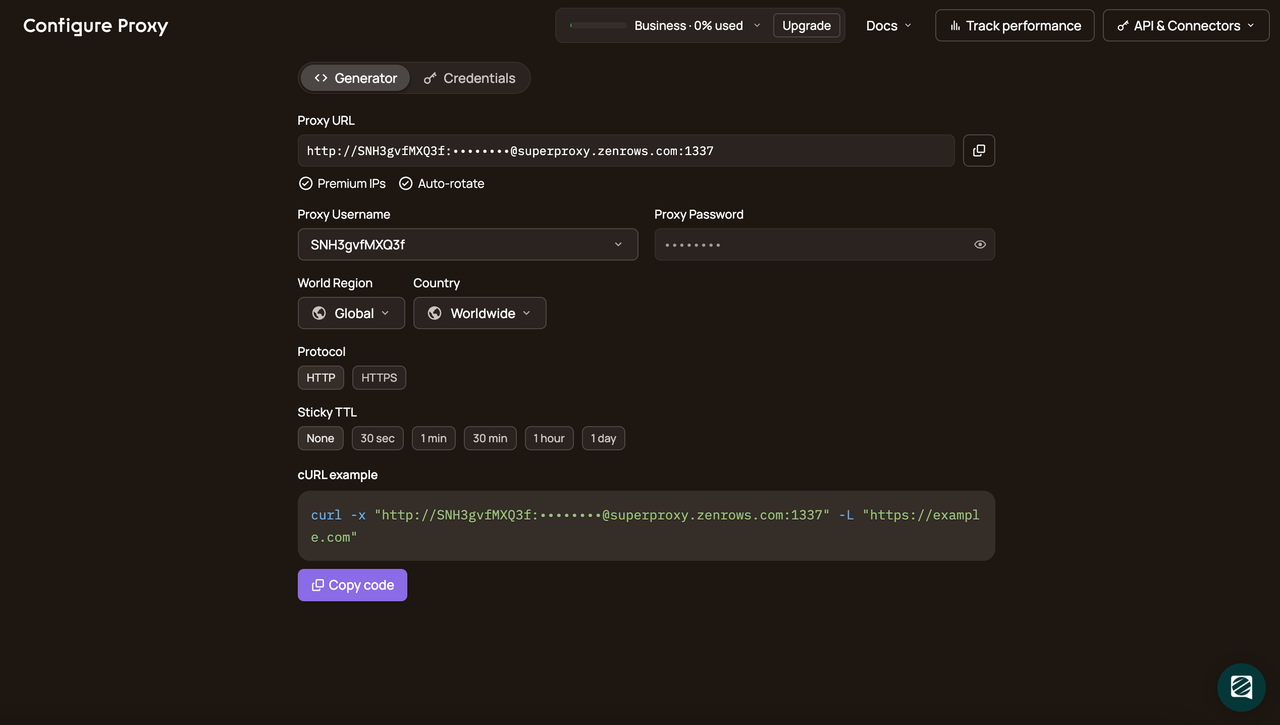
Copy your proxy credentials (username and password) and use them in the following code:
from seleniumwire import webdriver
from selenium.webdriver.chrome.service import Service
from webdriver_manager.chrome import ChromeDriverManager
from selenium.webdriver.chrome.options import Options
from selenium.webdriver.common.by import By

# configure the proxy
proxy_username = "<ZENROWS_PROXY_USERNAME>"
proxy_password = "<ZENROWS_PROXY_PASSWORD>"
proxy_address = "superproxy.zenrows.com"
proxy_port = "1337"

# formulate the proxy url with authentication
proxy_url = f"http://{proxy_username}:{proxy_password}@{proxy_address}:{proxy_port}"

# set selenium-wire options to use the proxy
seleniumwire_options = {
    "proxy": {"http": proxy_url, "https": proxy_url},
}

# set Chrome options to run in headless mode
options = Options()
options.add_argument("--headless=new")

# initialize the Chrome driver with service, selenium-wire options, and chrome options
driver = webdriver.Chrome(
    service=Service(ChromeDriverManager().install()),
    seleniumwire_options=seleniumwire_options,
    options=options,
)

# navigate to the target webpage
driver.get("https://httpbin.io/ip")

# print the body content of the target webpage
print(driver.find_element(By.TAG_NAME, "body").text)

# release the resources and close the browser
driver.quit()
When you run this script multiple times, you'll see output similar to this:
# request 1
{
  "origin": "156.146.35.212:31890"
}
# request 2
{
    "origin": "45.155.68.129:8118"
}
Congratulations! The different IP addresses in the output confirm that your script is successfully routing through ZenRows' residential proxy network.
Conclusion
In this article, you've learned how to rotate proxies in Selenium. Here's a summary of what you now know:
- Step-by-step guide on how to rotate free proxies from a custom list.
- How to handle proxy services that require authentication.
- Managing premium proxy rotation with web scraping solutions.
Find out more about our rotating IP proxy.
Feel free to keep honing your web scraping skills with more examples. Remember that many websites employ different anti-bot strategies. Bypass them all with ZenRows, an all-in-one web scraping solution. Try ZenRows for free now or speak with sales!