
How to Bypass IP Ban When Scraping in 2026
Learn why your IP address is being banned during scraping and how to avoid it. Scale your scraping operations without getting blocked.
An IP ban rarely shows up at the start of a scraping operation. It occurs right in the middle of your scraping runs, and pages that worked a minute ago start returning 403 Forbidden, 429 Too Many Requests, or a block page instead of the data you need. From there, the success rate drops, retries spike, and your scraper fails before you finish collecting the dataset.
This article will guide you on how to bypass IP bans successfully while scraping.
Why Scrapers Get IP-Blocked
Sites use automated filters that watch request volume, traffic patterns, and where the traffic comes from. When your requests cross a limit, the site starts throttling, challenging, or blocking the IP. These blocks are often temporary at first, but repeated triggers can escalate into permanent bans for the IP or even the IP range. Here are key reasons your IP is getting banned:
Rate Limits
Sites cap how many requests an IP can send in a time window. When you cross that limit, you often see 429 Too Many Requests, and responses may include Retry-After to indicate when you can try again.
Bot And Anomaly Detection
Some defenses don’t wait for high volume. They identify automation using browser integrity checks, such as browser fingerprinting, behavioral patterns, and more. They then respond with challenges or blocks when the traffic looks non-human.
IP Reputation
Some sites initiate bans based solely on the IP range. This happens when the range is linked to abuse, which is common with shared proxies and some data center networks. Reputation signals can include threat intelligence feeds and public datasets such as the Spamhaus Blocklist.
Geo-restrictions
Some targets deny access based on the country or region inferred from your IP address. This is often enforced before your request reaches the site’s backend, and it can show up as redirects, blocked pages, or consistent denials when you request the same URLs from the wrong location.
Skip the blocks. Try Zenrows free and get clean web data without the anti-bot fight.
How to Bypass an IP Ban While Web Scraping
You can get past IP bans in two ways. You can build the defenses into your own scraper and keep adjusting them as targets change. Or you can use a web scraping API that automatically bypasses IP bans for you behind a single endpoint.
Related: Bypass Rate Limit While Web Scraping Like a Pro
A self-managed setup can work for small scraping projects, but it becomes ongoing work and unreliable once you’re scraping at scale. Here are ways you can bypass IP bans during scraping:
1. Use Rotating Proxies for IP Ban Bypass
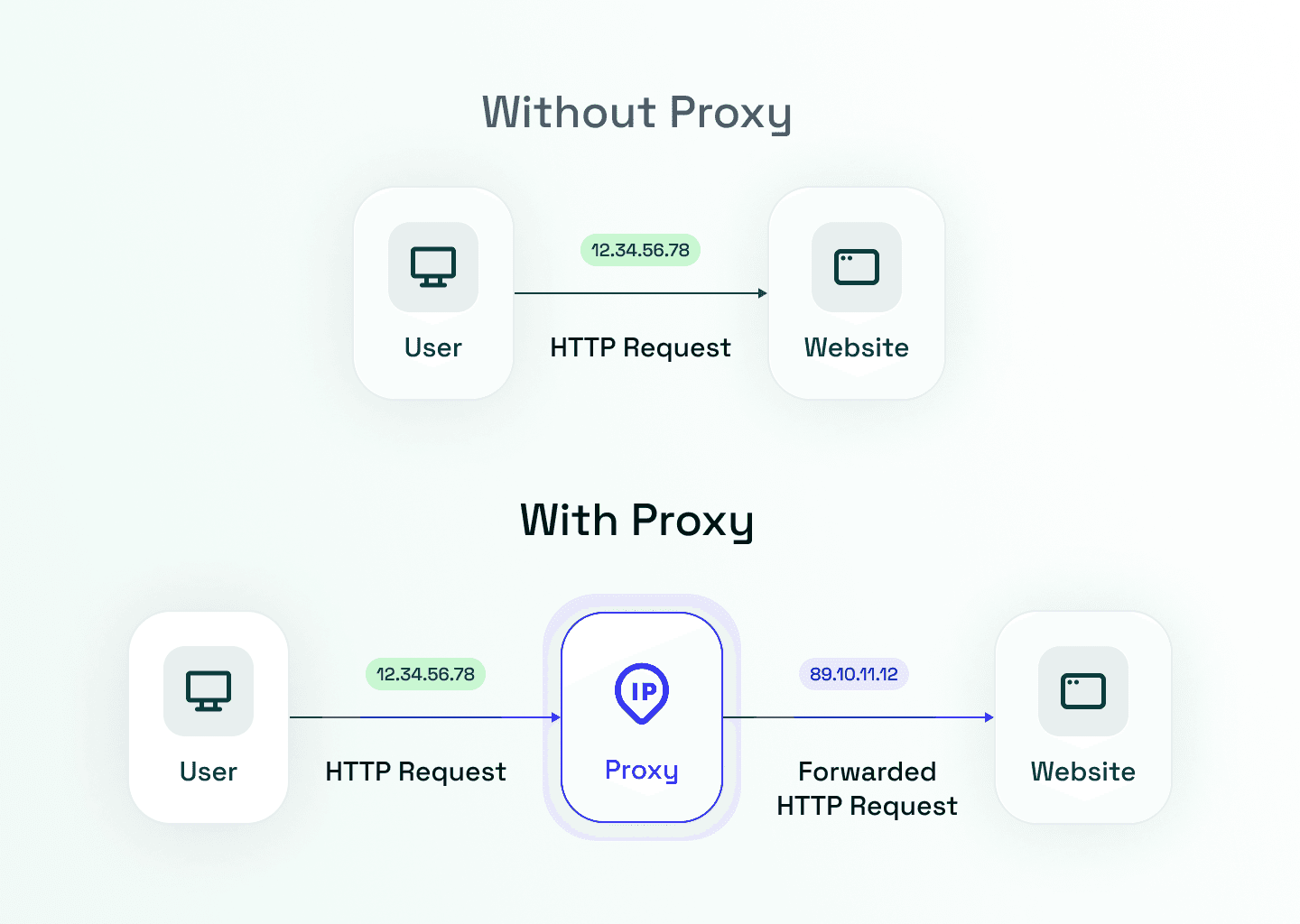
Rotating proxies help when IP bans are triggered by a single IP sending too many requests. If you’re crawling independent pages, you should rotate IPs per request so each page comes from a different exit IP address. If you need to persist a session with cookies, keep the same IP for that session using a sticky session, then rotate when the session ends.
Keep in mind that proxy rotation works best if your pool is large enough to handle your request rate. If you cycle through a small pool too fast, you’ll hit per-IP limits and start seeing blocks again. Track failures per exit IP and remove IPs that start returning 403, 429, or block pages so your retries aren’t wasted on burned exits.
Let’s see how you can rotate proxies using a simple IP check request. Download a proxy list and save it as proxies.txt with one IP:PORT per line.
Note
These are free proxies and may not work at the time of reading. For real scraping operations, use premium residential proxies instead.
# pip3 install requests
import requests
from itertools import cycle

URL = "https://httpbin.io/ip"
TIMEOUT = 15

# proxies.txt format (one per line):
proxies_list = open("proxies.txt", "r", encoding="utf-8").read().splitlines()
proxy_pool = cycle([p.strip() for p in proxies_list if p.strip()])

for _ in range(4):
    proxy = next(proxy_pool)
    proxies = {"http": f"http://{proxy}", "https": f"http://{proxy}"}

    try:
        r = requests.get(URL, proxies=proxies, timeout=TIMEOUT)
        r.raise_for_status()
        print(r.text)
    except requests.RequestException as e:
        print(f"Proxy failed ({proxy}): {e}")
This script reads your proxy list, then uses cycle() to loop through proxies one by one. Each iteration sends a request to httpbin.io/ip using a different IP, confirming that rotation is working. If a proxy is dead, slow, or blocked, the request throws an error, and the script prints a failure message, then moves on to the next proxy.
Here are sample results from running the code above.
{
    "origin": "195.158.8.123:3128"
}
{
    "origin": "156.246.90.81:80"
}
{
    "origin": "82.115.60.51:80"
}
That’s it. The origin is changing on each request, so you’re now rotating proxies.
2. Slow Down Requests and Handle Rate Limits
Most IP bans start as throttling. If you keep sending the same volume, the site escalates from 429 Too Many Requests to blocks. To avoid that, you should control concurrency per domain and slow down the request frequency.
Set a per-domain concurrency limit to prevent a single site from receiving too many parallel requests. Back off with exponential delays and add jitter so your request retries do not line up. If the response includes Retry-After, wait that long. Also, cap retries per URL and add a cooldown for URLs that keep failing, so you do not exhaust your proxy pool.
Deduplicate URLs before you crawl, then cache stable pages so you do not re-fetch the same content in the same run. Even a basic in-memory cache can significantly reduce traffic during retry-heavy crawls.
Let’s hit Cloudflare’s rate limit test page until it returns a throttle or IP ban response. When that happens, we'll pause for a specified time instead of retrying. This will help stop throttling from escalating into a longer IP ban. After the cooldown, we'll send one more request to confirm access is restored.
import time
import requests

# target page (swap this for any site you're testing)
url = "https://www.cloudflare.com/rate-limit-test/"

# request pacing (tune these per site)
max_requests = 20            # how many requests to try before stopping
seconds_between = 1          # spacing between requests
cooldown_seconds = 65        # fallback cooldown if retry-after is missing

s = requests.Session()

for i in range(1, max_requests + 1):
    r = s.get(url, timeout=30)
    code = r.status_code
    print(f"req {i}/{max_requests} -> {code}")

    # throttle or IP ban signals -> cool down, then stop
    if code in (429, 403, 503):
        ra = r.headers.get("Retry-After", "")
        wait = int(ra) if ra.isdigit() else cooldown_seconds
        print(f"{code} received. cooling down {wait}s")
        time.sleep(wait)
        break

    time.sleep(seconds_between)

# confirm the site accepts requests again
r = s.get(url, timeout=30)
print("after cooldown ->", r.status_code)
Here are sample results when you run the code.
req 1/20 -> 200
<!--omitted for brevity -->
req 12/20 -> 200
req 13/20 -> 429
429 received. cooling down 64s
after cooldown -> 200
As you can see, the cooldown enabled your IP to fall back under the limit, so the final request succeeded with 200.
3. Keep Sessions and Request Profiles Consistent
Many sites don’t just look at IP. They check whether your requests behave as a single continuous browser session. If your identity changes in the middle of a flow, your request can trigger suspicion and get banned..
Persist cookies for each session and reuse them across related requests. Keep headers and user agent stable within that same session so the fingerprint doesn’t shift from one request to the next. If you need to rotate identity, do it in batches, not in the middle of pagination, login, or “list then detail” flows. If the site ties state to both IP and cookies, use sticky sessions so the IP stays stable while the cookie jar stays consistent.
Here’s an example that uses requests.Session() to keep cookies and the User-Agent consistent across related requests. It then starts a new session to rotate identity.
import requests
from uuid import uuid4

base = "https://httpbin.org"

def run_batch(user_agent: str):
    # create a session so cookies persist across related requests
    s = requests.Session()

    # keep the user agent stable within this session
    s.headers.update({"User-Agent": user_agent})

    # set a session cookie to simulate a stateful flow
    sid = uuid4().hex[:8]
    s.get(f"{base}/cookies/set?sid={sid}", allow_redirects=True, timeout=30).raise_for_status()

    # confirm the same cookie is sent back on the next request
    data = s.get(f"{base}/cookies", timeout=30).json()
    jar = data.get("cookies", data)

    # confirm the same user agent is sent on the next request
    headers = s.get(f"{base}/headers", timeout=30).json().get("headers", {})

    print("sid cookie:", jar.get("sid"))
    print("user-agent:", headers.get("User-Agent"))

# batch 1: one identity (cookies + headers) reused across the flow
run_batch("UA-batch-1")

# batch 2: rotate identity by starting a new session
run_batch("UA-batch-2")
Here are sample results from running the code:
sid cookie: c51f0894
user-agent: UA-batch-1
sid cookie: 2cb738a0
user-agent: UA-batch-2
The output confirms that each session keeps the same cookie and user agent, and a new session creates a new identity.
4. Choose the Right Proxy Type for the Target
Proxy rotation won’t help if the target blocks the type of IPs you’re using. Many sites filter known data center networks early, so you can get banned on the first request, even when your request rate is low. When you see instant 403 responses or a block page right away, your proxy type is usually the issue.
Switch from data center IPs to residential IPs when the target filters server ranges early. Residential IPs come from internet service provider (ISP) ranges and survive stricter IP-range filtering, especially on sites that are aggressive about blocking automation.
If the site is sensitive to location, keep your IP geolocation consistent. Scraping the same pages from different countries can change content, pricing, and even access rules, and it can also look suspicious.
Finally, avoid reusing a small set of subnets across many projects. IP bans often apply to IP ranges, not just single IPs. A pool that appears large but spans a few repeated subnets will degrade quickly once those ranges are flagged.
5. Recommended: Use a Web Scraping API
A web scraping API effortlessly manages IP ban bypassing at scale, so you don’t have to worry about it. Instead of wiring together proxies, IP rotation rules, session logic, and a rendering layer, you only send the target URL to a single endpoint and obtain the data you need without being blocked.
One of the best web scraping APIs is the ZenRows Universal Scraper API. It is an all-in-one solution for web scraping at scale without an IP ban. It bundles premium IP routing, proxy rotation, session handling, JavaScript rendering, and more into a single endpoint to bypass all anti-bot measures.
Let's see how it handles Zillow, a real estate site that aggressively blocks and bans IP addresses of scrapers.
To use it, sign up for ZenRows. Then, navigate to the request builder and paste Zillow's Condo search URL as your target. Turn on Adaptive Stealth Mode. This lets ZenRows decide when to use JavaScript rendering and Premium Proxies. It aims for the cheapest combination that keeps your success rate high, and you only pay for what’s actually used.
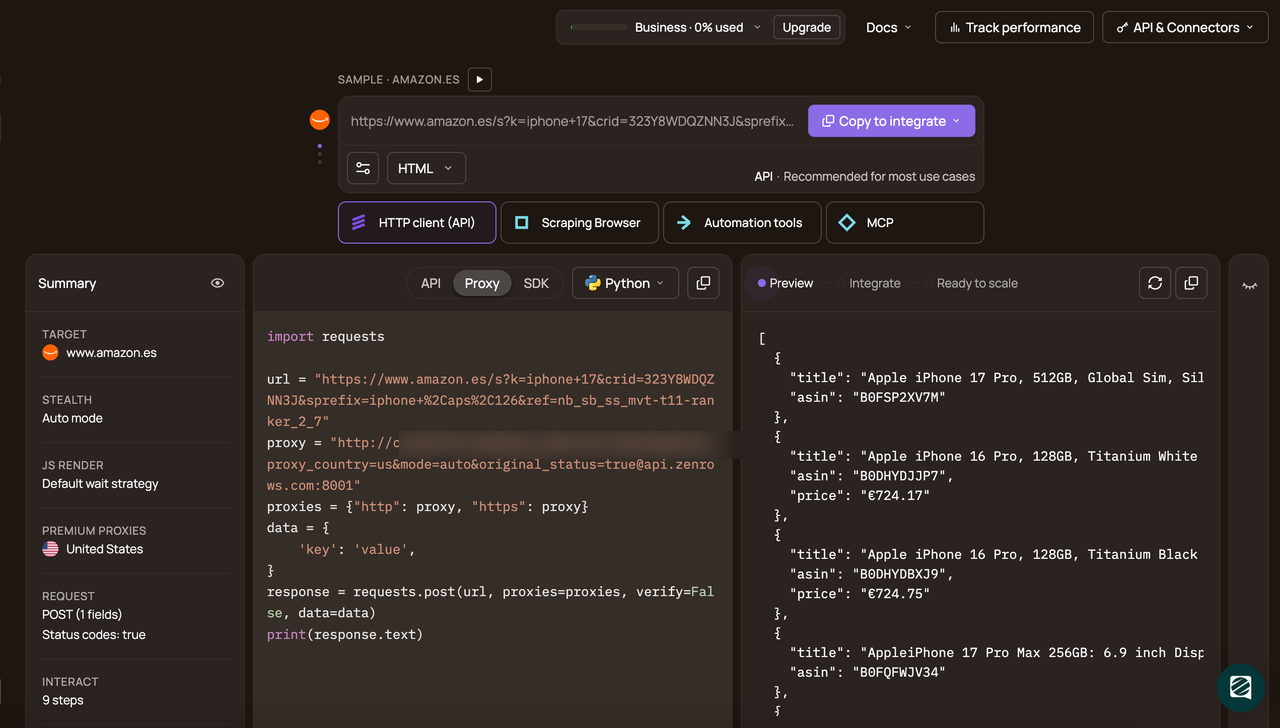
Then, pick Python as your programming language and select the API connection mode. Copy the generated code and paste it into your scraper script.
Before running the code, install requests first.
pip3 install requests
Then paste and run the generated code.
# pip install requests
import requests

url = 'https://www.zillow.com/us/condos/'
apikey = '<YOUR_ZENROWS_API_KEY>'
params = {
    'url': url,
    'apikey': apikey,
    'mode': 'auto',
}
response = requests.get('https://api.zenrows.com/v1/', params=params)
print(response.text)
When you run the code, the results are as shown:
<!--ommitted for brevity-->
<ul class="property-list">
  <li class="property" data-zpid="43122766">
    <a class="property-link" href="/homedetails/43122766_zpid/">
      <span class="address">3233 NE 34th St #1517, Fort Lauderdale, FL 33308</span>
      <span class="price">$344,900</span>
    </a>
  </li>

  <!--ommitted for brevity-->

  <li class="property" data-zpid="63695625">
    <a class="property-link" href="/homedetails/63695625_zpid/">
      <span class="address">3040 N Sheffield Ave APT 2, Chicago, IL 60657</span>
      <span class="price">$575,000</span>
    </a>
  </li>
</ul>
<!--rest of output omitted for brevity-->
Congratulations. 🎉 You just scraped a heavily anti-bot-protected page without dealing with proxies, sessions, or browser rendering.
Why Self-Managed Proxy Stacks Break Down at Scale
A self-managed proxy setup can work for a single site and a small crawl. At scale, proxy pool sourcing and health tracking stop being a one-time task. You have to measure the success rate and latency and check whether the response contains real content. A proxy can return 200 with a block page or a stripped response. At scale, you’re constantly retiring bad exits and replacing them.
Rotation logic becomes more complex once your crawl has a state. Pagination, list-to-detail flows, and logins often require cookies to stay stable. That pushes you into sticky sessions for parts of the crawl, then rotation between flows. Doing that across many targets with different session rules becomes a lot of tuning.
JavaScript and challenge pages force you to add a rendering layer. Browser rendering uses more CPU and memory than plain HTTP requests, so throughput drops and costs rise. Debugging also slows down because you have to inspect rendered output and browser behavior, not just status codes. Targets change, so you keep revisiting those settings.
Finally, proxy pools decay over time. IPs get banned, and subnets get flagged, so success rates drop. Retries increase, which pushes more traffic into the same limits. To keep output stable, you have to replenish the pool and keep adjusting cooldown and rotation rules.
If you’re hitting these issues often, use a web scraping API. It shifts the proxy and anti-bot maintenance off your side, so you can focus on extracting and storing the data.
Conclusion
In this guide, you’ve learned how to bypass IP bans by controlling request rate, rotating IPs with the right session model, and keeping sessions consistent. You’ve also learned how a self-managed setup works, and why it breaks at scale as targets change limits and tighten detection.
When you need reliable scraping at scale, the ZenRows Universal Scraper API is the simpler path because all anti-bots, including IP bans, are handled for you automatically behind a single endpoint.
Try ZenRows for free now or speak with sales!
FAQ
How long does an IP ban last during web scraping
An IP ban can last minutes, hours, or days, depending on the target and what triggered it. Use rotating proxies if you must keep scraping. If you’re scraping at scale, use ZenRows Universal Scraper API as it will automatically bypass the IP bans for you.
Does Changing the IP Address Always Bypass an IP Ban
No, because many sites also use cookies, request fingerprints, and behavior signals. When you change IPs, rotate the full identity and keep it consistent within a session.
When should you use sticky sessions vs rotating per request
Rotate per request when each page is independent and doesn’t rely on cookies. Use sticky sessions for logins, pagination, and list to detail flows where cookies must stay stable.
Why do scrapers still get blocked after proxy rotation
Because IP is only one signal, you can still hit rate limits, reputation blocks, or bot checks. To prevent blocks, slow down on 429 errors, cap retries, and keep headers and cookies consistent so your requests look like one session. If the site serves challenge pages, JS-heavy content, or still bans your scraper, use ZenRows with Javascript Rendering and Premium Proxies to automatically bypass the anti-bots.
When should you switch from datacenter to residential IPs
Switch when the datacenter IPs get blocked early, for example, you see 403 errors or a block page on the first requests. Switch also when the target is location-sensitive, and you need consistent geo access. With ZenRows, turn on premium_proxies for residential routing and set proxy_country when you need a specific region.