
How to Bypass Amazon CAPTCHA When Web Scraping
Learn to bypass Amazon CAPTCHA and scrape product information without limitations. Discover the best technique to achieve unbroken success at scale.
Scraping Amazon appears easy until you hit the CAPTCHA wall. If you rely on Amazon for pricing, catalog, review data, etc, but your scraping scripts keep hitting Amazon's CAPTCHA challenges, you’re in the right place.
This guide explains how to bypass Amazon CAPTCHA when scraping, so requests don’t get stuck on challenge pages. You’ll see why CAPTCHA appears, how a basic scraping request behaves under anti-bot checks, and what to change in your setup to build a reliable Amazon CAPTCHA bypass strategy that keeps your data pipeline running.
What Makes Amazon CAPTCHA Challenging to Bypass
Amazon doesn’t just look at your IP address. It builds browser fingerprints from HTTP request headers, JavaScript APIs exposed in the page, cookies, WebGL properties, time zone, and other signals.
For instance, a regular Selenium scraping setup exposes navigator.webdriver with unusual WebGL and browser runtime properties. This makes it easy for Amazon to classify as automated traffic.
Amazon also tracks session history and request patterns. When the same browser profile repeatedly hits similar URLs at a predictable pace, the likelihood of seeing a CAPTCHA or other anti-bot screen increases.
Instead of trying to solve every CAPTCHA manually, it's best to focus on reducing the number of automation signals so Amazon keeps serving the expected data rather than challenge screens.
In the next sections, you'll first see how a standard headless browser performs at scraping Amazon. You'll then see the methods to bypass it.
Skip the blocks. Try Zenrows free and get clean web data without the anti-bot fight.
Scrape an Amazon Page With a Headless Browser
When scraping Amazon, a common first approach is to use a headless browser such as Selenium, Playwright, or Puppeteer. In this guide, we will use Selenium to show how Amazon responds to a basic headless script and what needs to change for a more reliable setup.
First, install Selenium:
pip3 install selenium
Next, create a script that configures Chrome to run in headless mode and adds a simple User-Agent, so it appears more like a real browser. It then loads an Amazon search page and waits for it to finish loading. Finally, it prints the page title and URL and saves a screenshot of the rendered page as amazon_page.png so you can see exactly what the scraper received.
from selenium import webdriver
from selenium.webdriver.chrome.options import Options
import time

# configure Chrome options
chrome_options = Options()
chrome_options.add_argument("--headless=new")
chrome_options.add_argument("--disable-dev-shm-usage")

# set a basic User-Agent to appear more like a real browser
chrome_options.add_argument(
    "user-agent=Mozilla/5.0 (Windows NT 10.0; Win64; x64) "
    "AppleWebKit/537.36 (KHTML, like Gecko) "
    "Chrome/142.0.0.0 Safari/537.36"
)

# initialize the WebDriver
driver = webdriver.Chrome(options=chrome_options)

try:
    # target Amazon search page for keyboards
    url = "https://www.amazon.com/s?k=keyboards"

    # load the Amazon page
    driver.get(url)

    # wait for page to load/render
    time.sleep(3)

    # save a screenshot of whatever was loaded
    screenshot_path = "amazon_page.png"
    driver.save_screenshot(screenshot_path)
    print(f"Screenshot saved to: {screenshot_path}")

finally:
    driver.quit()
When you run the script on a clean home IP, the first screenshots often look fine. It's a regular search page for keyboards.
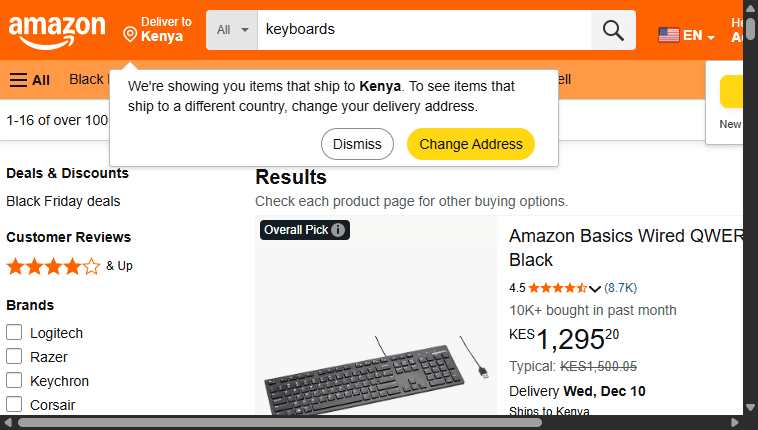
A single scraping (as done above) might not trigger a CAPTCHA. However, a real-life scraper that hits many URLs will eventually be routed to a challenge page, especially if it originates from a single IP address with known bot-like browser fingerprints.
Even if an error message like 403 forbidden doesn't appear in your output, you can still get a full-page CAPTCHA with a 200 response status, making the result vague and misleading.
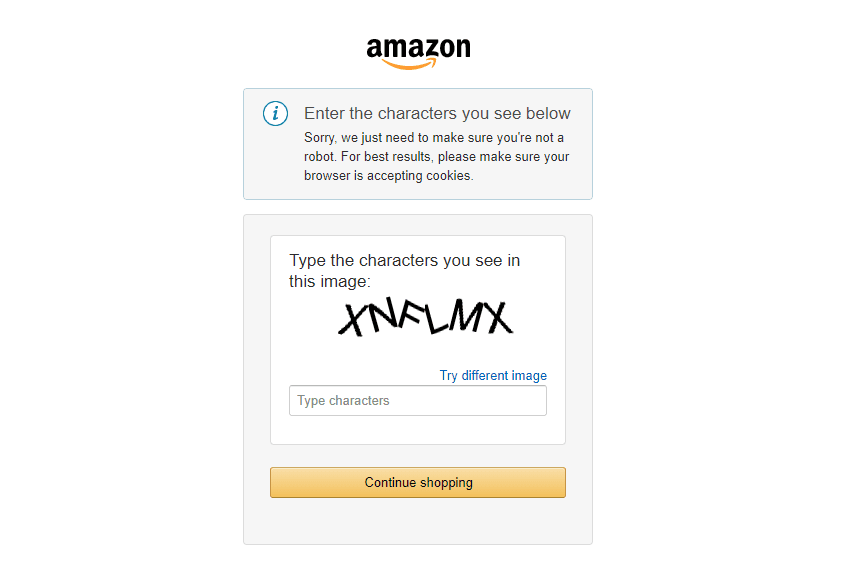
If you see the CAPTCHA above, Amazon has already determined that you're sending bot-like traffic from an automated tool. So, while a headless browser might appear as a basic solution, it isn’t enough to bypass Amazon CAPTCHA when scraping. You need more advanced methods to bypass it successfully.
You'll learn the tactics to bypass Amazon CAPTCHA in the next sections.
Method #1: Use a Stealth Browser to Bypass Amazon CAPTCHA
A stealth browser hides obvious automation signals of regular automation tools. It modifies bot-like parameters, such as WebDriver flags and predictable browser fingerprints. Instead of running Chrome in the default "controlled by automated test software" mode, a typical stealth tool adjusts how the browser instance is controlled.
A stealth browser patches parts of the JavaScript environment and tweaks request headers, window characteristics, hardware concurrency, and more. This way, anti-bot measures have a harder time classifying the session as a bot.
One effective stealth tool for Selenium is SeleniumBase with Undetected ChromeDriver. This tool is designed to make bots appear human and avoid anti-bot systems that trigger Amazon CAPTCHA.
Related: Web Scraping with SeleniumBase and Python in 2026
SeleniumBase uses techniques like masking WebDriver hooks and adjusting other browser fingerprints to bypass anti-bot checks. Tools like Scrapling and Camoufox follow a similar pattern, so you can choose any stealth tool that fits your setup.
In this section, we will use SeleniumBase.
First, install SeleniumBase using pip:
pip3 install seleniumbase
Then, adapt the earlier headless script to use SeleniumBase in UC Mode (uc=True) by replacing the plain Selenium webdriver.Chrome instance with the SeleniumBase SB context. This way, SeleniumBase handles installing and launching an Undetected ChromeDriver, opening pages in stealth mode and making your scraper less detectable.
from seleniumbase import SB

# use SeleniumBase with UC Mode (Undetected Chrome)
# incognito=True helps reduce stored-state fingerprints
with SB(uc=True, test=True, incognito=True, locale="en") as sb:
    # set a common window size for standard user fingerprint
    sb.set_window_size(width=1920, height=1080)

    # target Amazon search page for keyboards
    url = "https://www.amazon.com/s?k=keyboards"

    # stealthy page loading: disconnects chromeDriver during load, then reconnects
    sb.uc_open_with_reconnect(url, reconnect_time=4)

    # save screenshot of the loaded page
    sb.save_screenshot("amazon_products_uc_mode.png")
    print("Screenshot saved to: amazon_products_uc_mode.png")
The SB context with UC Mode starts Chrome in stealth mode. The incognito flag enables each browser context to run with a fresh profile. The English locale matches what Amazon expects for an English interface, and the 1920×1080 window size mimics a common desktop viewport, so the fingerprint looks more real.
The uc_open_with_reconnect call disconnects ChromeDriver while the page loads and reconnects after a delay. This reduces the constant DevTools control that many bot checks look for.
Instead of the Amazon CAPTCHA challenge that blocked the previous base Selenium script, this stealth setup is more likely to load the real search results, even with a few more requests. Here are the results when you run the above script.
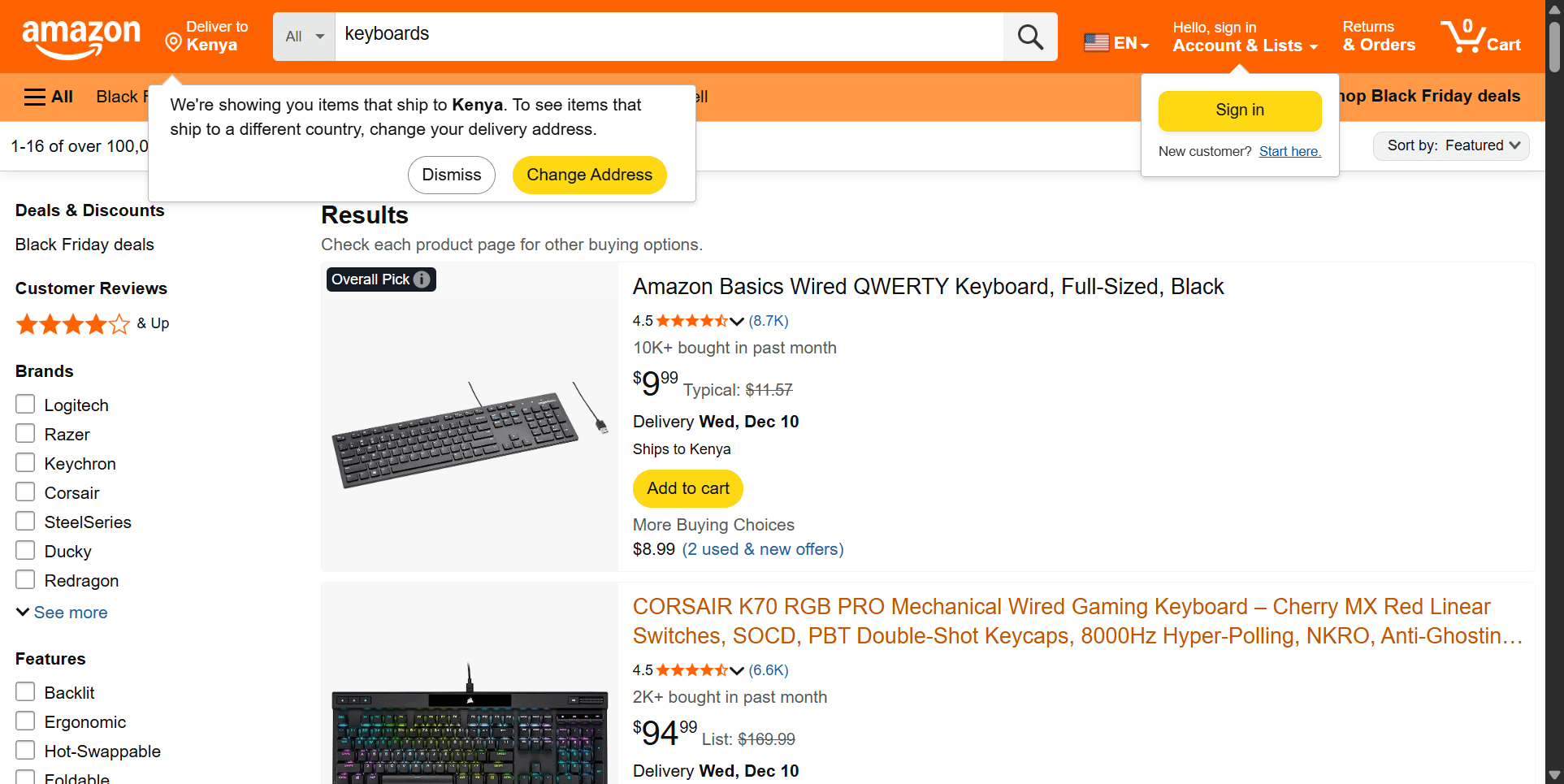
That said, stealth browsers are useful for small scraping jobs or low-volume requests where you don't intend to bypass Amazon CAPTCHA at scale. The real cost shows up when Amazon tightens its anti-bot checks, and you have to update fingerprint patches, browser scripts, and traffic patterns so the setup still looks like normal user traffic.
That overhead grows quickly in production, and even a well-tuned stealth browser won’t bypass every Amazon CAPTCHA. At this point, the better choice is to use web scraping APIs.
Method #2: Using a Web Scraping API to Bypass Amazon CAPTCHA
Web scraping APIs handle the heavy lifting of scraping, including running headless browsers, rotating IPs, retrying failed requests, handling anti-bot challenges, and more. You send a URL to an API endpoint and receive HTML or structured data. This means the Amazon CAPTCHA never reaches your code, because the API bypasses it under the hood.
ZenRows is one of the services built specifically for this kind of task. It runs full browsers with JavaScript enabled, routes traffic through premium proxies, and applies anti-bot techniques tailored to targets like Amazon. It exposes these services through the Universal Scraper API. You send an Amazon link, and the API handles JavaScript rendering and anti-bot bypass under the hood.
ZenRows' auto-scaled, auto-managed infrastructure lets you focus on data cleaning, fine-tuning, storage, and decision-making rather than wasting time and resources on debugging failed scraping requests.
To use it, sign up for ZenRows if you haven't already. Then, proceed to ZenRows' Universal Scraper API Request Builder. Paste your Amazon URL into the URL field. Enable JavaScript Rendering to load dynamic content, and turn on Premium Proxies to make requests more resilient against anti-bot and IP bans.
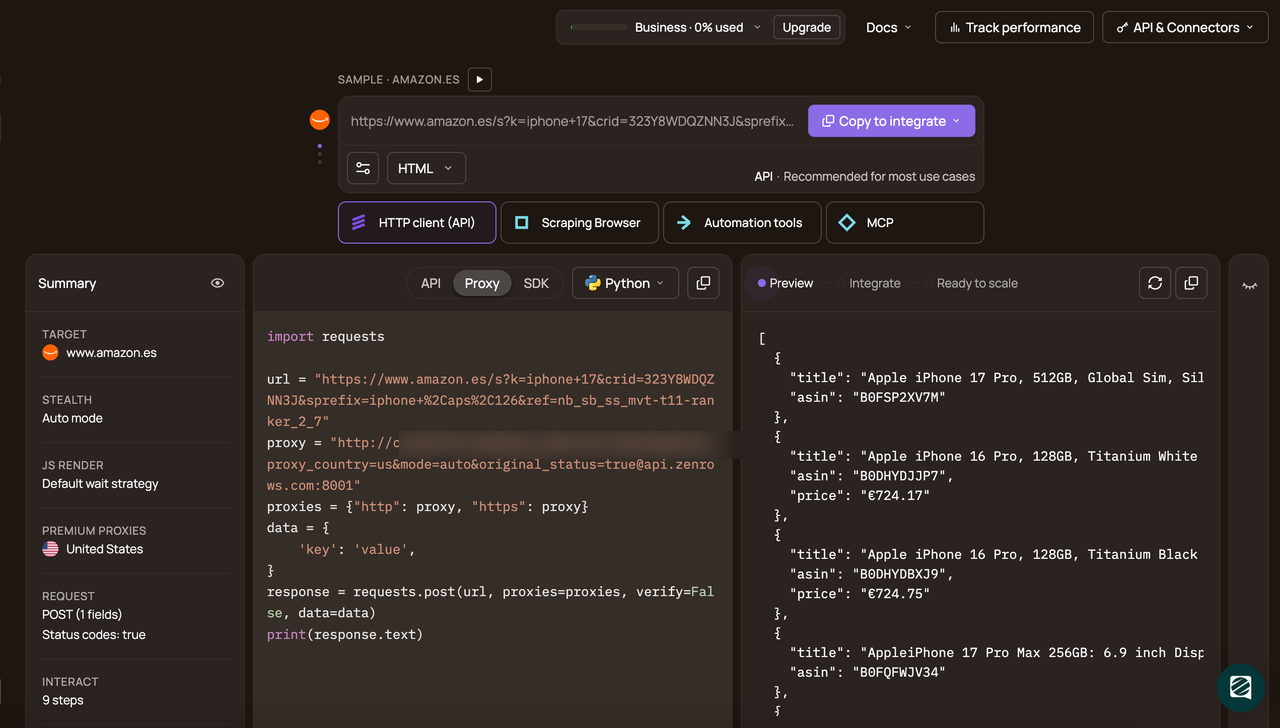
In the code panel, pick Python as your programming language and select the API connection mode. The request builder generates a code snippet pre-configured to bypass Amazon CAPTCHAs. Copy and paste the generated code into your scraper script.
The generated code should look like this:
# pip install requests
import requests

url = "https://www.amazon.com/s?k=keyboards"
apikey = "<YOUR_ZENROWS_API_KEY>"
params = {
    'url': url,
    'apikey': apikey,
    'js_render': 'true',
    'premium_proxy': 'true',
}
response = requests.get('https://api.zenrows.com/v1/', params=params)
print(response.text)
When you run the script, the API returns the page's HTML as shown:
<!-- Preceding HTML omitted for brevity -->
<h2 aria-label="Amazon Basics Wired QWERTY Keyboard, Full-Sized, Black" class="a-size-medium a-spacing-none a-color-base a-text-normal"><span>Amazon Basics Wired QWERTY Keyboard, Full-Sized, Black</span></h2></a>
<!-- Rest of HTML omitted for brevity -->
Congratulations! 🎉 You’ve successfully scraped an Amazon results page through ZenRows without being blocked by a CAPTCHA.
If you want structured data instead of raw HTML, ZenRows has an Autoparse feature that returns parsed JSON for supported Amazon pages. To enable it, add a 'autoparse': 'true' parameter to your request. When you run the same script with this parameter enabled, the response you receive looks like this:
[
  {
    "title": "Logitech MK270 Wireless Keyboard and Mouse Combo for Windows, 2.4 GHz, 8 Multimedia Keys, PC, Laptop, Wireless Keyboard Compact Mouse Combo - BlackCarbon Neutral Certified by SCS Global Services",
    "asin": "B079JLY5M5",
    "price": "$18.99"
  },
  {
    "title": "Amazon Basics Wired QWERTY Keyboard, Full-Sized, Black",
    "asin": "B07WJ5D3H4",
    "price": "$9.99",
    "review_count": "Products highlighted as 'Overall Pick' are:Rated 4+ starsPurchased oftenReturned infrequently"
  }
  // Rest of JSON omitted for brevity
]
ZenRows handles HTML and CAPTCHA bypass logic for you. You receive ready-to-use structured data.
Great! You now know how to move from a simple headless script to a reliable Amazon CAPTCHA bypass solution without constantly tuning your own browser stack.
Conclusion
In this guide, you saw why Amazon sometimes shows CAPTCHA pages instead of real content and why a basic scraping request, such as a standard headless browser script, quickly runs into those challenges once traffic grows. You also learned that stealth browsers can soften automation signals and load normal pages more often, but they start to struggle when you need to scrape at scale and keep up with frequent anti-bot changes.
Remember that consistent access to Amazon data requires the right setup. To scrape any protected website without limitations, we recommend using a web scraping API like ZenRows. With ZenRows handling browser execution, CAPTCHA challenges, and proxy rotation in a single request, your scraper only needs to send an Amazon URL and process the response.
Try ZenRows for free without a credit card and start scraping Amazon without getting stuck on CAPTCHA pages.
FAQ
How does Amazon detect scrapers?
Amazon detects scrapers by combining browser fingerprinting signals (HTTP request headers, JavaScript APIs, cookies, WebGL characteristics, timing) and IP reputation. It also looks at behavior such as request rate and navigation patterns. When that profile looks automated or risky, it serves a text or puzzle CAPTCHA instead of the normal page.
Is setting a User-Agent and extra headers enough to bypass Amazon CAPTCHA?
Request header changes help a little, but Amazon still sees automation traces such as WebDriver flags, missing plugins, misconfigured or missing media codecs, and more. A stealth browser can hide those automation signals, increasing the chances of bypassing anti-bots. They're decent for small jobs. That said, the best way to bypass anti-bot detection reliably at scale is to use a dedicated web scraping solution API like ZenRows. It handles fingerprinting, proxies, and CAPTCHA challenges, and more, for you.
Why use a web scraping API to bypass Amazon CAPTCHA?
A stealth browser can work on one machine at low volume, but it becomes hard to stay stealthy in production because you have to keep patching fingerprints and adjusting traffic patterns as Amazon’s anti-bot checks change. A web scraping API, on the other hand, adapts to security updates in real-time, allowing you just to send requests and obtain the responses.