
How to Scrape Job Postings from Job Boards
Learn how to scrape job postings from job boards using ZenRows. Bypass blocks and extract reliable job data.
Trying to scrape job postings and getting empty pages or surprise blocks? Job boards rely on JavaScript to load content, change their layout, and have detection rules to notice patterns that your script ignores. A scraper can work on one page, then return nothing on the next. If your team depends on fresh job data, that inconsistency turns into a real problem.
Scraping job boards needs more than a few quick requests. You need infrastructure that can load dynamic pages and bypass blocks. This guide walks through that process.
Why You Need Automated Job Data
Job postings are one of the clearest signals of what companies are planning to do next. They show which roles are open, which skills matter, where teams are growing, and how often hiring slows down. This information shapes hiring plans, sales outreach, and market research because it reflects real demand rather than guesses.
Choosing automated job scraping over manual checks lets you track these signals at scale while you focus on hiring and analysis. Recruiters get new roles in front of candidates faster. Sales and partnerships teams can spot companies that are expanding specific departments. Product and strategy teams can follow how demand for certain tools or skills changes over time.
Manual tracking can't keep up with how often job boards update. Posts appear, change, and disappear throughout the day. Relying on occasional visits means you miss openings, react late, or base decisions on outdated listings. Automated collection closes that gap by pulling fresh postings on a schedule and giving you a consistent stream of data that fits your workflows.
Why In-house Job Board Scrapers Usually Fail
Most job boards aren't simple HTML pages anymore. They load listings with JavaScript, track user behavior, and run checks in the background to decide whether a visitor looks like a person or a bot. A basic script that sends a few GET requests and parses the raw response often sees almost empty HTML, even though the page looks full of jobs in your browser.
Once you start sending repeated requests from the same IP or network range, things get worse. Job boards tighten their rules, return different content, or send 403 errors and CAPTCHA pages instead of listings. Some expect a full browser environment with cookies and active sessions before they return useful data.
All of this turns a simple scraper into a fragile tool. It might work during early tests and then fail as soon as you increase volume, change regions, or the site ships a minor update. That is why in-house scrapers becomes unreliable on real job boards, even if they handle smaller static sites without problems.
Skip the blocks. Try Zenrows free and get clean web data without the anti-bot fight.
Common Ways to Gather Job Board Data
There are several ways to bring job data into your workflows. The right choice depends on how fresh the data needs to be, how much control you want, and how much time your team can spend on maintenance instead of analysis.
You can start with ready-made datasets. These give you a large volume of job postings without writing any scraping code. The tradeoff is that you follow the provider’s update schedule, so there's usually some delay between what is live on the boards and what reaches you. For early validation, this is often enough, but it can fall short when you need near-real-time data.
You can also build your own in-house job scraper from scratch. That means owning every layer, from HTTP requests and parsing to proxy rotation, browser automation, anti-bot bypass, and more. Over time, this often turns into running a scraping engine rather than just a script. Each change on a job board, new JavaScript path, rate limit, or anti-bot rule adds more work to maintain stability. It offers full control but comes with a constant maintenance load.
A third option is to use a third-party scraping service like ZenRows that handles the heavy lifting for you using its Universal Scraper API. You focus on defining the pages to target and the data to extract while the service provides reliable data access across boards and regions. You gain an infrastructure layer already tuned for job sites instead of building and operating that layer yourself.
Why Infrastructure Matters for Job Scraping
Once you choose how to collect job data, the next challenge is keeping your scraper reliable over time. That is where infrastructure becomes more important than the scraping logic itself.
Infrastructure is everything that happens around your extraction code. It includes request scheduling, IP rotation, session handling, JavaScript rendering, retries, timeouts, logging, and alerts when success rates drop. Without this layer, every new block or layout change turns into a manual debugging session. With it, you catch issues early and give your parsing logic a stable view of each page.
For job boards, this matters because you're often scraping the same targets every day. You want consistent access to listings instead of chasing 403 errors and empty responses.
A platform like ZenRows sits in this infrastructure layer. It takes care of rendering pages, rotating proxies, handling tough protections, and exposing a simple API that your scraper can call. You still decide which boards to target, which jobs to collect, and how to store them, but you no longer have to build a full scraping engine just to keep the data flowing.
Building a Basic Job Scraper with Python Requests
To see how job scraping works, begin with a simple site that returns plain HTML. MyJobMag is a good example because the listings appear directly in the page source, which makes it easy to extract titles, descriptions, and posting dates.
Open MyJobMag in your browser and search for "Python developer".
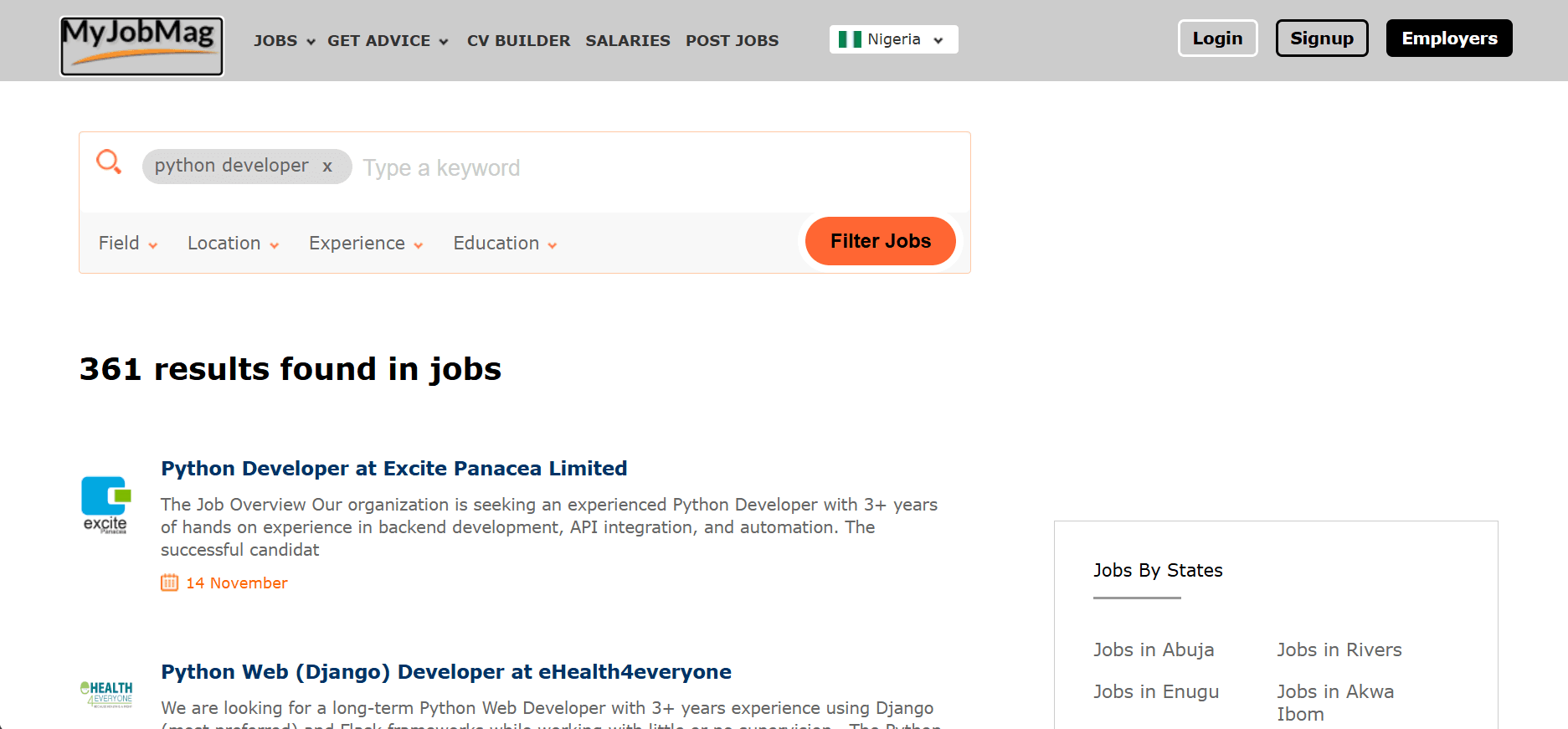
When the results page loads, open your browser’s developer tools. In the Elements panel, you will see that each job is rendered as a list item inside a list.
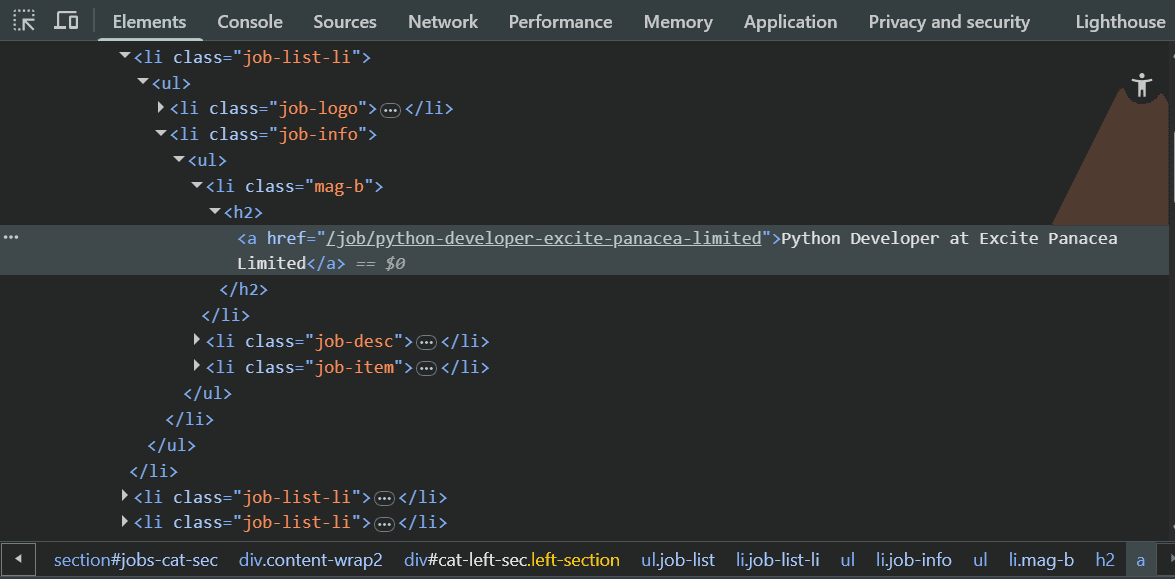
The job title sits inside an <a> tag whose href contains /job/. The scraper will mirror this structure by looping through <ul> elements, looking at each direct <li> inside them, and then finding the first <a> tag whose href matches /job/. That pattern is enough to identify individual job postings on this page. Now, write a script to extract this data.
First, install the required packages:
pip3 install beautifulsoup4 requests
Then, import the dependencies for HTTP requests, HTML parsing, pattern matching, timestamps, and CSV export:
import requests
from bs4 import BeautifulSoup
import csv
import re
from datetime import datetime
from time import sleep
Next, define a scrape_myjobmag function to handle the main flow. The function receives a search query and a page limit, builds the MyJobMag search URL for each page, and fetches the HTML. It then scans the lists on the page and finds links that match /job/. For each match, it builds a job dictionary with the title, URL, short description, and posted date. Finally, it skips duplicates and returns the full list of jobs.
# ...
# function to scrape job listings from myjobmag by query (and number of result pages)
def scrape_myjobmag(query, pages=3):
base_url = "https://www.myjobmag.com"
headers = {'User-Agent': 'Mozilla/5.0'}
jobs = []
for page in range(1, pages + 1):
# build search result URL, include current page parameter if page > 1
url = f"{base_url}/search/jobs?q={query}" + (f"¤tpage={page}" if page > 1 else "")
print(f"Scraping page {page}...", end=" ")
try:
# fetch and parse the page HTML
soup = BeautifulSoup(requests.get(url, headers=headers, timeout=10).content, 'html.parser')
# find all job card containers (unordered lists)
for ul in soup.find_all('ul'):
for li in ul.find_all('li', recursive=False):
# find job link matching '/job/' pattern
link = li.find('a', href=re.compile(r'/job/'))
if not link:
continue
job_url = base_url + link['href']
# skip duplicate jobs by url
if job_url in [j['url'] for j in jobs]:
continue
# get job description text and posted date if possible
text = ' '.join(li.get_text(strip=True).split())
date_match = re.search(r'(\d{1,2})\s+(January|February|March|April|May|June|July|August|September|October|November|December)', text)
jobs.append({
'title': link.get_text(strip=True),
'url': job_url,
'description': text[:300] + '...' if len(text) > 300 else text,
'posted_date': f"{date_match.group(1)} {date_match.group(2)}" if date_match else 'Recently',
'scraped_date': datetime.now().isoformat()
})
print(f"{len(jobs)} total jobs")
sleep(2) # delay to reduce load on server
except Exception as e:
# print any errors that occur during scraping
print(f"Error: {e}")
return jobs
To keep the results for later analysis, add a helper function that exports the collected jobs into a CSV file. This function receives the list of job dictionaries, uses the keys from the first item as the CSV header, and writes each job as a row.
# ...

# function to save jobs as a CSV file
def save_csv(jobs, filename='myjobmag.csv'):
    if not jobs:
        return
    try:
        with open(filename, 'w', newline='', encoding='utf-8') as f:
            writer = csv.DictWriter(f, jobs[0].keys())
            writer.writeheader()
            writer.writerows(jobs)
        print(f"Saved {len(jobs)} jobs to {filename}")
    except Exception as e:
        print(f"Error saving to CSV: {e}")

# main routine to run scraping and save results
if __name__ == "__main__":
    jobs = scrape_myjobmag("Python+Developer", pages=3)
    save_csv(jobs)
Here is the complete MyJobMag scraper code:
import requests
from bs4 import BeautifulSoup
import csv
import re
from datetime import datetime
from time import sleep
# function to scrape job listings from myjobmag by query (and number of result pages)
def scrape_myjobmag(query, pages=3):
base_url = "https://www.myjobmag.com"
headers = {'User-Agent': 'Mozilla/5.0'}
jobs = []
for page in range(1, pages + 1):
# build search result URL, include current page parameter if page > 1
url = f"{base_url}/search/jobs?q={query}" + (f"¤tpage={page}" if page > 1 else "")
print(f"Scraping page {page}...", end=" ")
try:
# fetch and parse the page HTML
soup = BeautifulSoup(requests.get(url, headers=headers, timeout=10).content, 'html.parser')
# find all job card containers (unordered lists)
for ul in soup.find_all('ul'):
for li in ul.find_all('li', recursive=False):
# find job link matching '/job/' pattern
link = li.find('a', href=re.compile(r'/job/'))
if not link:
continue
job_url = base_url + link['href']
# skip duplicate jobs by url
if job_url in [j['url'] for j in jobs]:
continue
# get job description text and posted date if possible
text = ' '.join(li.get_text(strip=True).split())
date_match = re.search(r'(\d{1,2})\s+(January|February|March|April|May|June|July|August|September|October|November|December)', text)
jobs.append({
'title': link.get_text(strip=True),
'url': job_url,
'description': text[:300] + '...' if len(text) > 300 else text,
'posted_date': f"{date_match.group(1)} {date_match.group(2)}" if date_match else 'Recently',
'scraped_date': datetime.now().isoformat()
})
print(f"{len(jobs)} total jobs")
sleep(2) # delay to reduce load on server
except Exception as e:
# print any errors that occur during scraping
print(f"Error: {e}")
return jobs
# function to save jobs as a CSV file
def save_csv(jobs, filename='myjobmag.csv'):
if not jobs:
return
try:
with open(filename, 'w', newline='', encoding='utf-8') as f:
writer = csv.DictWriter(f, jobs[0].keys())
writer.writeheader()
writer.writerows(jobs)
print(f"Saved {len(jobs)} jobs to {filename}")
except Exception as e:
print(f"Error saving to CSV: {e}")
# main routine to run scraping and save results
if __name__ == "__main__":
jobs = scrape_myjobmag("Python+Developer", pages=3)
save_csv(jobs)
When you run the scraper, the results are as follows:
Scraping page 1... 18 total jobs
Scraping page 2... 36 total jobs
Scraping page 3... 54 total jobs
Saved 54 jobs to myjobmag.csv
The scraping succeeded and found 54 jobs.
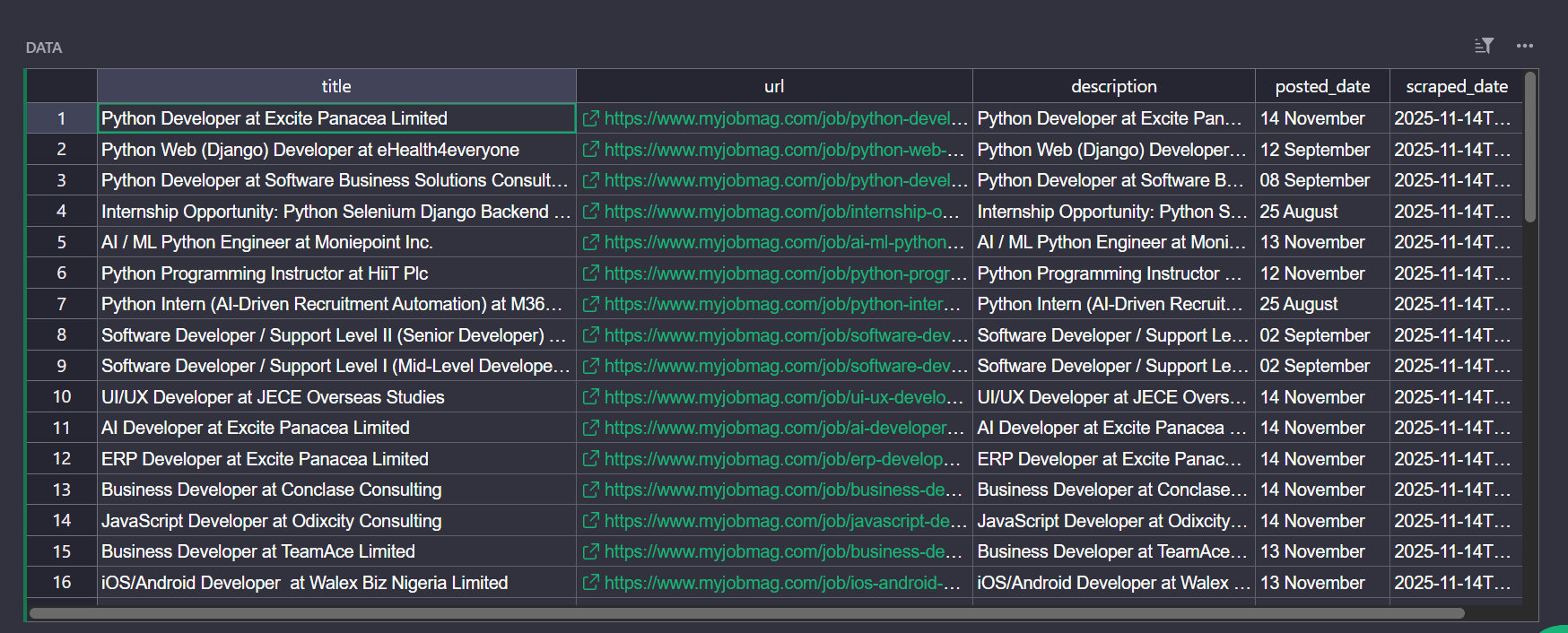
This basic scraper works because the site returns the full HTML for each results page. But what happens when you try the same approach to a job board that requires rendering and has stronger protection systems?
What Happens When You Try Real Job Boards
Modern job boards behave very differently. Many of them load their listings with JavaScript, expect a browser environment, or apply strict bot detection. When you apply the same approach to a site like Indeed, the response looks nothing like what you see in your browser.
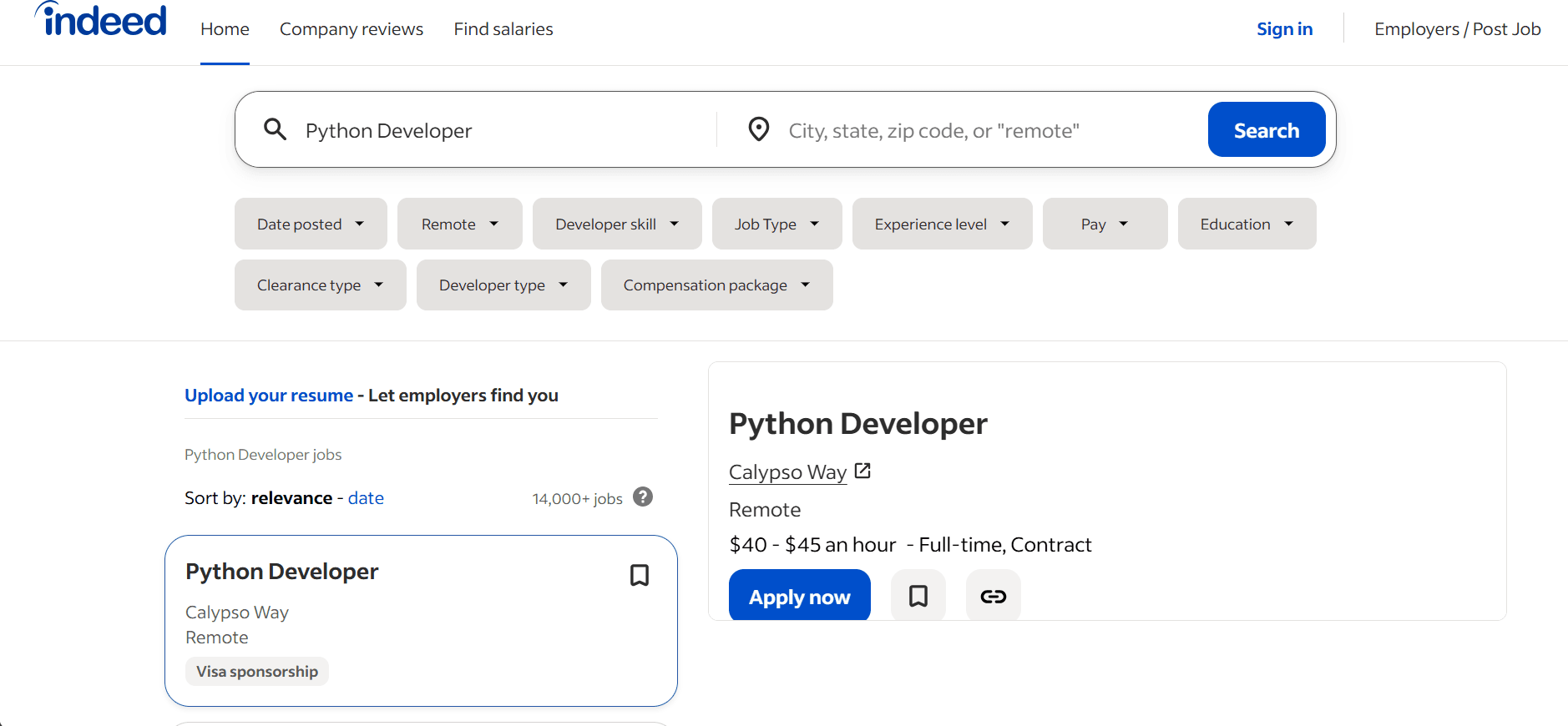
Below is the same Requests with BeautifulSoup, this time targeting Indeed for the same Python developer postings. Extract using the CSS selectors the same way you did for MyJobMag:
import requests
from bs4 import BeautifulSoup
import csv
from datetime import datetime
from time import sleep

# function to scrape job listings from Indeed based on a query and number of pages
def scrape_indeed(query, pages=3):
    base_url = "https://www.indeed.com"
    headers = {'User-Agent': 'Mozilla/5.0'}
    jobs = []

    for page in range(pages):
        # build the URL for the current result page
        url = f"{base_url}/jobs?q={query}&start={page * 10}"
        print(f"Page {page + 1}...", end=" ")

        try:
            # request the page content with appropriate headers
            response = requests.get(url, headers=headers, timeout=10)
            response.raise_for_status()
            soup = BeautifulSoup(response.content, 'html.parser')

            # iterate through all job cards found in the page
            for card in soup.select('div.cardOutline'):
                try:
                    title_elem = card.select_one('.jcs-JobTitle')
                    if not title_elem or not title_elem.get('href'):
                        continue

                    job_url = base_url + title_elem['href']
                    # avoid adding duplicate jobs based on URL
                    if job_url in [j['url'] for j in jobs]:
                        continue

                    company_elem = card.select_one("span[data-testid='company-name']")
                    desc_elem = card.select_one("div[data-testid='belowJobSnippet']")
                    description = desc_elem.get_text(" ", strip=True) if desc_elem else ""

                    jobs.append({
                        'title': title_elem.get_text(strip=True),
                        'company': company_elem.get_text(strip=True) if company_elem else "",
                        'description': description[:300] + '...' if len(description) > 300 else description,
                        'url': job_url,
                        'scraped_date': datetime.now().isoformat()
                    })
                except Exception as e:
                    # log any job card parsing errors
                    print(f"Error parsing job card: {e}")
                    continue

            print(f"{len(jobs)} total jobs")
            sleep(2)  # delay to avoid hitting the server too fast

        except requests.exceptions.RequestException as e:
            # handle network or HTTP errors gracefully
            print(f"Error fetching page {page + 1}: {e}")
        except Exception as e:
            # handle unexpected page parsing errors
            print(f"Error parsing page HTML: {e}")

    return jobs

# function to save the collected jobs into a CSV file
def save_csv(jobs, filename='indeed_jobs.csv'):
    if not jobs:
        return
    try:
        with open(filename, 'w', newline='', encoding='utf-8') as f:
            writer = csv.DictWriter(f, jobs[0].keys())
            writer.writeheader()
            writer.writerows(jobs)
        print(f"Saved {len(jobs)} jobs to {filename}")
    except Exception as e:
        print(f"Error saving to CSV: {e}")

# main execution for scraping and saving jobs
if __name__ == "__main__":
    jobs = scrape_indeed("Python+Developer", pages=3)
    save_csv(jobs)
When you run this script, the difference becomes clear. Instead of job listings, you receive repeated HTTP errors.
Page 1... Error fetching page 1: 403 Client Error: Forbidden for url: https://www.indeed.com/jobs?q=Python+Developer&start=0
Page 2... Error fetching page 2: 403 Client Error: Forbidden for url: https://www.indeed.com/jobs?q=Python+Developer&start=10
Page 3... Error fetching page 3: 403 Client Error: Forbidden for url: https://www.indeed.com/jobs?q=Python+Developer&start=20
Indeed blocks these requests even though the scraping logic is almost the same as the MyJobMag example. From the site's perspective, the traffic looks automated, and the client doesn't behave like a real browser. The protection layer returns 403 Forbidden instead of search results. This is where simple scripts reach their limit, and you need a different setup if you want consistent access to real job boards.
Building an Indeed Job Scraper with ZenRows
Instead of patching the basic scraper every time a job board blocks you, move the heavy work to ZenRows. JavaScript rendering, proxy rotation, and anti-bot handling happen in the infrastructure layer, while you stay in control of the selectors, the queries, and how the job data flows into your system.
You will use the same kind of CSS selectors as before for Indeed, but this time, ZenRows renders the page, routes traffic through premium proxies, and returns structured data instead of 403 errors.
Step 1: Set up the request in the ZenRows Request Builder
To prepare a ZenRows request for Indeed, sign up and open the ZenRows Universal Scraper API Request Builder in the dashboard. Then, paste an Indeed search URL into the URL field.
https://www.indeed.com/jobs?q=Python+Developer
Check the Premium Proxies box, then enable JS Rendering so the job cards that load with JavaScript are available to extract. In the code panel on the right, select Python at the top, and click the API tab.
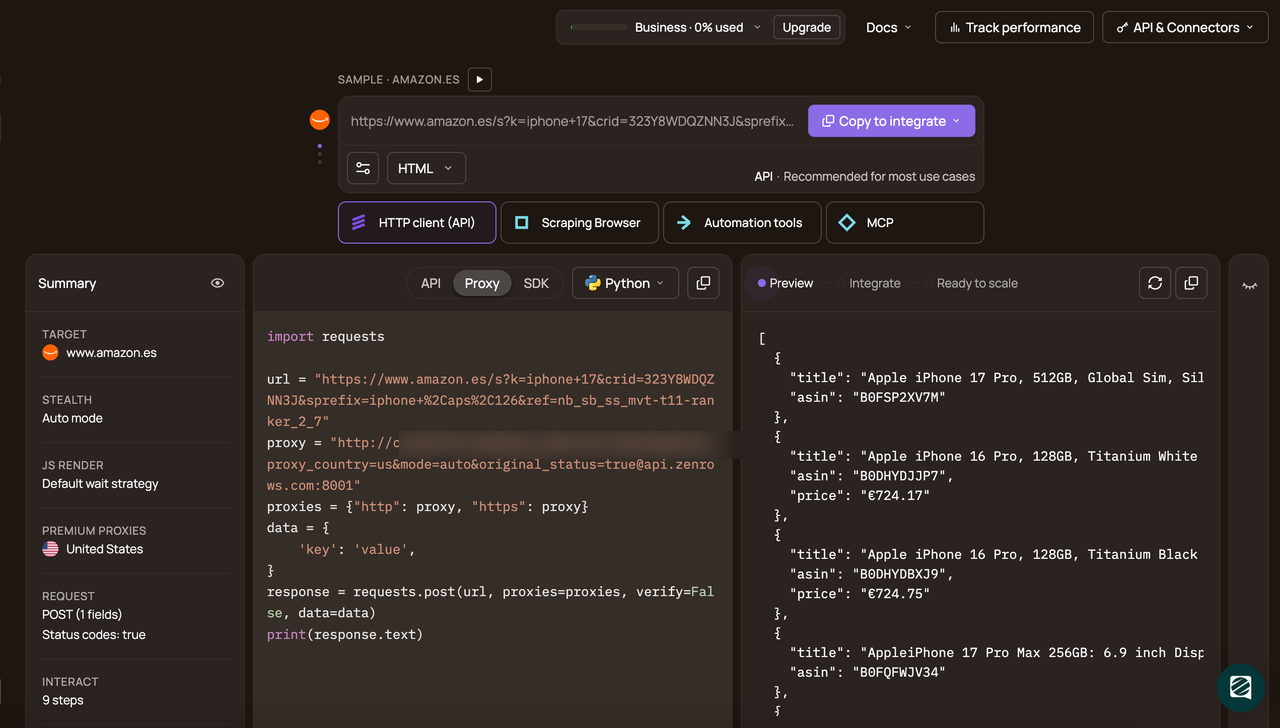
You now have a ready-to-use Python snippet that shows how to call the Universal Scraper API with those options. Click Copy code and paste it into your scraper file.
# pip install requests
import requests

url = 'https://www.indeed.com/jobs?q=Python+Developer'
apikey = '<YOUR_ZENROWS_API_KEY>'
params = {
    'url': url,
    'apikey': apikey,
    'js_render': 'true',
    'premium_proxy': 'true',
    'autoparse': 'true',
}
response = requests.get('https://api.zenrows.com/v1/', params=params)
print(response.text)
Run the code, and you will get the data in a well-structured format:
[
  {
    "title": "Software Engineer II, Offboard Python Application",
    "company": "Latitude AI",
    "formattedLocation": "Allen Park, MI",
    "formattedRelativeTime": "30+ days ago",
    "snippet": "You'll both work on the sim/resim cloud framework implementation to make this easy for all developers to add in their metrics and support the metrics...",
    "link": "/rc/clk?jk=c0d5c57e7649cd81&bb=xKoYCx0RGFD6jLlb8-swPixLH35tgg2UnTiEuD845kDNBMQujmjIDst4RwqxP15tAucUIbwJ2E9OY8djd1ei2T9UdotuAdjwK6HLdtmIkrUVVxAs5nx53npOfjpYUMxrRCvRuazL6hzucrVCinRDXw%3D%3D&xkcb=SoAQ67M3qKNlQaSWnJ0LbzkdCdPP&fccid=0094ba88a49d3226&vjs=3",
    "viewJobLink": "/viewjob?jk=c0d5c57e7649cd81&from=vjs&tk=1jaa2qkfmgiij8ne&viewtype=embedded&xkcb=SoAQ67M3qKNlQaSWnJ0LbzkdCdPP&continueUrl=%2Fjobs%3Fq%3DPython%2BDeveloper",
    "indeedApplyable": true,
    "sourceId": 27242595,
    "indeedApplyEnabled": true,
    "salarySnippet": {
      "text": "$150,320 - $225,480 a year"
    },
    "taxonomyAttributes": [
      {
        "attributes": [
          {
            "label": "Full-time"
          }
        ],
        "label": "job-types"
      },
      {
        "label": "shifts"
      },
      {
        "label": "remote"
      }
    ]
  }
]

// cut for brevity... ⟶
You will trim this code snippet into a small helper function that you can call with any URL and any set of CSS selectors.
Step 2: Create a reusable ZenRows helper
In your Python file, start by adding the imports and a zenrows helper. Replace the API key value with your own key from the ZenRows dashboard.
import requests
import json
import csv
from concurrent.futures import ThreadPoolExecutor
from time import sleep
# ...
# zenrows API authentication and base URL
API_KEY = "<YOUR_ZENROWS_API_KEY>"
BASE_URL = "https://www.indeed.com"

# make a zenrows API call with custom CSS selectors
def zenrows(url, selectors):
    params = {
        "url": url,
        "apikey": API_KEY,
        "js_render": "true",
        "premium_proxy": "true",
        "css_extractor": json.dumps(selectors)
    }
    return requests.get("https://api.zenrows.com/v1/", params=params, timeout=180).json()
This helper takes a target URL and a dictionary of CSS selectors. It keeps the Request Builder choices in one place by always sending js_render and premium_proxy as true, and leaves the selector details to the call site. The function returns parsed JSON instead of raw HTML, so there's no extra parsing step in your scraping logic.
Step 3: Scrape the listing and job detail pages
The function below fetches a single Indeed search page for a query, limits the total number of jobs, and then visits each job page in parallel to collect the description and other details.
# ...
# scrape job listings from Indeed using search parameters and ZenRows
def scrape_indeed(query, max_jobs=10, max_workers=3):
    all_jobs = []

    # build URL for job listing
    listing_url = f"{BASE_URL}/jobs?q={query}"
    print(f"Fetching listing...", end=" ")

    # extract job URLs, titles, companies from listing page
    listing = zenrows(
        listing_url,
        {
            "url": ".cardOutline .jcs-JobTitle @href",
            "title": ".cardOutline .jcs-JobTitle",
            "company": ".cardOutline span[data-testid='company-name']"
        }
    )

    # get only the desired number of jobs
    hrefs = listing.get("url", [])[:max_jobs]
    companies = listing.get("company", [])[:max_jobs]

    if not hrefs:
        print("No jobs found.")
        return all_jobs

    print(f"Found {len(hrefs)} jobs. Scraping details...", end=" ")

    # helper function to scrape full job description and info
    def scrape_detail(href, listing_company):
        detail = zenrows(
            f"{BASE_URL}{href}",
            {
                "title": "h1.jobsearch-JobInfoHeader-title",
                "company": "span[data-testid='company-name']",
                "description": "div#jobDescriptionText"
            }
        )
        return {
            "title": (detail.get("title") or "").strip(),
            "company": (detail.get("company") or "").strip() or listing_company,
            "description": (detail.get("description") or "").strip()[:300],  # limit description length
            "url": f"{BASE_URL}{href}"
        }

    # fetch job details concurrently
    with ThreadPoolExecutor(max_workers=max_workers) as executor:
        jobs = list(executor.map(scrape_detail, hrefs, companies))

    all_jobs.extend(jobs)
    print(f"Done. Total: {len(all_jobs)} jobs")

    return all_jobs
The first call to zenrows sends a request to the Indeed search results page with CSS selectors for job links, titles, and company names. The script trims the returned URLs to max_jobs and exits early if no jobs are found.
For each job URL, scrape_detail calls zenrows again on the job page, this time using selectors for the title, company, and description. A thread pool runs these detail requests in parallel, so the scraper collects several job pages at once.
Step 4: Save the results and run the scraper
To keep the results for later analysis, add a helper that writes the collected jobs into a CSV file, and then tie everything together in the __main__ block.
# ...
# save job listings to a CSV file
def save_to_csv(jobs, filename="indeed_jobs.csv"):
    if not jobs:
        print("No jobs to save.")
        return

    try:
        with open(filename, 'w', newline='', encoding='utf-8') as f:
            writer = csv.DictWriter(f, fieldnames=jobs[0].keys())
            writer.writeheader()
            writer.writerows(jobs)
        print(f"Saved {len(jobs)} jobs to {filename}")
    except Exception as e:
        print(f"Error saving to CSV: {e}")

# main execution: scrape jobs and save to CSV
if __name__ == "__main__":
    jobs = scrape_indeed(
        query="Python+Developer",
        max_jobs=15,
        max_workers=5
    )

    save_to_csv(jobs)
Here's the organized, complete code:
import requests
import json
import csv
from concurrent.futures import ThreadPoolExecutor
from time import sleep

# zenrows API authentication and base URL
API_KEY = "<YOUR_ZENROWS_API_KEY>"
BASE_URL = "https://www.indeed.com"

# make a zenrows API call with custom CSS selectors
def zenrows(url, selectors):
    params = {
        "url": url,
        "apikey": API_KEY,
        "js_render": "true",
        "premium_proxy": "true",
        "css_extractor": json.dumps(selectors)
    }
    return requests.get("https://api.zenrows.com/v1/", params=params, timeout=180).json()

# scrape job listings from indeed using search parameters and zenrows
def scrape_indeed(query, max_jobs=10, max_workers=3):
    all_jobs = []

    # build URL for job listing
    listing_url = f"{BASE_URL}/jobs?q={query}"
    print(f"Fetching listing...", end=" ")

    # extract job URLs, titles, companies from listing page
    listing = zenrows(
        listing_url,
        {
            "url": ".cardOutline .jcs-JobTitle @href",
            "title": ".cardOutline .jcs-JobTitle",
            "company": ".cardOutline span[data-testid='company-name']"
        }
    )

    # get only the desired number of jobs
    hrefs = listing.get("url", [])[:max_jobs]
    companies = listing.get("company", [])[:max_jobs]

    if not hrefs:
        print("No jobs found.")
        return all_jobs

    print(f"Found {len(hrefs)} jobs. Scraping details...", end=" ")

    # helper function to scrape full job description and info
    def scrape_detail(href, listing_company):
        detail = zenrows(
            f"{BASE_URL}{href}",
            {
                "title": "h1.jobsearch-JobInfoHeader-title",
                "company": "span[data-testid='company-name']",
                "description": "div#jobDescriptionText"
            }
        )
        return {
            "title": (detail.get("title") or "").strip(),
            "company": (detail.get("company") or "").strip() or listing_company,
            "description": (detail.get("description") or "").strip()[:300],  # limit description length
            "url": f"{BASE_URL}{href}"
        }

    # fetch job details concurrently
    with ThreadPoolExecutor(max_workers=max_workers) as executor:
        jobs = list(executor.map(scrape_detail, hrefs, companies))

    all_jobs.extend(jobs)
    print(f"Done. Total: {len(all_jobs)} jobs")

    return all_jobs

# save job listings to a CSV file
def save_to_csv(jobs, filename="indeed_jobs.csv"):
    if not jobs:
        print("No jobs to save.")
        return

    try:
        with open(filename, 'w', newline='', encoding='utf-8') as f:
            writer = csv.DictWriter(f, fieldnames=jobs[0].keys())
            writer.writeheader()
            writer.writerows(jobs)
        print(f"Saved {len(jobs)} jobs to {filename}")
    except Exception as e:
        print(f"Error saving to CSV: {e}")

# main execution: scrape jobs and save to CSV
if __name__ == "__main__":
    jobs = scrape_indeed(
        query="Python+Developer",
        max_jobs=15,
        max_workers=5
    )

    save_to_csv(jobs)
When you run this script, you will see these results:
Fetching listing...
Found 15 jobs. Scraping details...
Done. Total: 15 jobs
Saved 15 jobs to indeed_jobs.csv
Here is sample data from the saved CSV file:
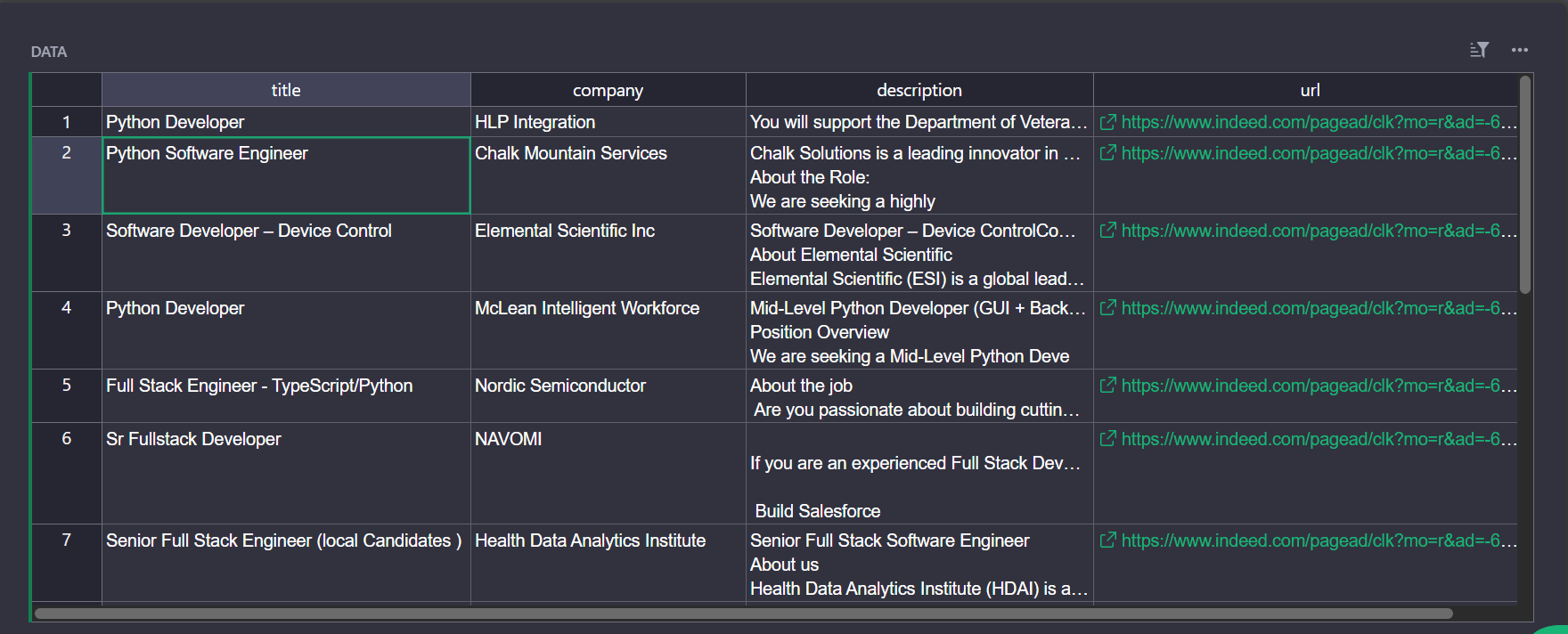
Congratulations! 🎉 You just scraped live job postings from Indeed using Python and ZenRows. You're now ready to pull reliable job data into your workflows at scale.
Scaling to Multiple Job Boards with ZenRows
Once the Indeed scraper works, you don't need a separate script for every site. Use ZenRows as the engine for a single job board data aggregator. The zenrows helper, concurrency, and storage stay the same. You only change the base URL and selectors per site.
One configuration acts as your Indeed jobs scraper, another as a Glassdoor jobs scraper, and a third as a Google jobs scraper. All of them can write into the same database or table, giving you one combined job feed instead of scattered exports.
ZenRows still handles JavaScript rendering, proxies, and anti-bot checks in the background. Scaling the job board scraper then means adding more searches, locations, or boards and running the pipeline on a schedule, not rebuilding infrastructure every time you want data from a new job site.
Conclusion
You learned how to scrape job postings from job boards without getting stuck on empty pages or 403 errors. You started with a simple Python scraper on a static site, saw why that approach fails on modern boards, and then used ZenRows to turn a blocked script into a working job board data pipeline.
Now you know:
- Why automated job data matters for hiring, salary benchmarking, and market research, and why manual checks on job boards don't scale.
- Where basic scrapers break on real sites like Indeed, and how ZenRows fixes that with JavaScript rendering, premium proxies, and an infrastructure layer built for job scraping.
- How to use a single ZenRows-based design as an Indeed jobs scraper, Glassdoor jobs scraper, and Google jobs scraper inside one job board data aggregator instead of juggling separate scripts.
Try ZenRows for free and start pulling job data from your target boards today.
FAQ
Can you set up job scraping with real-time updates?
Yes. To achieve this, schedule ZenRows scrapers to run frequently against your target job boards. Use short polling intervals and a pipeline that stores only new postings. This gives you real-time job updates without extra infrastructure.
What are the main things to consider when job scraping?
Stick to publicly available pages, respect each site's terms of service and robots.txt, and avoid collecting sensitive data. For commercial or large-scale pipelines, review the legality with legal counsel since it depends on jurisdiction and use case.