
How to Bypass Cloudflare in Python
Learn the six most popular tools to bypass Cloudflare with Python. Choose the best one for your project and improve your scraper.

Does your Python scraper get blocked by Cloudflare? That's because you keep getting in the line of the anti-bot. But no worries. You can bypass it and scrape your desired data.
We'll show you 5 tested and trusted Python tools to help you scrape without getting blocked by Cloudflare.
Let's go!
Can Cloudflare Detect Python Scrapers?
Like any other programming language, Python scrapers are automated scripts, so they're prone to Cloudflare's detection. Cloudflare is one of the most common anti-bot measures you'll encounter while scraping. It employs multiple detection techniques at varying protection levels to block scrapers.
While some protection levels are simple and can be broken with a few customizations, others are more advanced, and bypassing them requires combining several solutions.
For example, Python's Requests library, a popular HTTP client, is unlikely to pass Cloudflare's defenses because it sends bot-like parameters, such as the User-Agent header python-requests/2.32.3.
It's common for Cloudflare to block Python Requests because the library lacks key browser-like capabilities needed to evade detection. Additionally, it doesn't support JavaScript rendering and lacks the browser-like features to automate human interaction with a website.
To fact-check that claim, let's see how the Requests library performs against the Cloudflare Challenge page. Try it out with the code below:
# import the required library
import requests

# send the request
response = requests.get("https://www.scrapingcourse.com/cloudflare-challeng")

# validate and print the response
if response.status_code!=200:
    print(f"The request failed with an error {response.status_code}")
else:
    print(response.text)
The code fails with the Cloudflare 403 forbidden error, as shown below. This error is a result of Cloudflare blocking the Requests library due to its bot-like attributes:
The request failed with an error 403
Cloudflare continues to update its defense system, making it increasingly difficult to bypass. To stay ahead of Cloudflare's detection mechanisms, you'll need to implement specific bypass techniques in your web scraper.
For a detailed guide on broader techniques useful for tricking Cloudflare, read our article on bypassing Cloudflare.
Now, let's show you the five solutions to bypass Cloudflare with Python and scrape without getting blocked.
How to Bypass Cloudflare in Python
Various libraries and tools may help bypass Cloudflare while web scraping in Python. If you're looking for a Python Cloudflare scraper, we have you covered with the five best tools and how each works.
Skip the blocks. Try Zenrows free and get clean web data without the anti-bot fight.
1. Cloudscraper
Cloudscraper is an easy-to-use browser emulator for bypassing Cloudflare in Python. The library is functionally similar to Python's requests, making it a good choice if you want a lightweight open-source option to bypass Cloudflare. Additionally, you can use it as an alternative to Python Request Cloudflare bypass.
Cloudscraper's JavaScript engine makes it easy to decode and parse JavaScript, allowing your request to emulate a regular web browser's behavior.
Clouscraper supports multiple browsers, including Chrome and Firefox, and emulates fingerprinting data, such as cipher suites, to maintain a secure client-server connection.
However, the downside of using this Python Cloudflare scraper is that it doesn't pass advanced fingerprinting tests, making it unsuitable for evading sophisticated Cloudflare Turnstile CAPTCHA. That said, pairing it with paid CAPTCHA solvers like 2Captcha and fortifying it with proxies can enhance its evasion capabilities.
👍 Pros
- Easy to use.
- Features User Agent auto-rotation for Cloudflare bypass.
- Suitable for bypassing basic blocks.
👎 Cons
- It fails on websites using advanced Cloudflare protection.
- Not regularly updated.
- It only emulates a small fraction of the browser.
Check out our detailed tutorial on using Cloudscraper with Python to learn more.
2. ZenRows
The best way to bypass Cloudflare with Python is to use the ZenRows Universal Scraper API. It's a web scraping solution that bypasses Cloudflare with a single API request. As a full-fledged bypass toolkit, ZenRows allows you to focus on your scraping logic while it handles anti-bot auto-bypass under the hood.
In addition to a scraping API, ZenRows offers residential proxy services with geo-targeting and auto-rotation. If scraping a JavaScript-rendered website, it acts as a headless browser to automate human actions such as scrolling, clicking, and more. ZenRows also works with any programming language and is compatible with other libraries, making it easy to integrate into your existing workflows.
👍 Pros:
- Easy to use.
- Compatible with any programming language
- Bypasses Cloudflare and other anti-bot measures, regardless of the difficulty level.
- It features smart rotating premium proxies.
- Scrapes JavaScript-rendered pages.
- ZenRows provides an auto-managed, auto-scaled infrastructure.
- Easy to integrate into your existing workflows.
- 24/7 customer support with a complete knowledge base.
- Frequently updated.
👎 Cons:
- It's a paid service (but offers a free trial).
How to Bypass Cloudflare in Python Using ZenRows
Let's use ZenRows to scrape the Cloudflare Challenge page to see how it works. To bypass Cloudflare with ZenRows, you only need your free API key and the target URL.
Sign up to open the ZenRows Request Builder. Paste the target URL in the link box, activate Premium Proxies, and click JS Rendering. Select Python as your programming language, then choose the API connection mode. Now, copy and paste the generated code into your scraper file.
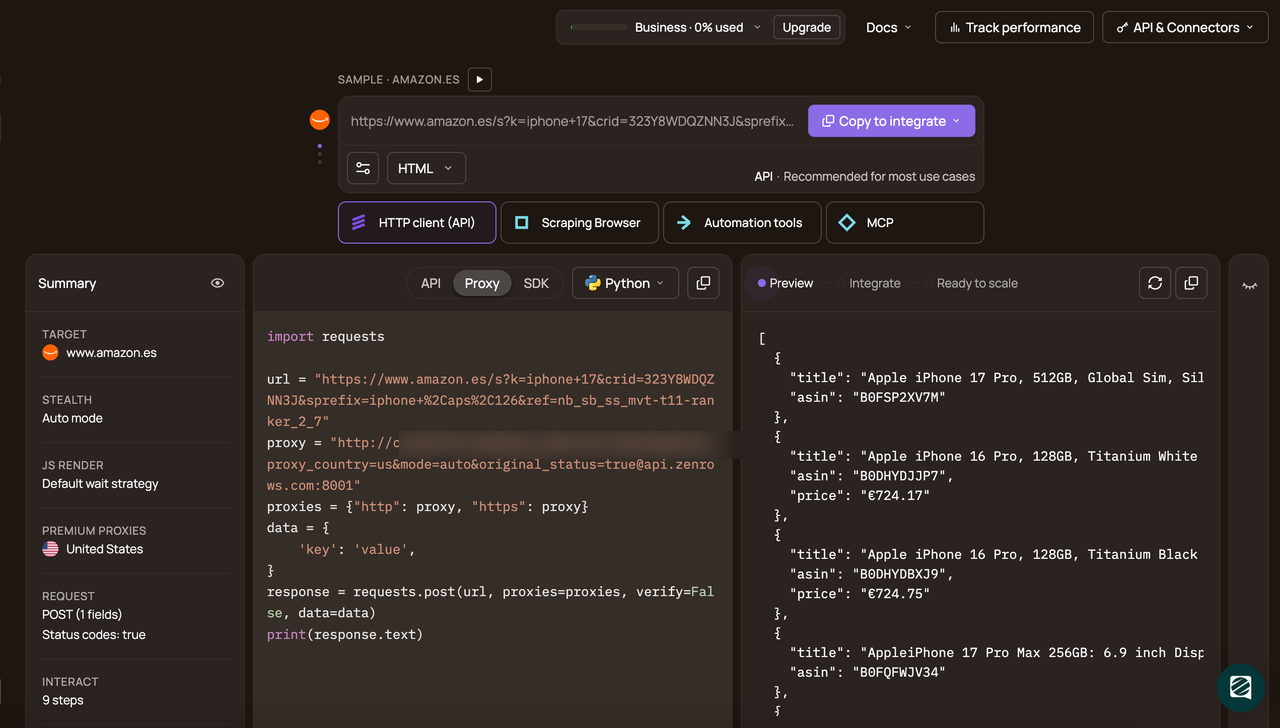
The generated code should look like this:
# pip install requests
import requests

url = 'https://www.scrapingcourse.com/cloudflare-challenge'
apikey = '<YOUR_ZENROWS_API_KEY>'
params = {
    'url': url,
    'apikey': apikey,
    'js_render': 'true',
    'premium_proxy': 'true',
}
response = requests.get('https://api.zenrows.com/v1/', params=params)
print(response.text)
The above code accesses the protected web page and extracts its full-page HTML, as shown:
<html lang="en">
<head>
    <!-- ... -->
    <title>Cloudflare Challenge - ScrapingCourse.com</title>
    <!-- ... -->
</head>
<body>
    <!-- ... -->
    <h2>
        You bypassed the Cloudflare challenge! :D
    </h2>
    <!-- other content omitted for brevity -->
</body>
</html>
Great! Your scraper now uses ZenRows to bypass Cloudflare in Python.
3. SeleniumBase
SeleniumBase is a modified version of Selenium that can bypass Cloudflare. The library enables you to run Chrome with Undetected ChromeDriver patches, increasing the likelihood of evading anti-bot measures such as Cloudflare.
By using SeleniumBase in Undetected ChromeDriver mode, you remove obvious automation flags when scraping the web. This allows your scraper to emulate legitimate browser fingerprints and bypass Cloudflare detection.
Related: How to Bypass Cloudflare With Selenium
SeleniumBase is particularly useful for bypassing Cloudflare Turnstile or the "Verify you are human" interstitial page, as it includes CAPTCHA-clicking functionality that automatically detects and clicks CAPTCHA fields. Like standard Selenium, SeleniumBase also supports JavaScript execution to interact dynamically with websites.
However, like other headless browsers, SeleniumBase introduces memory overhead since it triggers a browser instance. Its CAPTCHA-clicking functionality also works in non-headless (GUI) mode. These limitations alone make SeleniumBase unsuitable for large-scale web scraping.
👍 Pros:
- Increases the chances of bypassing browser fingerprinting tests.
- Its CAPTCHA-clicking functionality can be used to evade Cloudflare Turnstile.
- SeleniumBase uses UndetectedChromedriver to increase stealth.
- The library can execute JavaScript and mimic human behavior.
- It's suitable for handling JavaScript challenges.
👎 Cons:
- The browser instance reduces overall performance.
- Unsuitable for large-scale web scraping.
- Unable to bypass advanced Cloudflare protection.
Read our complete tutorial on how to use SeleniumBase with Undetected ChromeDriver in Python to learn more.
4. Curl_cffi
Curl_cffi is an improved version of the standard cURL library in Python. It patches the standard cURL library with actual browser fingerprints, allowing it to emulate popular browsers like Chrome, Safari, and Edge.
It bypasses anti-bots like Cloudflare by replacing detectable bot-like signals, such as cURL's OpenSSL library, with Chrome's BoringSSL. However, curl_cffi isn't a headless browser and can't execute JavaScript. So, it has fingerprinting limitations and can still be flagged by advanced anti-bot measures.
👍 Pros:
- Emulates different browsers without introducing memory overhead.
- Good for bypassing basic fingerprinting tests.
- Simple learning curve.
👎 Cons:
- It can't bypass sophisticated anti-bot measures.
- Its inability to execute JavaScript reduces the chances of evading anti-bots.
Want to learn more about curl_cffi? Check out our detailed tutorial on using curl_cffi for Python web scraping.
5. Cfscrape
The cfscrape Python library is another popular browser emulator for bypassing Cloudflare in Python. This tool follows the same operational pattern as Cloudscraper. The only difference is that cfscrape doesn't allow you to specify a browser, as it only emulates Chrome by default.
That said, cfscrape isn't perfect: it can only handle webpages with simple anti-bot measures, meaning it's ineffective against advanced Cloudflare protection. It also requires downgrading to a lower urllib3 version because it doesn't support urllib3 versions 2+. You might need to run the following command to install a specific lower version of urllib3:
pip install "urllib3<2"
👍 Pros:
- Easy to use and implement.
- The lightweight browser emulation feature can reduce the likelihood of detection.
👎 Cons:
- Ineffective against advanced Cloudflare challenges.
- It lacks maintenance and updates.
- It's less feature-rich than other options like Cloudscraper.
- Incompatible with recent urllib3 versions (versions 2+).
- No option to switch browsers.
Want to learn more about bypassing blocks with cfscrape? Check out our detailed tutorial on using cfscrape with Python.
6. Cf-Clearance-Scraper for Cloudflare Python Bypass
Cf-Clearance-Scraper is a Python library that extracts and leverages the Cloudflare cf_clearance cookie to bypass Cloudflare blocks.
The cf_clearance cookie is a passkey issued by Cloudflare to users who pass its challenge. This cookie typically persists across sessions, allowing the user to access the protected site with the same clearance cookie for as long as the session lasts.
By extracting that cookie and passing it to your scraping requests, Cf-Clearance-Scraper ensures you appear to be a real user who has passed the Cloudflare challenge. And that prevents you from getting blocked on subsequent requests.
However, a limitation of Cf-Clearance-Scraper is that the cf_clearance cookie is tied to a session. Your scraper will most likely fail once the session expires. Additionally, because the cf_clearance cookie's expiration time is unpredictable, you risk an unexpected scraping failure that could disrupt your data pipeline.
👍 Pros
- Cf-Clearance-Scraper directly extracts the
cf_clearancecookie. - It has low memory overhead because it doesn't require a full-blown browser instance.
- You can switch IP address and User Agent per scraping request to further boost stealth.
👎 Cons
- The scraping workflow fails once the
cf_clearancecookie expires. - You risk unpredictable scraper failure.
- Session management and persistence can be challenging at scale.
Check out our detailed tutorial on bypassing Cloudflare with Cf_Clearance_Scraper to learn more.
Conclusion
Knowing how to bypass anti-bots is as vital as the scraping process itself, especially when you're scraping a web page protected by Cloudflare. In this article, we covered 5 techniques for bypassing Cloudflare using Python. They include Cloudscraper, cfscrape, ZenRows, SeleniumBase, curl_cffi, and CF-Clearance-Scraper.
While other tools often fail under large-scale scraping or under advanced Cloudflare security measures, ZenRows is the only solution that reliably bypasses Cloudflare and other anti-bot measures at scale. What's more, ZenRows requires only a single API call and doesn't require technical setup like other tools.
Try ZenRows for free now or speak with sales!
FAQ
What Is Cloudflare Bot Manager?
Cloudflare Bot Manager is one of the most professional and widely deployed web security systems for mitigating attacks from malicious bots. Unfortunately for us, web scrapers might be unfairly detected.
Cloudflare bot detection techniques include TLS fingerprinting, Event tracking and canvas fingerprinting. If you've tried to scrape a Cloudflare-protected site before, some of the errors you'll see include:
- Error 1020: Access denied.
- Error 1010: The owner of this website has banned your access based on your browser's signature.
- Error 1015: You are being rate-limited.
- Error 1012: Access denied.
These are usually accompanied by a Cloudflare 403 Forbidden HTTP response status code.
How to bypass a "You have been blocked on Cloudflare?"
If you've been blocked by Cloudflare while scraping with Python, here are some effective solutions:
- Use ZenRows: ZenRows' scraping API bypasses Cloudflare with a single API call. It handles JavaScript rendering, rotates proxies, and avoids detection seamlessly.
- Cloudscraper: This Python library emulates browser-like behavior to bypass basic Cloudflare blocks. Pair it with proxies for better results.
- Undetected-Chromedriver: A modified Selenium ChromeDriver that mimics human-like interactions and handles JavaScript challenges effectively.
- Curl_cffi: A lightweight library that replaces bot-like fingerprints with browser-like ones. It’s great for basic blocks but lacks JavaScript support.
- Cfscrape: A simple tool to bypass basic Cloudflare challenges, though it struggles with advanced protection.
For large-scale or advanced scraping, ZenRows is the most reliable option for bypassing Cloudflare.
Can Python Bypass Cloudflare CAPTCHA?
Cloudflare often blocks Python web scraping scripts since they're automated. You can bypass Cloudflare in Python only if you use the right techniques and libraries. While open-source solutions like Cf-Clearance-Scraper are cheap options, they don't guarantee success at scale. The best way to bypass Cloudflare CAPTCHA in Python is to use web scraping APIs, such as ZenRows.
How do I stop Cloudflare from blocking me?
During web scraping, you can stop Cloudflare from blocking you by removing any automation flags that make your scraper appear as a bot. This involves manually patching headless browsers or using stealth tools such as SeleniumBase. However, for an auto-managed solution, opt for web scraping APIs.
Does Cloudflare block web scraping?
Yes, Cloudflare's bot management deploys several detection techniques to detect bot-like requests. These include browser fingerprinting, WebGL fingerprinting, behavioral analysis, IP address analysis, request header checks, and more. You can avoid detection by using open-source stealth tools or paid services such as web scraping APIs.
Is it legal to scrape Cloudflare-protected websites?
Scraping publicly available data is generally legal. However, it's important to avoid misusing scraped data or scraping personal information behind a login wall, as doing so can lead to legal action. Overall, it's important to follow best practices during scraping.