
Anonymous Proxy Detected: Causes & Fixes (2026)
Learn why the "Anonymous Proxy Detected" error occurs and discover effective ways to bypass proxy detection in 2025.

Proxies are necessary for web scraping, but they can be detected. So we're going to learn why this happens and how to fix it.
What Is an Anonymous Proxy?
An anonymous proxy basically acts as a go-between. Instead of your scraper talking to the website directly, it routes traffic through a separate IP. That way, the site sees the proxy address, not yours.
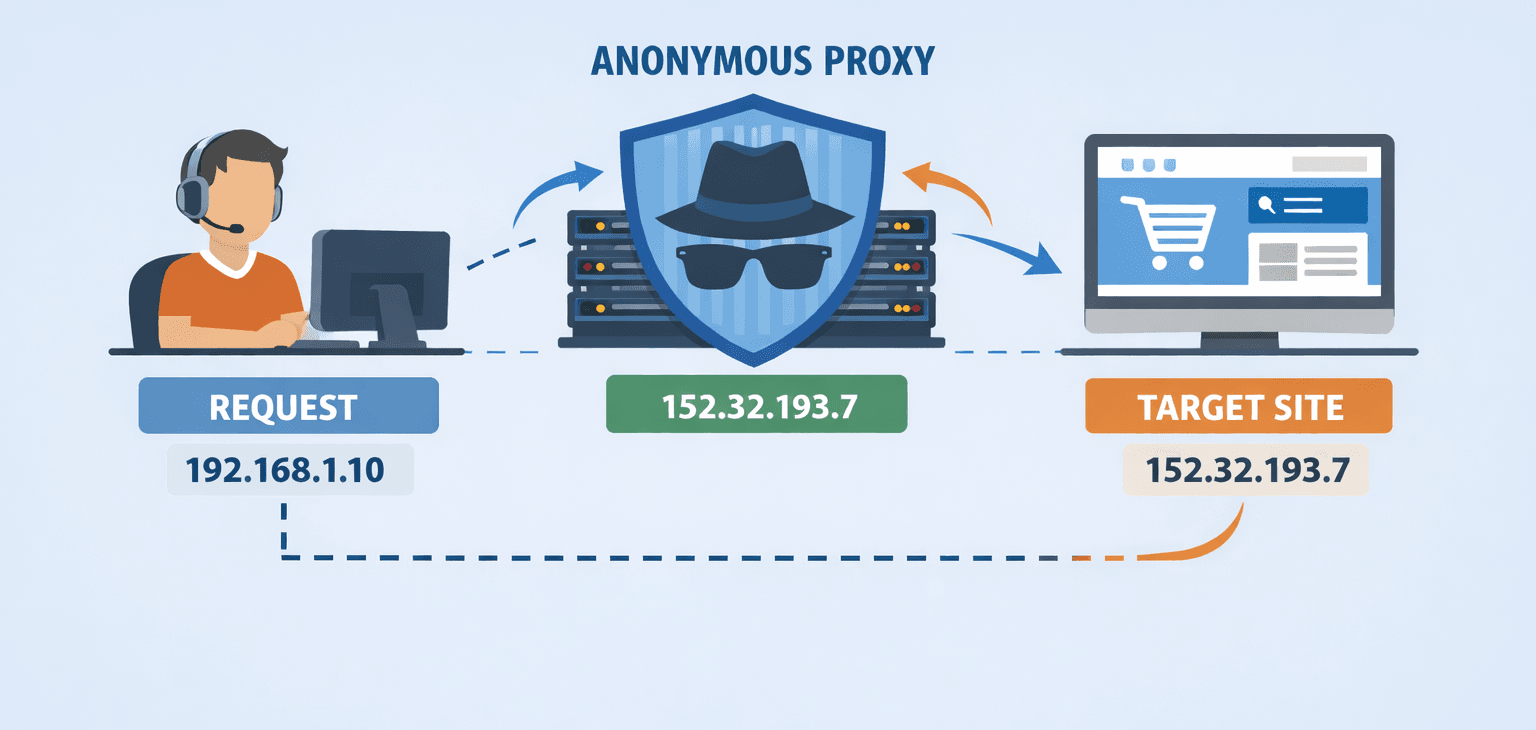
It’s a good way to avoid rate limits, bans, or location-based restrictions. But “anonymous” doesn’t always mean invisible. There are levels to it.
Here’s how it breaks down:
- Elite proxies are the ones you want if you’re trying to stay hidden. They don’t just hide your IP; they also mask obvious signs in the request headers that may show that you're using a proxy. To the site, your requests appear to be coming from a regular browser.
- Standard anonymous proxies also mask your IP address, but they may still leave clues that you've changed your IP. Headers like X-Forwarded-For or Via can tip the site off that you’re using a proxy. Some sites let that slide, but others don’t.
- Transparent proxies are not useful for scraping. They forward your real IP and tell the site they’re a proxy. It defeats the purpose.
If you’re getting blocked, chances are your proxy setup isn’t clean. Maybe the IP you’re using has already been flagged. Or maybe your headers are leaking. Either way, switching to a better proxy is only part of the fix. You usually need to tweak your scraper's behavior, too.
Skip the blocks. Try Zenrows free and get clean web data without the anti-bot fight.
How Proxy Detection Works
Websites use a variety of techniques to detect when traffic is coming through a proxy. Some of these methods are fairly simple, while others involve more advanced analysis. If you're scraping at any scale, it's worth understanding how detection works so you can build around it.
Here are some of the more common methods used to flag proxy traffic:
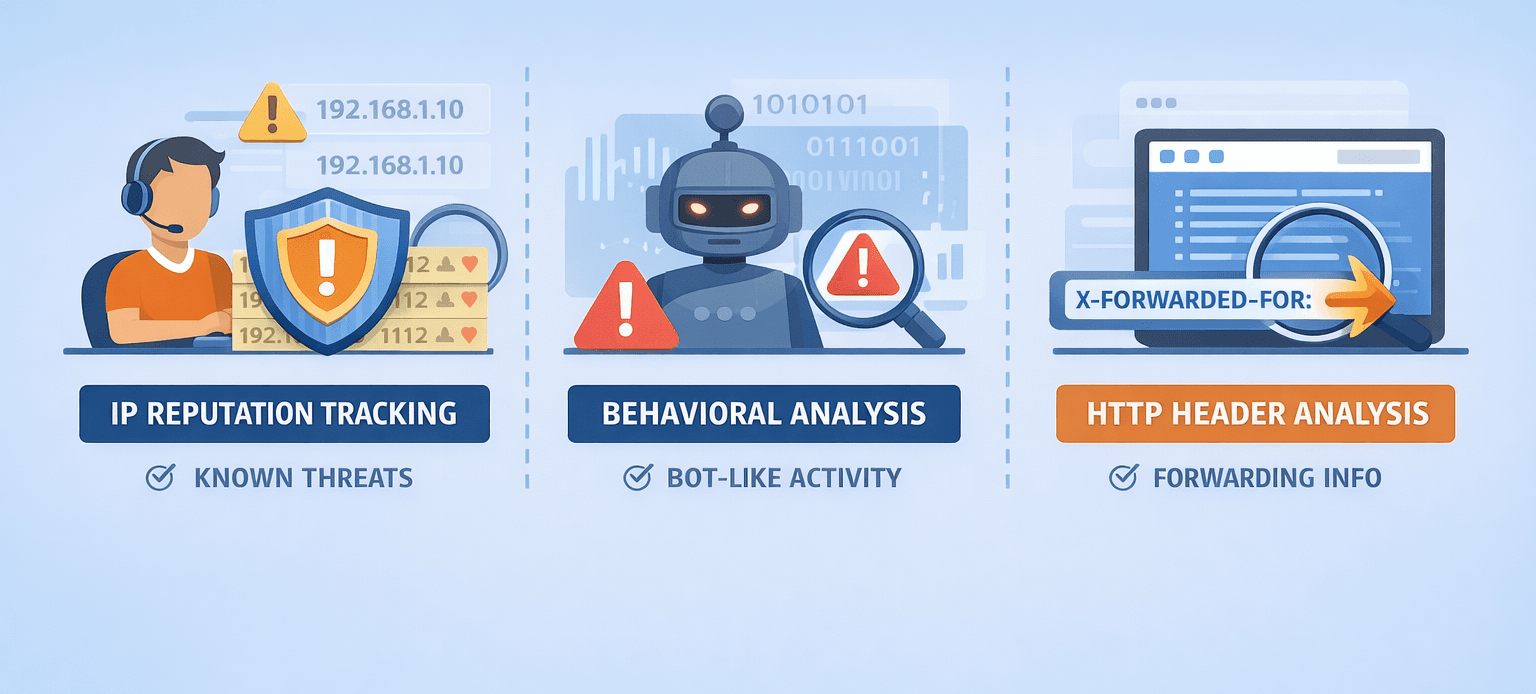
IP Reputation Tracking
Many websites rely on third-party services to help identify and classify IP addresses. These services analyze large volumes of traffic data across industries to build reputation profiles.
When a request reaches a server, the site checks the IP against lists of flagged addresses, such as ones known for spam, fraud, scraping, or other automated activities. If your IP has a history of this kind of behavior, there’s a good chance it’ll be blocked.
The IP reputation list is frequently updated. So, an IP that worked fine yesterday might suddenly be blacklisted, and new proxy ranges pop up all the time. That’s why using the same set of IPs for scraping usually stops working after a while.
Behavioral Analysis
Proxy connections are often associated with bot-like activities. So, websites also analyze incoming requests for signs of bot behavior to block unwanted traffic, including proxy traffic.
This includes various user interactions, such as mouse movements, clicks, scrolls, and keystrokes. Natural users typically show different navigation patterns when interacting with a webpage. On the other hand, bots are scripted and most often follow repetitive sequences.
Inconsistencies between proxy configuration and browser fingerprinting can also lead to detection. For instance, if the fingerprint remains the same while the IP address keeps changing, your request might get flagged.
So, by analyzing client behavior in real time and comparing it with known bot activities we discussed above, websites can easily detect and block proxy connections.
HTTP Header Analysis
When you make an HTTP request or visit a website using your browser, you also send HTTP headers to the target website. These headers often contain information about your requests, which websites can analyze to detect anomalies indicative of a proxy connection.
Since some anonymous proxies leave traces that signify their use, such as the presence of X-Forwarded-For in the request headers, websites can quickly identify and block them.
Common Reasons for "Anonymous Proxy Detected"
If you encounter the "Anonymous Proxy Detected" error message, it means that the target server has identified your proxy connection and blocked your request. This can happen for many reasons and is not limited to:
- Using free or low-quality proxies.
- Static IPs are being flagged as proxies.
- High request frequency, leading to behavioral detection.
- Leaking real IP due to misconfigured proxy settings.
- Using an IP from an unsupported country results in geo-blocking.
While these reasons can occur as isolated events, the main culprits are free proxies, which are often flagged due to poor IP reputations.
Since numerous users can connect to the same proxy server, free proxies can easily be associated with suspicious activity and, therefore, blacklisted.
Also, free proxies are mostly low-quality and pose significant operational issues, including frequent downtime, data leaks, and malware infections, among others.
How to Fix the "Anonymous Proxy Detected" Error
Fixing the "Anonymous Proxy Detected" error requires high-quality proxies and improved configurations.
This is because websites can easily identify and block low-quality proxies, and misconfigurations can result in your actual IP address being leaked. Also, when web scraping, it's essential to configure against high request frequency.
Here are some solutions to optimize your configurations:
Use Residential Proxies
Using residential proxies is the first step to avoiding the "Anonymous Proxy Detected" error. Unlike other proxy types, residential proxies use the IP addresses of real residential devices. So, your requests appear to originate from a natural user, making it difficult for websites to identify your proxy connection.
Enable IP Rotation
Websites most often flag a high request frequency as malicious activity and will block your proxy if you make too many requests from the same IP address.
Solution? Enable IP rotation. This is where you distribute your requests across multiple servers so that they appear to originate from different users.
Here's a Python script that randomly selects a proxy from a proxy pool per request.
# import the required modules
import requests
import random

# define a proxy list
proxy_list = [
    "http://66.29.154.105:3128",
    "http://47.242.47.64:8888",
    "http://41.169.69.91:3128",
    "http://50.172.75.120:80",
    "http://34.122.187.196:80"
]

# choose a proxy at random
proxy = random.choice(proxy_list)

# specify proxies to used for HTTP and HTTPS requests
proxies = {
    'http': proxy,
    'https': proxy,
}

# make a GET request to target website using the specified proxy
response = requests.get("https://httpbin.io/ip", proxies=proxies)

# print HTML content
print(response.text)
However, instead of hard-coded IP rotation, which is expensive and tedious to maintain, it's best to use a residential proxy service with automatic rotation.
Use Geotargeted Proxies to Avoid Geo-Blocking
Rotating the IP isn’t enough for proxy switching. Some websites allow requests from specific countries and block others. Even with a strong residential proxy, using an IP address from an unsupported country can result in the "anonymous proxy detected" error.
Ensure the IPs in the pool are from countries supported by the target website. To make this easier, use proxy services with geo-targeting functionality. Such services enable you to rotate IPs within a chosen country, ensuring every selected IP is geographically supported.
Use Proxy Chaining
Proxy chaining is a configuration technique that routes requests through a series of proxies, making it harder for websites to track your connection.
Instead of the conventional client > proxy > website connection, you send your traffic to the first proxy server, which then forwards it to another proxy server, and so on, until it reaches the destination.
That said, proxy chaining can be risky if not properly configured. Some websites use advanced proxy detection techniques to detect when an IP address changes within the same session. When such an anomaly is detected, the target site can invalidate your session and block the request.
Clear Cookies and Browser Cache
Websites also track cookies and cache to identify returning users. So, even if you use a proxy, cookies and cached data can still expose your original identity, leading to an "Anonymous Proxy Detected" error.
To avoid this, clear the cookies and browser cache to ensure a new session that isn't tied to previous web activities.
Modify Headers and User-Agent
Remember that websites analyze request headers for anomalies that may signal proxy usage.
For example, an inconsistent IP location, browser settings, and User-Agent can trigger the "Anonymous Proxy Detected" error. To prevent this, use custom browser-like headers and user agents. This will mask your identity and help you avoid detection.
Choosing the Best Proxies to Avoid Detection
Residential proxies are the best way to avoid detection. Unlike free proxies, which are easily flagged, residential proxies use actual IP addresses assigned by genuine internet service providers.
For illustrative purposes, below is a basic Python script that routes a request through a free proxy.
# import the required module
import requests

# define a proxy dictionary
proxy = {
    "http": "http://66.29.154.105:3128",
    "https": "http://66.29.154.105:3128",
}

# make a GET request to target website using the specified proxy
response = requests.get("https://httpbin.io/ip", proxies=proxy)

# print HTML content
print(response.text)
Here's the result:
ConnectionRefusedError: [WinError 10061] No connection could be made because the target machine actively refused it
This indicates that the target server flagged the free proxy and actively blocked the request, reiterating the need for residential proxies.
The best residential proxies, like ZenRows' Residential Proxies, provide everything you need to avoid detection, including anti-bot systems.
ZenRows offers a pool of over 55 million proxies, which gives you access to geo-restricted pages and location-specific content from over 185 countries.
It also automatically rotates proxies, enabling you to distribute traffic without implementing any configuration.
Below is a step-by-step guide to getting started with ZenRows Residential Proxies.
Sign up and navigate to the ZenRows Proxy Generator page. You'll find your automatically generated proxy URL in the Proxy URL section.
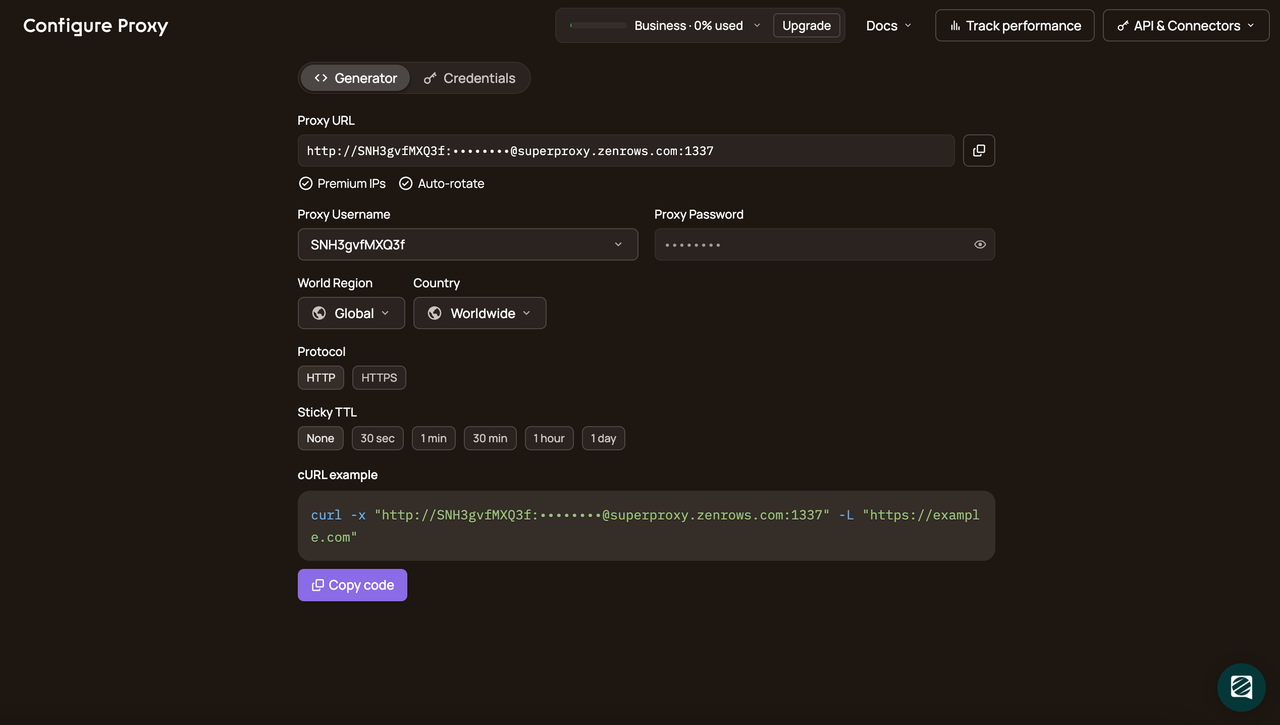
You can customize the settings by navigating to the Credentials tab and setting a proxy username and password.
Once you're all set up, copy the generated proxy URL for your scraper. For this example, we'll use the Requests library and the same target URL as before.
Your new code should look like this:
# import the required module
import requests

# define a proxy dictionary
proxy = {
    "http": "http://<ZENROWS_PROXY_USERNAME>:<ZENROWS_PROXY_PASSWORD>@superproxy.zenrows.com:1337",
    "https": "https://<ZENROWS_PROXY_USERNAME>:<ZENROWS_PROXY_PASSWORD>@superproxy.zenrows.com:1338"
}

# make GET request to target website using the specified proxy
response = requests.get("https://httpbin.io/ip", proxies=proxy)

# print HTML content
print(response.text)
ZenRows automatically rotates proxies by default. Thus, this code will return different IPs for each request.
Here are the results for two runs.
# request 1
{
  "origin": "2.60.102.197:64587"
}

# request 2
{
  "origin": "31.181.240.86:56195"
}
Awesome! ZenRows' Residential Proxies ensure high success rates and bypass detection mechanisms effectively.
Conclusion
The "Anonymous Proxy Detected" error message means the website detects your proxy connection and actively refuses to fulfill it. This can be frustrating, especially when web scraping.
However, you can avoid this error using the techniques discussed in this article.
Just keep in mind that free proxies are unreliable, and the best proxies for avoiding detection are premium residential proxies, like those from ZenRows. If scraping a heavily protected website that just proxies can't handle, we recommend using the ZenRows Universal Scraper API instead, which enables seamless, scalable scraping without being blocked.
Try ZenRows for free now or speak with sales!
FAQ
What Does Anonymous Proxy Detected Mean?
"Anonymous Proxy Detected" means the website has identified that your connection is being routed through a proxy. This typically happens when the proxy leaves traces in HTTP headers, uses flagged IPs, or exhibits bot-like behavior. Websites use this detection to block suspicious or automated traffic, such as web scrapers.
What Are the Risks of Anonymous Proxies?
Anonymous proxies can pose several risks, especially low-quality or free ones:
- IP Blacklisting: Free proxies often use flagged IPs, leading to frequent blocks.
- Data Leaks: Misconfigured proxies can expose your real IP or sensitive information.
- Malware: Free proxies may carry malware or expose your connection to malicious actors.
- Unreliability: Poor uptime and slow speeds can disrupt scraping or browsing tasks.
For safe and efficient use, opt for high-quality residential proxies like ZenRows.
How Do I Get Rid of an Anonymous Proxy?
To avoid the "Anonymous Proxy Detected" error:
- Use Residential Proxies: These mimic real users and are harder to detect.
- Enable IP Rotation: Rotate IPs with each request to avoid blocks.
- Clear Cookies and Cache: Prevent websites from tracking your sessions.
- Modify Headers: Ensure your requests mimic a legitimate browser.
For a seamless experience, ZenRows provides premium residential proxies with automatic rotation and anti-detection features.